Our Community is in read-only mode until April 8th, learn more here. You can still search existing threads or get help via Dropbox Support, the Dropbox Help Center, or Learn.
Try something new
56 TopicsWhat’s new: Facebook data transfer
Now is the perfect time to back up all your photos and videos, and if you’re anything like me, half of them are on Facebook and nowhere else. Good news, you can now download all of them from Facebook, directly to your Dropbox account. Overview: The Facebook Data Transfer process creates copies of your files and saves them in your Dropbox account. All your photos and videos will still be available on Facebook, and Facebook will only receive permission to add files to the single Dropbox folder that contains the export, so don’t worry about accidentally sharing all your files with your Facebook friends. New photos and videos won’t be automatically added to Dropbox, so each time you back up your Facebook photos and videos, a new folder will be created in your Dropbox account in the Facebook Data Transfer folder. The folder will be named “Photo Transfer” or “Video Transfer”, followed by a number. It’s worth noting that all the photos or videos in your Facebook account will be copied every time you initiate a transfer - so you can probably delete old transfers and save space. Learn more: You can learn all about how to download your Facebook photos and videos here. Audience: This is available on Dropbox Basic, Plus, Family and Professional accounts now. More ideas: We would love to hear what you think of this new feature, so why not comment below. If this has sparked your imagination, why not submit an idea for the next Dropbox feature you’d love to see released? Will you back up your important photos and videos?151KViews11likes1CommentIntroducing:: Dark mode for Paper
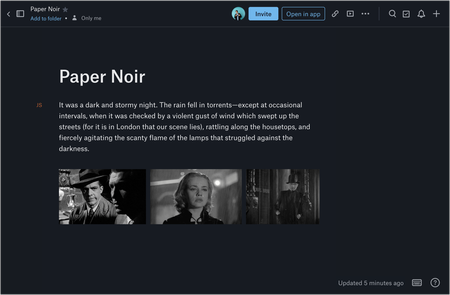
Overview Dark mode has been one of Paper’s most requested features from our users. We are now very happy to say that dark mode for Paper is now available! Audience This feature is available to all Dropbox Paper users, including our Basic, Pro and Plus subscriptions, not just those on a team subscription. How do I get it If you haven’t seen dark mode yet, you can flip it on from the “?” menu on the bottom-right of any Paper doc. You can also turn on dark mode from your computer’s system preferences. This is available on desktop, so get on there and start using it now! More ideas If you have more ideas on how we can improve our product then check out our Paper ideation board here, or our Dropbox Business ideation board here. Request improvements, suggest ideas, we’ll review them all! Thank you for helping to improve our product.56KViews6likes2CommentsEdit Photos and PDFs with Dropbox
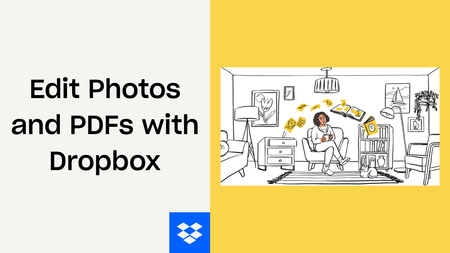
Want to hear about one of the handiest Dropbox features I use regularly? Check out how easy it is to upload, edit, send, and sign PDFs in one place. No technical wizardry, no back-and-forth file conversions, and no additional software to install. PDF editing features let you add text and more Not all PDFs are ready to go, there's usually some info you need to add or edit, and now, editing them is as easy as click, click, click. There are tools on our PDF editing feature so you can do more without changing programs. Within Dropbox, you can: Add text to documents: Insert descriptions, dates, notes etc., anywhere on a PDF and modify text font, color, size, and emphasis Page zoom: Adjust the page view for easier navigation These features are useful for managing work-related and personal documents. Our own team makes the most of editing PDFs to organize and consolidate receipts at home. Learn how to get started editing PDFs now. Edit PDFs on-the-go Need to make changes when you'er away from your desk? No worries, you can edit PDFs directly on your iPhone or Android device. Edit PDFs on iOS: Add text or a signature to PDFs on your iPhone with the Dropbox mobile app. Edit PDFs on Android: The Dropbox smartphone app makes it easy to edit PDFs on your Samsung Galaxy, Google Pixel, or any other Android device. Work from wherever you are, without needing to switch between devices or apps to get things done. Automatically add watermarks to multiple files No one likes to have their work passed off as someone else’s - and now you can make sure it doesn’t happen to you with a few simple steps. Save time, ensure confidentiality, and protect your brand by applying a watermark automation to a new or existing folder. Then, every PDF and image added to the folder will be automatically watermarked. We’re big fans of automations that truly make life easier, and this one makes us very happy! To create an automation and learn more about watermarking, visit our automations page. I’d love to know how you make the most of these PDF editing features - tell us below!36KViews7likes0CommentsThe Dropbox Community is currently being updated
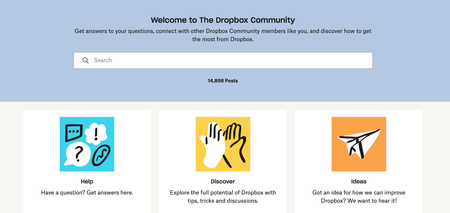
UPDATE: We are aware of the issue with the badge emails resending to everyone, we apologise for the inconvenience - learn more here. Hi everyone, The Dropbox Community team have been busy working on some major updates to the Community itself! So, here is some info on what’s changing, what’s staying the same and what you can expect from the Dropbox Community overall. We are excited to share our side of things, but we want to hear from you, so tell us what you think in the comments below. What’s Changing on the Dropbox Community: These are most of the changes that you may notice in the next few weeks, and there’s more to come, so keep an eye out! What’s under the hood: Essentially, the biggest change here is the platform that the Dropbox Community is built on is getting an upgrade, so a lot of the functionality that you know and love is now part of the site overall. In the past, a lot of those features were customizations, things like the placement of threads, leaderboards, the ideas section and more were essentially hand built by the team. With this upgrade, these features will now be seamlessly integrated, making the platform's code a LOT cleaner and more efficient. The look and feel: As the title implies, we are getting a visual upgrade as well. You can see some samples of that below but overall, the new Community will be cleaner, smoother and easier to navigate. That’s the goal, but of course, let us know if what you’re seeing matches up once we make the changes. Cool New Features to Make the Dropbox Community Even Better: There are some fun new features as part of this update, and while a lot are technical, here are a few you will see pretty easily! Searching by tags: You will be able to search by tags. Pretty self explanatory but a really handy one, you can search by tags so posts that might not have your keyword in the title will still show up when you search. Previously, we’ve had tags and labels but now we are just working with tags so no more doubling up on categories. It’s easier than ever to post: Previously, there were a lot of steps to posting a thread but now it a lot sleeker and simpler. Nested replies are finally here: You can now reply directly to a specific comment - before, comments automatically popped down to the end of the thread, which is not how real conversations happen, but now you can reply directly to a specific comment and the replies are nested under that comment instead of the overall thread. I’ll add an image because it’s so much clearer when you see it, but overall this is a more natural way to chat. Voting from the ideas page: You can now vote for ideas from the menu, without having to click in, so if the title hits hard enough you can vote, and be on your way in no time. Simple! Single page threads: You might have seen that currently our comments on a thread push on to a new page after 10 comments, but now we will have all the comments on one page - so the conversation just keeps going and you don’t get lost. What Hasn’t Changed on the Dropbox Community: The Team Are Still Here to Help: The Dropbox Community team are all still here to help, and while we might be working on a snazzier look and feel, the team are still here and committed to helping you get the answers you need. All of your threads are still here! None of your threads will be lost in the changes here, so there are still a mountain of helpful posts to review, answers to check and conversations to join too. Your Voice Matters: As always, your feedback is invaluable to us. This is your community, and we want it to work for you! So keep sharing your ideas and suggestions—we’re all ears. Why is the Dropbox Community Changing? It was time for a refresh, and the new update means that the upkeep of the website is a LOT less intense - so the load time is quicker, and there should be no code bloat, just a smoother experience for you, and for us. And, to be frank, the old version of the Community website was close to end of life. This new version of the Community also means we can implement new and fun features as they become available. Basically, if the tools work well, we can connect Dropbox Staff and you, our Community members more smoothly, and that means we can be more useful to you. When is This Change Coming? You’ll start seeing the updates within a few weeks. We’re still ironing out a few things, so if you come across any bugs or issues, please let us know right away. Your feedback is key as we fine-tune the new platform. That’s all for now! Stay tuned for more updates, and don’t hesitate to reach out if you have any questions or thoughts. We’re excited about this new chapter and look forward to hearing what you think!27KViews29likes31Comments
Publish to social media from Dropbox!
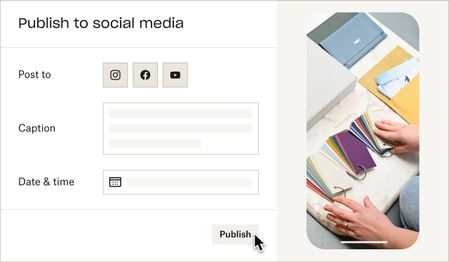
Hello! My name is Amanda. My team is building a feature to help users publish videos to their final destination — whether that’s social media, YouTube, your website, or elsewhere. We hear this task is repetitive and tiresome, and you shouldn’t have to waste time downloading and uploading videos to multiple places. Starting today, you can publish videos and photos directly from Dropbox to Instagram and Facebook**. Simply open a video or photo on www.dropbox.com, and click "Publish". Soon, we’ll let you schedule posts in advance, and post to YouTube. Note: This feature isn’t widely available to all users yet — if you don’t see the Publish button, reply to this thread with “opt-in” and we'll give your account access. 😉 If you’d like to collaborate and help shape the future of this feature, reply with “I’m ok for Dropbox to contact me by email” and we will reach out. **You must have an Instagram Business account and a Facebook Page to publish from Dropbox. See this article for support. ***Update - this feature has been temporarily postponed and there is no longer an "opt-in" option for it. Thank you for your continued patience.***Solved26KViews8likes32CommentsHave your say on the Community!
Hello everyone, Here at the Dropbox Community, we are always trying to listen to what you, our Community members, are saying, and we share your feedback with the appropriate teams every week. One area that the Community team would love to hear your feedback on is, well, the Community! We’re always striving to improve the user experience on the Community, and we are looking for new ways to hear from our users. As a result, we’re creating a customer panel of Community users to give their feedback on the Community, and help us develop the Community into the future. Give us your feedback, get a free gift card* If you would be interested in having your say on the Community, please sign up to be a part of our customer panel here. If you’re not interested in signing up for this customer panel, but still want to have your say about the Community, please leave us a comment below. Be as detailed as possible, as we will take every comment on board! Gift cards are available to users who sign up and complete surveys after we contact them. Our mission is to make the work day work better for everyone. And we need your help to get it right! Join our user research panel and help us build a better Dropbox for hundreds of millions of users worldwide. Regards, Emmet *Depending on the study type and length, you may receive a virtual gift card of your choice. If you’d like to be considered for future research studies, please sign up here. You would change the Join our user research panel with something related to just your project people would only get incentives if they have an official session with you.25KViews14likes0CommentsHow to import your passwords to Dropbox Passwords from other password managers
You might have heard about Dropbox Passwords, (and if you haven’t, you can learn all about it here) but what if you already use a password management tool? We have good news, it’s simple to import your passwords from another tool. Follow the steps below to import your already saved passwords from LastPass, Dashlane, 1Password and other password tools. Import from LastPass Sign into LastPass.com or LastPass browser extension Click Advanced Options on the sidebar Select Export under Manage Your Account Enter your LastPass master password If you’ve signed into LastPass.com on web, you will see your passwords data on a new Tab. Copy the content and save it to a file. You can name it <name>.csv If you’ve signed into the browser extension, you will see a lastpass_export.csv automatically downloaded From your Dropbox Passwords app, click Add button under your avatar, select Import from…, select Passwords Manager and select the csv file from step 4 Delete the file from step 4 for safety reasons Import from Dashlane Launch Dashlane and log in to your account Select File > Export > Unsecured archive (readable) in CSV format Enter your Master Password (if required) Save the file in a safe place From your Dropbox Passwords app, click Add button under your avatar, select Import from…, select Passwords Manager and select the csv file from step 4 Delete the file from step 4 for safety reasons Import from 1Password Open and unlock 1Password. Select the vault you want to export. It’s not possible to export from “All Vaults”, so you’ll need to switch to a specific vault. Choose File > Export > All Items. If you belong to a team account, there may be some vaults where you don’t have the “Export items” permission. Ask your team administrator. Enter your Master Password. Choose a location to save your export to (such as your desktop), choose File format: “Comma Delimited Text (.CSV)” , “All Fields” , “Include Column Labels”, Click “Save” From your Dropbox Passwords app, click Add button under your avatar, select Import from…, select Passwords Manager and select the csv file from step 5 Delete the file from step 5 for safety reasons Import from other Password Managers find the option from other Passwords managers to export items to a CSV From your Dropbox Passwords app, click Add button under your avatar, select Import from…, select Passwords Manager and select the csv file from step 1 Delete the file from step 1 for safety reasons Now that you can transfer your passwords over with just a few clicks, it’s the perfect time to get set up with Dropbox Passwords and leave the dreaded ‘forgot password?’ button in the past.23KViews4likes3CommentsTell us how you use Dropbox!
We have shared a lot of stories about how we use Dropbox, from using Dropbox to plan a wedding to organizing and planning a project, and now we want to focus on you and how you use it! So, to start, we would love to hear about how, and why, you started to use Dropbox. Whether it was to make sure your photos were safe, or to scan and save your receipts, or to work on a group project, we want to hear about it! Leave your stories in the comments, we want to learn from you - the more we know about how you use Dropbox, the more we can share tips and tricks that make sense for you. Looking forward to seeing your comments below!20KViews11likes35CommentsIntroducing Dropbox Dash: The AI-powered universal search tool
Back in the early 2000’s when we still had computer classes and CD-ROMs, it was really easy to find your files, because you maybe had tens, or maybe even hundreds of files and they were pretty small (size wise, not in terms of impact). Now, however, it seems we can’t exist without creating hundreds of files a week, which is great for recording our most important creations, it does make navigating our files a bit of a nightmare, especially when it comes to work. Now we have windows upon windows, tabs upon tabs, saved files, untitled files. With scattered files and folders, search can be a scattered affair too. So, we set out to build a tool that can help you spend less time searching and organizing all your content, and more time efficiently doing your best work. And we think you’re going to like it, because we do. From folders to files, docs to decks, notes to names, Dash knows what you’re looking for better than you do. Because it’s not just AI-powered search, it’s a way to spend less time sorting through tasks and more time on what matters to you. You can keep reading for more details, some customer testimonials and more, but you can also check out this video with none other than our CEO, Drew. Introducing Dropbox Dash: The AI-powered universal search tool for work Dropbox Dash is AI-powered universal search that connects all of your tools, content, and apps in a single search bar. Working with the tools you actually already work with, like Google Workspace, Microsoft Outlook, Salesforce, and more, you can find everything in one place, fast. Overall, you can make search a one step process again. And if universal search isn’t enough, Dash can do more than that too. And it will continue to grow but for now you can look forward to: Start Page: A single dashboard that lets you access Dash universal search, view Stacks, get shortcuts to recent work, and start meetings, making it easier to navigate your day and get back to your most important work. Stacks: Smart collections for your links that offer a quick way to save, organize, and retrieve URLs. In the same way files have folders and songs have playlists, Stacks provide an easily shareable, organizational layer for your cloud content. You don’t have to take my word for it, Craig Smith from the University of New Hampshire put it well when he said: “I can see stacks being very useful especially if I don't have to curate stacks. I want something to just learn my flows and present ways of executing those flows faster.” - And of course, we want to make sure that these things actually work for you, the people who use Dropbox. Why not sign up for the Dropbox Dash beta and get stuck in and tell us all about what you think! 17KViews11likes2Comments
What’s new: Dropbox Shop, editing PDFs, and Dropbox Backup
This is a big month for product updates, so keep reading to get all the details about Dropbox Shop, Dropbox Backup and PDF editing. Trust us when we say there are some seriously useful updates here, whether it’s to do with day-to-day file management, security or an online shopfront - exciting times! Secure your digital life with Dropbox Backup—here’s what’s new: Backing up your files, as you know, is super important and if you need a simple and secure backup solution to protect the most important parts of your digital life - Dropbox Backup is for you. Whether you have family photos, graduation videos, or tax forms on your computer—you can keep it all safe and quickly recover with Dropbox Backup. If you’re a member of the Dropbox Community, chances are you’ve heard of Computer Backup before, so what’s the new news? Based on feedback from customers and our Community members, the team have made improvements to Computer Backup - building on our popular backup functionality, we’re now introducing Dropbox Backup. Backup has been upgraded with new features our users have been asking for, including a new restoration flow, settings to manage your backups on your computer, and more. Simplify your backup experience- Manage everything from your desktop—one place to check progress, view history, and prioritize specific files. Be prepared with an automated safety net- Keep backed up files separate from your shared files, so you won’t have to worry about overwriting your emergency backups. Rely on fast recovery if things go wrong- Start recovery with just a few clicks, and your files will be automatically restored from cloud backup. Dropbox Shop is here, and ready for you to try: You might have heard us mention Dropbox Shop before, but now you can join the Public Beta and check it out for yourself! (If you are outside of the U.S. or are part of a team and want to sign up, click here). Dropbox Shop is a new platform that allows creators (like you, maybe) to easily sell content—from e-books and recipes to prints and workout videos—directly to customers, so you can spend more doing what you love: creating. With Dropbox Shop you can: Easily create product listings in three clicks: Add content directly from Dropbox or your computer, set a custom image, audio, or video preview, and determine your price, and now, tipping is also enabled. Customize your storefront: Set your seller profile up with a name, picture, and description that lets customers know exactly who you are and what you’re doing! And if you want to update it later, you can simply edit the items and your storefront too. Make the connection: Establish your brand and maintain your relationship with customers through a custom storefront, not a cluttered marketplace of sellers. Add content directly from Dropbox: No need to upload your files all over again. Sell any type of content: With the ability to upload multiple files, of any type, up to 50GB per file for Plus/Pro users and 2GB for Basic users See what works (and what doesn’t): View key analytics to help learn what’s working and what can be better for your business. Share directly with customers: There’s no middleman here. You control how you interact with customers - you can share a listing directly with them wherever you interact with them already, whether it’s on email, social media and even newsletters. Enable secure payment processing: Don’t worry about managing payments, it’s covered through our partnership with Stripe and Paypal and multiple payment options for customers. Automatically deliver content upon payment: That allows you to save time facilitating sales, and keep on creating. Simplify transactions for you and your customers: Buyers don’t need a Dropbox account to make a purchase, they can access their files via email verification and download it within 28 days. Those with a Dropbox account can access everything they’ve purchased when logged in. Work conveniently from your desktop, tablet, or mobile Why not take the first brave step and put your work out there for sale? As we said, you can set up your first content listing in 3 easy clicks, so get started here. Save time and edit PDFs in Dropbox PDFs are incredibly handy files, but sometimes they need to be updated, and now, you can edit them without leaving Dropbox. Well, just exactly how much editing can you do? Within Dropbox you can: Rearrange PDF pages Insert, rotate, and delete PDF pages Fill interactive forms Manage multiple versions: save PDFs as a copy or replace original These features are available to a select few in Beta now, and will roll out to more people in coming weeks. Sounds like a time saver to us! Will you use this feature? Now you can keep your files safe with just a few clicks, sell your digital content, and edit PDFs in no time, which sounds good to us! But wait, there are even more updates you can check out here. Will you be using these new products and features?16KViews3likes5Comments