Our Community is in read-only mode until April 8th, learn more here. You can still search existing threads or get help via Dropbox Support, the Dropbox Help Center, or Learn.
Uninstall
75 Topics
Can you remove the space in the dropbox folder name ("Dropbox (Company-Name)")?
I'm using my companies business dropbox account. And it created a folder called "Dropbox (my companies name here)". Is there a way to remove the space between "Dropbox" and "("? I don't want to have a space in the path. So the folder name will become "Dropbox-Company" or "Dropbox_Company" or something, but not space. It seems impossible.Solved46KViews68likes139Comments
How can I get the old file view back?
Hi, How do I remove 'Recents' as I login now and I can't get to see my files and folders...I can't even get using the menu on the left hand side!! If this is a 'fancy new development' then the cheif development manager at Dropox need to loose his job!!! Total nightmare!!Solved14KViews28likes36CommentsHow do I remove Dropbox from my Mac if I get an error message when attempting to uninstall?
I am trying to delete the Dropbox app from my Mac, but it gives me an error message saying 'The item “Dropbox” can’t be moved to the Trash because some of its plugins are in use', even after closing all other open applications. What could these plugins be and how can I stop them from being in use? ThanksSolved138KViews20likes48Comments
The Dropbox desktop application will no longer be supported for Windows 7, 8 and 8.1 on October 22nd
Congratulations Dropbox! You've just put the nail in the coffin of all W7 users who prefer not to be spied on and constantly used for data scraping! Well done. If the constant scaremonger nagging about running out of space, the constant begging to upgrade, the incessant app updating demands, the constant USB device interrogation upon connection wasn't enough of an incentive to finally ditch Dropbox for good, then the cutting off of users of a still perfectly good and functional, non-spyware infested OS will be the last straw. Thank you Dropbox for giving me the incentive to go to your competitors instead and get out of your ever more bloated crapware ecosystem. Sometimes, people need a little push to get away from what's comfortable and familiar, even though they suspect just how bad that relationship is for them. I thank you Dropbox for giving me this little push. Goodbye.9.4KViews11likes33Comments
How do I remove the Dropbox icon from the Windows 10 file explorer?
Since upgrading from Windows 7 to Windows 10, there is a Dropbox icon in the Windows file explorer navigation pane. I already have a link to Dropbox and other cloud-storage options in the Quick links section of the file explorer, so I don't need this extra icon! How do I remove the Dropbox icon from the navigation pane? And to be clear, I don't mean the quick-link, I mean the stand-alone 'system-type' icon in the navigation area.19KViews8likes37Comments
How can I remove the word "(Personal)" in the name of my Dropbox folder?
I recently added a Dropbox Business account to my Mac and so Dropbox prompted me to add "(Personal)" in the name to signify which account it was. However, after disconnected the Dropbox Business account, my personal Dropbox folder is still named "Dropbox (Personal)". When I try to rename the folder to just "Dropbox," the computer tells me the "name "Dropbox" is already taken." Is there a way to rename this folder to just Dropbox again? Thanks so much for any and all help!6.3KViews5likes6Comments
How can I safely delete the desktop app in order to give it to someone else?
I use my Dropbox account and its files on several computers. I’m giving one of the computers away, but want to wipe it beforehand. Therefore, I want to wipe all Dropbox access from the giveaway computer without affecting the master files themselves or access to them from any of the other computers. Thank you for a safe way to do this. —JohnSolved35KViews3likes5CommentsNot showing any Dropbox options when right-clicking the folder in Explorer
When I right-click on a folder or file on my Dropbox the drop down menu is the same as local folders (Desktop, etc.). Therefore, I can't, for example, toggle smart sync options or access previous versions of the files on my desktop. I've already uninstalled dropbox and reinstalled to the latest version but the problem persists. I'm on Windows 10. CheersSolved11KViews3likes11CommentsWhen I try to remove the Dropbox app from my computer I lose access to my desktop folders
Removing Dropbox from my computer is proving to be a nightmare. My computer Operating system is Windows 10. I have managed to un sync from my account and deleted all the folders concerned in my Dropbox account. On my computer the Dropbox folder is located C:\Users\dough\Dropbox and it contains a "PC" folder in which contains Desktop, Documents, and Downloads. Whenever I uninstall or delete the Dropbox folder I lose all the content from those folders Desktop, Documents, and Downloads. I have no need for Dropbox and wish to remove it completely from my computer, would you please explain to me how to do this. I would appreciate it very much. Thank you.Solved14KViews2likes27CommentsUnable to uninstall the desktop app on Windows 11
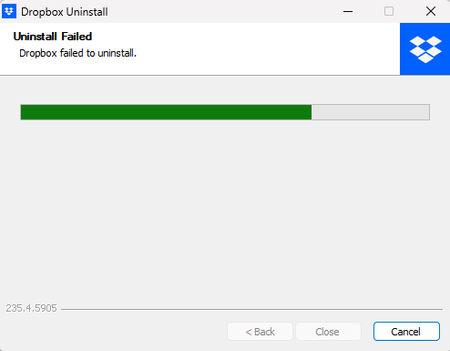
Application Affected Dropbox Windows 11 Operating System/Browser (if using the web) (Windows 11) Dropbox App Version (if using the app) (235.4.5905, assuming the installed apps screen is correct) Question or Issue Hello, I've been trying since last night to uninstall the app for Windows 11. It'll make it about 3/4 of the way through the uninstallation process and stops there. Based on some digging I did online, this seems to be a common thing. I followed all the steps here and it did not resolve the issue for me. (The only folder I could not delete was the one in %PROGRAMFILES(x86)%, it said something was in use somewhere.. no idea where as I cannot currently open the app at all which is what lead to me trying to uninstall in the first place. Any help would be appreciated. This is very frustrating.205Views1like3Comments