Your workflow is unique 👨💻 - tell us how you use Dropbox here.
View
48 Topics
How do I disable Sign Up pop-up when sharing links?
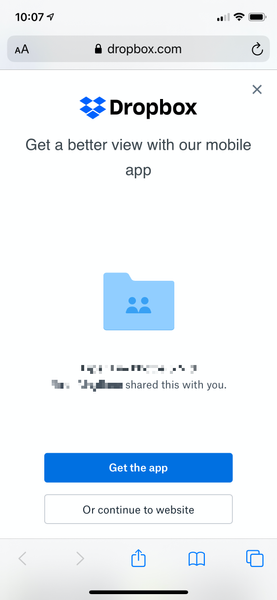
I cannot believe that as a paid Dropbox customer, people I share links with get a giant full screen popup pushing them to sign up for Dropbox that they have to close out before they can view the link contents. This is so confusing for those who click on my shared links, not to mention tacky AF. Where can I disable this? This is kind of pushing me over the edge to finally cancel my Dropbox account. It's THAT infuriating. This is what people see on mobile when I share a link to a folder with them:3.2KViews5likes4Comments
Location info of photos and videos missing in Android 14
Google Photos shows the location (country and place) of photos and videos taken with my Samsung Galaxy S22 Ultra. When backup to OneDrive I don't see this information in the OneDrive app but it's available on the OneDrive website when clicking on the '!' sign of the pictures. That's cumbersome, but the information is still there. However, in Dropbox this location info doesn't appear at all. Even the longitude and altitude data isn't included in the metadata. I would like to subscribe to Dropbox if the location data of the photos and videos taken with my phone is shown in Dropbox. That's why so far I have a subscription to Google Drive to use Google Photos for my photos and videos. There are a lot of apps available which can show the country and place based on the longitude and altitude data in the metadata. But does anybody know whether this simple feature is also available in Dropbox or is this just a crucial omission (and great mistake) from Dropbox? It's unnecessary complicated to use a separated app for information which should just be shown in Dropbox!1.6KViews1like4Comments
Dropbox says another user is viewing/editing a file, but he is not.
When I open some of my company's Excel files, Dropbox's badge indicates my coworker is viewing and/or has unsaved changes. But looking at his PC, he doesn't have Excel open and the Excel lock files are not in the directory with the original files. Any suggestions?Solved9.4KViews1like14Comments
Can't Open a Dropbox link sent to me. What can I do?
I am trying to obtain a retirement interview video file that the sender can open with their link and drop box account, but the file cannot be opened by me at my end. I do not know if it is a firewall issue, but I can't open the link on my end? I get a response saying it is a "local file" and it cannot be opened. Here is the link: file://R900E6BR/Users/am1113/Dropbox/File%20May%2012,%2010%2043%2001%20AM.movSolved97KViews1like10Comments