Our Community is in read-only mode until April 8th, learn more here. You can still search existing threads or get help via Dropbox Support, the Dropbox Help Center, or Learn.
Web
14 Topics
Did you know... you can search for images using just text?
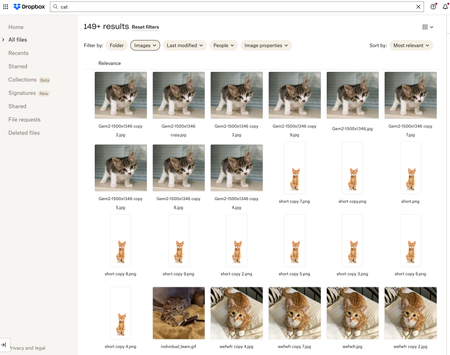
Hello Dropbox Community! My name is Lainie and I'm a Product Manager at Dropbox. Every now and again, I am going to post a "Did you know..." to 1) keep you informed of all of the cool technology that exists at Dropbox and 2) gather your feedback on how the features are performing. In today's, "Did you know..." I'll be talking about Image Search! Image search is allows you to use the Search Bar to search for the contents of the image using words to describe the image. For example, if you search for "cat" your search results will show files that 1) contain the word "cat" in the file name or body, AND 2) files that contain images of cat. No mention of the word "cat" is necessary! Pretty cool! If you haven't yet, I recommend that you check it out. Please respond to this thread and let me know... A) Did you know this feature existed? Do you use it? B) How can we make this even more useful for you? Have a great day! Lainie For more information, check out our Help Center Article on Image Search!9.5KViews9likes3CommentsEdit Photos and PDFs with Dropbox
Want to hear about one of the handiest Dropbox features I use regularly? Check out how easy it is to upload, edit, send, and sign PDFs in one place. No technical wizardry, no back-and-forth file conversions, and no additional software to install. PDF editing features let you add text and more Not all PDFs are ready to go, there's usually some info you need to add or edit, and now, editing them is as easy as click, click, click. There are tools on our PDF editing feature so you can do more without changing programs. Within Dropbox, you can: Add text to documents: Insert descriptions, dates, notes etc., anywhere on a PDF and modify text font, color, size, and emphasis Page zoom: Adjust the page view for easier navigation These features are useful for managing work-related and personal documents. Our own team makes the most of editing PDFs to organize and consolidate receipts at home. Learn how to get started editing PDFs now. Edit PDFs on-the-go Need to make changes when you'er away from your desk? No worries, you can edit PDFs directly on your iPhone or Android device. Edit PDFs on iOS: Add text or a signature to PDFs on your iPhone with the Dropbox mobile app. Edit PDFs on Android: The Dropbox smartphone app makes it easy to edit PDFs on your Samsung Galaxy, Google Pixel, or any other Android device. Work from wherever you are, without needing to switch between devices or apps to get things done. Automatically add watermarks to multiple files No one likes to have their work passed off as someone else’s - and now you can make sure it doesn’t happen to you with a few simple steps. Save time, ensure confidentiality, and protect your brand by applying a watermark automation to a new or existing folder. Then, every PDF and image added to the folder will be automatically watermarked. We’re big fans of automations that truly make life easier, and this one makes us very happy! To create an automation and learn more about watermarking, visit our automations page. I’d love to know how you make the most of these PDF editing features - tell us below!36KViews7likes0CommentsTell Us How You Use Dropbox
No two people use Dropbox in exactly the same way. Some of you rely on it every day for work, others for school, creative projects, or keeping life organized - and we love that. We’d love to hear how you’re using Dropbox today - is it something you use once in a while, is it part of your day to day, are there any features you can’t live without? What workflows have you built that save time or reduce friction? And where do you see opportunities for us to do better? Your tips, ideas, and honest feedback really help us to make sure we can share useful tips, and they help other community members discover new ways to get more out of Dropbox too. Share your experience, favorite features, or suggestions in the comments below. Your voice truly helps shape the future of the Dropbox community 😁 The Dropbox Community Team3.9KViews4likes14CommentsWant to get started with Dropbox Dash?
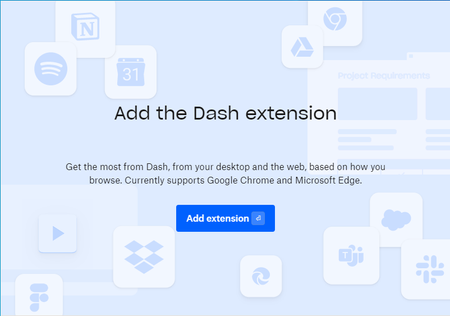
You might have heard us mentioning the new and fantastic Dash, and if not, you can learn about it here. But just so you know what’s going on, Dropbox Dash is AI-powered universal search that connects all of your tools, content, and apps in a single search bar. We want to make sure folks can sign up for the Dropbox Dash beta and try it out. With that in mind, we chatted to our in house Dash expert James, and he shared how to make sure your set up is perfect first time around. The Dash extension is helpful when you use it on Chrome or Microsoft Edge, but some folks have been getting a little stuck here: I can’t add the Dash browser extension. How can I solve this? If you’re seeing this screen and clicking ‘add extension’ isn’t working, it might be because you don’t have Chrome set as your default browser. This isn’t to say you can’t have multiple browsers in use on your computer, but to finish the installation you will need to: Ensure that Chrome is your default browser Force quit the installation and restart the computer Run installation again Now you can set whatever you want as your default browser but whenever you use Chrome you will have access to Dash, and all of the very helpful AI abilities that come with it. And if you need any help, you can head to dropbox.com/support/email and select Dropbox Dash from the dropdown menu. Let us know how you get on!6KViews3likes4CommentsMake the most of Movebot and Dropbox
If you do any kind of business online, chances are you use an online storage platform and sometimes, your needs change and you need to move your files. But don’t worry - moving from cloud storage platforms, or on-premise file servers to Dropbox couldn't be easier. The Data Migration Add-On, powered by Movebot, makes it simple, secure and affordable, without the need for software deployment or complex processes. Whether you are transferring a single drive, a team or an entire organization, Movebot's cloud migration tool has been built to make your Dropbox migration simple. Not only can you quickly and securely migrate files, you can also copy over all of the associated permissions from on-premise file servers and existing cloud storage solutions to Dropbox. So, what can I do with Movebot? Well, first of all, you can: Migrate home directories, folders, and personal shares to Dropbox Transfer sharing permissions from cloud and on-premises sources to Dropbox Monitor file transfer jobs in real-time with reporting, visualization, and event-logging Automate and expedite migrations with parallel loading, Dropbox API call optimization, and Movebot’s managed scalable technology Schedule migration jobs in advance — to run once or on a repeating schedule. But you don’t just have to take our word for it, Jack is a senior designer on the team over at Graphicks, a creative agency, who recently used Movebot to transfer their files over to Dropbox, and he said: Movebot and Dropbox have made our lives so much easier. We used Movebot to migrate around 2TB of data from a different cloud service to Dropbox and the process was very smooth. We work with a wide range of file formats and both platforms supported our every need. We deal with large design files on a daily basis, which makes the different sync options available on Dropbox vital to our workflow. Being able to collaborate easily as a team from different parts of the country is essential. As a creative agency we needed a more collaborative and cost-effective solution to managing our files. Dropbox was an easy choice as other solutions have fewer features and don’t handle larger files formats as well. The unlimited storage that Dropbox offers means that we can continue to grow as a team without the worry that we will run out of storage – something that our previous platform would constantly remind us of! Have you ever needed to transfer a large amount of files from one platform to Dropbox? Check out how the Dropbox Data Migration Add-On, powered by Movebot can benefit your business or talk to our team about using Movebot today.17KViews3likes5Comments
Wix Dropbox App going end of life?
Good afternoon, It would appear that Wix has chosen to drop the Dropbox App that allows visibility/access to specific Dropbox folders directly from a Wix site. Are there any alternatives that anyone is aware of that could support a real-time peering between a Wix website and a specific Dropbox folder to upload and download files? Thank you,455Views2likes1Comment
Small tip if you want to print a list of files in a Dropbox folder!
I've been trying to figure out if there is a way to print a list of files in a Dropbox folder. Turns out there is no such printing option. However, if you select all files with Ctrl + A, all subfolders and files will be selected. Then using Ctrl + C, copy to the clipboard. Next open a new blank Word document and paste (Ctrl +V) to the Word page. All text should appear from the Dropbox webpage. Delete whatever text is not relevant and you'll be left with a list of folders and files.12KViews2likes12Comments