We’re Still Here to Help (Even Over the Holidays!) - find out more here.
Windows
1267 Topics
Dragging file - copy vs. move
I use Dropbox to move files between Mac computers (OS 10.11 and 10.13) and Windows computers (Win7). When I drag a file from the Dropbox folder to a Windows local folder, it COPIES the file. When I drag a file from the Dropbox folder to a Mac local folder, it MOVES the file (i.e., deletes it from the Dropbox folder). Why the inconsistent treatment of the same action? Is there anything a user can do to change the default action? Obviously there is a way in each system to reverse the default action, but why make the user remember to do that? At this point I don't even care whether the default is MOVE or COPY -- I just want it to be the same on all platforms.Solved12KViews1like8Comments
Can't redirect into reparse point please choose different target path
So, I uninstalled Dropbox. Now I find that my folders; Desktop, Documents, Downloads, Music, Pictures, and God knows what else are all set to my Dropbox folder. When I go to 'restore' these folders to their correct, default Windows 10 path, I get the above error message. This is outrageous. What is the solution?Solved14KViews0likes67Comments
CertFindCertificateInStore failed with: (-2146885628) error in Windows Event Viewer
As multiple other users have already reported over the last couple years, I am seeing many of these error events in my Windows 10 Event Viewer, all coming from the DbxSvc (Dropbox service) event source. Can you all please fix your desktop client software to stop spamming my event logs with these errors? This issue has dragged on far, far too long already. Either stop emitting these errors, or fix the underlying problem. Thank you.Solved46KViews10likes100Comments
I use selective sync but my folder keeps showing up on Windows.
Hi, I accidentally sync a folder that makes my dropbox full. Now I need to unsync it following these steps: Open your Dropbox desktop app preferences. Click the Sync tab. Under Selective Sync, click Selective Sync… (as I use Windows). Check the folders you'd like saved on your hard drive. Uncheck the folders you'd like removed. Click Update. However, the unwanted folder keeps appearing and syncing many times! Anyone who could help! Thanks peterSolved23KViews0likes12Comments
My online -only files take up space on my Windows device. Why?
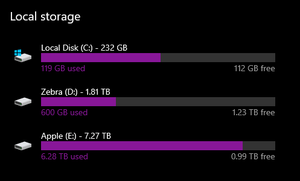
I have an 8Tb drive where I store my dropbox files on my Windows computer and despite setting all files to be 'online only' as well as going to Dropbox preferences and setting select sync to not sync any folders I am still getting the message "Can't sync not enough free space". In my system settings it appears the files are still taking up space on my "Apple" drive where I have drobox downloaded and have set it to sync to (I have less than 200GB of non-dropbox data on that Apple drive). However, when I use a storage analysis tool like WinDirStat, it doesn't see there being that much space taken up: Here it shows only 1.4Tb of space being taken up by Dropbox files, and while that should be 0, it's still way less than what my computer system settings believes are on the drive. I had this problem on my Mac a year ago and solved it by checking the box on the website to not have online files take up hard drive space. I've done the same for my PC. I have unlimited space on my dropbox account. I have updated Dropbox to the latest version (released December 21st 2021). I have read through every relevant online article and forum I could find. So now I am here. Does anyone know how to solve this? I use dropbox to manage all of my projects and files. I don't have this problem on my Mac Laptop which has the same dropbox account. I am lost suffice to say hah.15KViews0likes30CommentsWhat does the brown box icon next to my Dropbox files mean on Windows?
I have searched the relevant help topics without finding an explanation on the "brown box" icon that appears on files in my Dropbox folder. See the attached file "Dropbox_Meaning of Icon_BrownBox.pdf" (below).2.3KViews0likes3CommentsNew experience in system tray: Clicking folder link also opens file
Application Affected Dropbox desktop app Device Desktop PC Operating System/Browser (if using the web) Windows 11 Dropbox App Version (if using the app) 233.3.4870 Question or Issue I enabled the new experience for Dropbox in the system tray. I understand that it is in beta, but a regression seems to have occurred that I would like to see addressed. When I bring up the tray popup from the icon. a list of my activity appears--files I added, when I added them, and the folder to which they were added. When I click the folder link next to the "Added (duration) ago" text, the folder opens, but so does the file. I expect that only the folder should open. If I recall correctly, only the folder opened prior to the apparent regression. I can work around this issue by disabling the new experience. In the current experience, the folder link only opens the folder as expected. I would appreciate it if this issue could be addressed before the new experience becomes the default experience.Solved124Views0likes6Comments
Dropbox freezes and crashes when I navigate in my Dropbox folder within File explorer.
Hello, I am having trouble with dropbox working through my Windows file explorer. For some reason, within the last week every time I try to navigate to one of my dropbox files the file explorer crashes and I have to force close the program. I can open files from the specific application. For instance, if I open Word and then open a file from word it will open, but if I try to open the same file from the windows file explorer it freezes. I have tried to uninstall and reinstall. Any other suggestions/solutions?20KViews3likes165Comments
Failed to uninstall the Dropbox desktop app on my Windows 10.
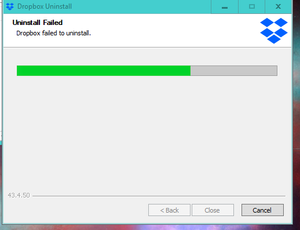
Hello, not possible uninstall the programm - desktop version I have also disabled dropbox at starting to avoid any execution Not icon tray at starting In windows 10, in program (x86)/dropbox - there 3 different folder client. Thanks for your support D.Solved94KViews1like3Comments"This folder/ file has properties that cannot be copied to new location" when using the desktop app.
Can anyone help? I'm having trouble moving my files, I have Dropbox on my phone, tablet, home computer, work computer and work apartment but recently I've noticed If i try to copy a film for example, from my work computer to a colleagues hard drive or music to my usb flash for the car it says "this folder/ file has properties that cannot be copied to new location" Whats the problem here, am I missing something simple?Solved44KViews3likes17Comments