Your workflow is unique 👨💻 - tell us how you use Dropbox here.
desktop
6127 Topics
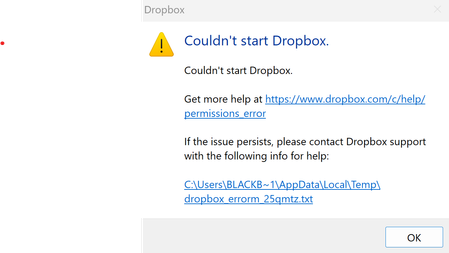
I get an error that the Dropbox app can't start after installing it on my Windows device.
The error file is as follows: bn.BUILD_KEY: Dropbox bn.VERSION: 243.4.6956 bn.constants.WINDOWS_SHELL_EXT_VERSION: 90 bn.is_frozen: True machine_id: fb77be58-97d3-4be1-8b70-5fb248364473 pid: 18096 cwd: 'C:\\Program Files (x86)\\Dropbox\\Client' real_path='C:\\Program Files (x86)\\Dropbox\\Client' mode=0o40777 uid=0 gid=0 parent mode=0o40777 uid=0 gid=0 HOME: None appdata: 'C:\\Users\\Kimpan\\AppData\\Local\\Dropbox\\instance1' real_path='C:\\Users\\Kimpan\\AppData\\Local\\Dropbox\\instance1' not found parent not found dropbox_path: None not found parent not found sys_executable: 'C:\\Program Files (x86)\\Dropbox\\Client\\Dropbox.exe' real_path='C:\\Program Files (x86)\\Dropbox\\Client\\Dropbox.exe' mode=0o100777 uid=0 gid=0 parent mode=0o40777 uid=0 gid=0 trace.__file__: 'C:\\Program Files (x86)\\Dropbox\\Client\\243.4.6956\\python-packages.zip\\dropbox\\client\\ui\\common\\boot_error.pyc' real_path='C:\\Program Files (x86)\\Dropbox\\Client\\243.4.6956\\python-packages.zip\\dropbox\\client\\ui\\common\\boot_error.pyc' not found parent not found TMP: C:\Users\BLACKB~1\AppData\Local\Temp TEMP: C:\Users\BLACKB~1\AppData\Local\Temp tempdir: 'C:\\Users\\BLACKB~1\\AppData\\Local\\Temp' real_path='C:\\Users\\BlackBook Pro 17\\AppData\\Local\\Temp' mode=0o40777 uid=0 gid=0 parent mode=0o40777 uid=0 gid=0 Traceback (most recent call last): File "desktop/dropbox/client/main.py", line 10670, in main_startup File "desktop/dropbox/client/main.py", line 3231, in initialize File "desktop/dropbox/client/main.py", line 2040, in startup_low File "desktop/dropbox/client/main.py", line 1586, in safe_makedirs File "desktop/dropbox/fsutil.py", line 783, in safe_makedirs File "desktop/dropbox/overrides.py", line 165, in makedirs File "desktop/dropbox/overrides.py", line 178, in makedirs PermissionError: [WinError 5] Access is denied: 'C:\\Users\\Kimpan\\AppData\\Local\\Dropbox' I have tried unistalling, re-installing... everything and nothing works. I just can't get DropBox App to run on my computer. I need help14Views0likes2Comments
Taskbar app hard to exit
I been finally, yes after years... planning on upping to a paid version. I was comparing things. Recently, about a month or 2 now, a patch made my decision. I've always been a bit annoyed with the rclick , hit account, then exit(quit) and it do a popup to hit ok. All other taskbar setups, i rclick select quit/exit and they are gone. I shutdown 4 computers 2 times a day. just one time, its annoying. it gets old fast. The recent update? made it even worse. Now its rclick exit, Taskbar popup, click exit, THEN the popup. So, i worked on moving my data to another platform. Yes. all because someone thought it was a good idea to annoy me, with making sure i wanted to exit, when i selected exit. Thanks for the years.10Views0likes1Comment
Cannot sync due to permissions on macOS Sonoma
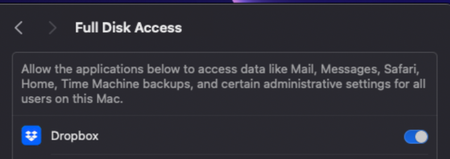
Device Mac Mini M2Operating System/Browser (if using the web) MacOS Sonoma 14.3.1 Dropbox App Version (if using the app) 242.4.5815 Syncing Status Files are unable to Sync Question or Issue Files won't sync on Mac OS. I have tried this on windows PC on the same network, and it works fine. I think this is a MacOS Bug with multiple versions of MacOS and dropbox that needs to be fixed. As you can see, has full disk access and no firewall issues, but won't sync. I have tried to "fix Hardlinks, etc". Fixing hardlinks only resolves it temporarily - when more files arrive in the folder, the issue persists. My dropbox storage is not full, neither is my computer. I have seen other troubleshooting steps to move images out then back in, but that is not a solution to me. Quitting, then relaunching does not solve. Dropbox Folder location: /Users/andrewwevers/Library/CloudStorage/Dropbox I have tried a reinstall as well. I have done this https://www.dropboxforum.com/discussions/101001014/syncing-problem-on-sonoma-14-1/733803 and this https://www.dropboxforum.com/discussions/101001014/my-desktop-app-is-stuck-at-syncing-and-i-need-help-with-the-buttons-to-fix-hardl/405492#M3494446Views0likes3Comments
My Backup online shows as 0 bytes. What is happening?
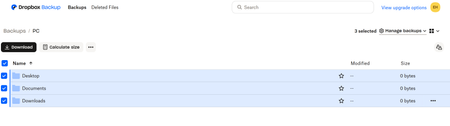
Hi I was able to download the Dropbox App for my surface pro and setup the backup. After successfully backing up, the dropbox online says my "Desktop" "Documents" & "Downloads" backed up but there are 0 bytes in each folder. I only wanted to back up these three folders. Can someone please help me? Thank you, Emily37Views0likes5Comments
System restore on Windows not working due to an error referring to a Dropbox folder
I need to restore my system due to a problem with my Windows/Fonts folder. However, whenever I try to run System Restore, after about 20 minutes Windows restarts with the following error message: https://www.dropbox.com/scl/fi/8cs9ufypm9f2ntom1jvin/temp-1.png?rlkey=ny26ffpl7ssueq13h1lh67duz&st=wzq01mjv&dl=0 (I tried posting the above url as a link but I got a message saying that the link contained invalid html! But I didn't write any html, I just used the Insert Link button. Why doesn't the Insert Link button create links that can be posted?) As the error message was referring to a Dropbox folder, and I don't need Dropbox to be restored, I need my Fonts folder to be restored, I tried uninstalling the Dropbox desktop app for Windows and running System Restore again - but I got the same error message. I then tried deleting the Dropbox folder from my hard drive, and running System Restore again - but I still got the same error message. So how can I restore my syste? I have a hunch that the problem might be somehow related to the fact that I upgraded Dropbox for Windows at the time of the last automatic restore point. But how can I get round it? It is extremely serious if the Dropbox upgrade has somehow made it impossible to run System Restore. How can I fix this? Dave685Views0likes15Comments
Cannot search for images that contain text after desktop app update on macOS Sequoia
Application Affected (Dropbox , finder) Device MAcbook M1 sequoia Operating System/Browser (if using the web) sequoia Dropbox App Version (if using the app) 243.3.6895 Question or Issue Hi everyone,I’m having an issue with Dropbox and I hope someone can help. I can’t search for images that contain text anymore. For example, in Finder on my Mac, inside my Dropbox folders, I’m no longer able to find images based on the text inside them. This used to work perfectly when Dropbox was in its original location. After restarting my Mac, Dropbox was moved to the Library folder without my permission. I thought, “Okay, I don’t really care where it’s located,” but since then I’ve only had problems. Honestly, this is very disappointing. How can I fix this?85Views0likes8CommentsTrying to delete files, not working. I refuse to just buy more storage space.
I am trying to make space in my dropbox on my HP computer, since I am getting a warning about starting to delete files unless I buy more storage space. I absolutely do not want to buy more space! It is a good time to delete some unnecessary files. So now I am permanently deleting all my deleted files, one by one. At some point it does not allow me to delete any more of them. I get no message to explain why, it just does not function. I am pretty sure it just tries to force me to buy more space. Any thoughts on this? Or, do you guys know of any other cloud services that actually allow you to manage your own data?34Views0likes5Comments
How to sync to an external Thunderbolt 3 SSD Drive on Mac?
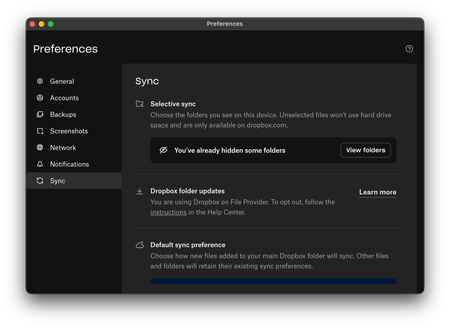
Device Mac Studio M1 Max Operating System/Browser (if using the web) macOS Tahoe 26.2 Dropbox App Version (if using the app) (240.4.8609) Dropbox Plan (Plus) Question or Issue I have purchased a 2TB Thunderbolt 3 SSD to use as an external drive for Dropbox as I am running out of space on my 1TB drive in the Mac Studio. For the life of me, I cannot figure out a way in Preferences to point it to the external TB3 SSD drive. It says I am using Dropbox on File Provider and I cannot see the option that will allow me to point it to the external drive. I had previously done so in the past with no problems, till the update to macOS Tahoe when suddenly the link to the external USB-C drive was severed. It worked for a while as I have sufficient space on my 1TB and I did selective sync. Now, I am running out of storage space, I appreciate guidance.113Views0likes8CommentsLocal links
Problem In our Dropbox Business account, we often need to share links to files or folders with colleagues who already have access and have Dropbox installed. Currently: When we use the “Share” feature, the link opens in the browser. This is inefficient when the user just needs to open the local file/folder, especially for deeply nested folders. Or worse, the person sends the file as an email, and now we have multiple versions and confusion about which is the "source of truth". Workaround: We have to manually send them the file path (e.g., /Users/bob/Dropbox/ProjectX/Report.docx), which: Requires the recipient to hunt it down in Finder/Explorer. Is error-prone due to path differences, renames, or accidental typos. Offers a worse user experience than comparable tools like Google Drive File Stream, which can open the file directly via a smart link from the web. Proposed Solution Introduce a new link format — .dropboxlink files — that can be double-clicked or opened to launch the Dropbox desktop app, which then opens the file or folder locally. How it might work: The link includes a Dropbox-relative path (e.g., /ProjectX/Report.docx). When opened, the Dropbox app: Resolves the correct local file path on that device. Brings the file into sync if it’s online-only (with options if needed). Opens the file in its native app or highlights it in Finder/Explorer. Key Benefits Faster collaboration: Opens files/folders locally with one click. Less error-prone than copying/pasting paths. Easier onboarding: Helps users avoid learning about aliases, sync paths, or browser UX differences. Reusable: These .dropboxlink files could be stored on desktops, added to docs, or included in readme files for onboarding. Design Considerations Security: Only opens if user has access. Device-aware: Dropbox app already tracks where the folder is located per device. Fallbacks: If the file is no longer available, provide a browser fallback or a “Request Access” flow. If offline or not synced, offer user-friendly prompts (e.g. “Make available offline”).643Views3likes2Comments