We’re Still Here to Help (Even Over the Holidays!) - find out more here.
dropbox basic
129 Topics
Dropbox Feedback
Hello, some new features that seem to really irk me me when I'm trying to use my account. Complexity: I just want a basic interface (nothing special) where I can see/share/interact with the files I place here. Your product is becoming a nuisance to use with all of the extra features. Make them optional, not required. The reason I went with DB is because your competitors were doing this to their free products and really didnt care if their customers paid or not, or even liked it for that matter. Comments: These things are getting dastardly annoying. I know some users really want this feature, but please give me an option to disable globally. Stop all shares/sharing: This option would globally strip out any shares established. Think of it like a panic button. This would allow people to stop a share if they cannot find it and the content could potentially be sensitive. Photos: Just give me a list of files. Please stop trying to group photos automatically. It is sorting my photos based on the name and not the actual content. Know what? Just give me an option to disable it. Thanks. Click-bait: Please dont click-bait someone and then not give them a way to revert. I'm looking at you Dropbox Paper! I "click here for info" and found my self permanently signed up for something I have no need or use for with no way to get out of. While I give you a good pat on the back for sticking it to MS and G for making things a bit more competitive on the market, I cannot condone this tactic. Blocking of sharing: Why would you want to do this? There are unscrupulous people out there. Scenario: I've been randomly shared a file that was an executable and it just showed up in my file list. My curiosity lands me a crypto-locker virus. Catch my point? Its probably a really good idea to not let it just happen. I've shared content with another DB user and it just magically showed up in their file list. Thank you for your time.11KViews9likes14Comments
I've paid for my account but it's not showing up
My account was charged for a new month's subscription yesterday. Then this morning, I get an email telling me that my account is full, out of space, no longer syncing. I went to my account and logged in, and it says I need to upgrade, that I'm only a Basic user! But, I am a PLUS user and have been for many years! I'm not going to pay to upgrade my account to a level I'm already at - especially when they just billed me yesterday! The payment was successfully processed, I checked. So, there is no reason for this. NONE of this makes ANY sense to me whatsoever: - My bank account processed the payment for my subscription successfully. - I pay for my subscription through Google Play - which shows me as an active Plus member, with my next payment being due in April. - The email I received was telling me to upgrade to the next level of 3 TB. But, 3 TB is NOT the next level up from Basic - 2 TB is! So, that makes it seem as if I'm already at 2 TB...? - When I logged into my account, it said I was using a little under 6 GB, and that I was full, out of space, no longer syncing - meaning I'm in a Basic account. Since the account is showing me as Basic, I'm unable to contact anyone in Customer Support for help - no phone, no chat, no email. Apparently, that is only for "paid" customers - WHICH I AM!! I need help with this. I need to know if any Dropbox employees monitor these boards and might see this...??? I have MANY important documents saved in my cloud, so I need this working correctly again! Any help would be extremely appreciated. Please. Thank you, Lori5.8KViews7likes35CommentsDropbox Unlinked My Accounts Suddenly
Hi there! I've have a free dropbox personal account for 15 years, and at some point added a free Teams account. Several years ago I upgraded the Teams account to a Professional account. ----- Today I got this message, and all my Professional files were taken off my machines (they're still on dropbox of course) Business Dropbox Removed: Your business Dropbox account was removed from this computer because your accounts were unlinked. Your files have not been deleted. ------ I would love to be able to link my two accounts, and continue having two separate dropbox home folders on my machine. Basically, I am leaving the country tomorrow morning and will have extremely limited internet access. I just need it to work how it used to, but I accept that I may need an alternate setup based on whatever Dropbox has changed. When I am signed into my Personal (free) account, it says I have 3TB of space, and the same for the Professional account. Within the settings menu the Pro account is called Personal Account, but when I check the billing plan for the Pro account, it calls it Dropbox Professional. Any solutions? Many Thanks! (too bad this is my only option for customer support 🙂Solved11KViews5likes27CommentsGet support for your paid Dropbox account
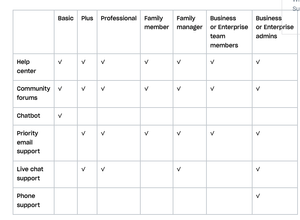
Obviously, you know that we (the Dropbox Community forum) are always here for you. No I mean it, we’re here 24/7, but of course, there are other ways to get support too. Check out your options below, or ask us a question and we will do our best to direct you to the right spot. Getting support on a Dropbox Basic plan: You’ve seen us talk about the many benefits of Dropbox Basic before but when something isn’t working quite right, you can get help: Right here, the Dropbox Community forums The Help Center The Chatbot Getting support for your paid Dropbox account If you need more support than that, and you are on a paid Dropbox plan, you can also access priority email support. With email support, you can expect an email response from support within 1 business day (Monday–Friday). Users on the Enterprise plan can expect a response from email support within 1 hour, any day of the week. Live chat and phone support are also available during your local business hours, 9:00 am – 5:00 pm. How to receive support in your preferred language Help isn’t help if you can’t understand it - so make sure you can access support in your preferred language, so here’s what you need to know. All Dropbox customers have access to support in English. Depending on your account type and location, support may be available in French, German, Japanese, Portuguese, and Spanish. Sign in and visit dropbox.com/support to see your language options. If your language isn’t listed at dropbox.com/support, you can send an email or start a chat in your preferred language, and you’ll be routed to the appropriate team. And if that doesn’t make it clear, you can check out this table to see how you can best get support, check this out. So, we hope that answered your questions about getting support, but if not, tell us about it in the comments below!5.4KViews3likes2CommentsFraud Charge on my Credit Card
Hello, There was a fraudulent charge on my credit card. I am a basic plan user only so when I got the notification from my credit card company that I had a charge from Dropbox I knew something was suspicious. I was able to track down the invoice and receipt using the transaction ID lookup tool so I have that documentation. I want to report this to Dropbox so they may take action against this user. Thanks, DonSolved7.1KViews3likes9Comments
Why was I charged by Formswift?
Anyone get scammed by formswift? Evidently they are tied to Dropbox somehow. I now have a charge of 37.00 on my debit card When I call the number then they want my bank account number or my debit card. Never even asked my name, address, or phone number. Anyone else?53KViews2likes22Comments
Ilegal credit card usage
My conversation with Kim over someone using my credit card to start an account on Dropbox. Buyer beware. And if this conversation is deleted, I'll be posting about it on the major news services! Ticket #8516958: DB: $99.00 charge on my credit card that I didn't charge! You can add a response by replying to this email. Please be sure to reply with the same email address that you used to originally contact us. Kim, Nov 4, 9:25 PM PST: Hi Paul, Thank you for contacting Dropbox Support! My name is Kim and I'd be happy to help you with this charge! Dropbox currently only offers phone support for Business Standard, Advanced and Enterprise subscribers however, I am more than happy to assist you via email. I don't see a charge for your account at [personal information removed for security purposes] — is it possible that you have another account under a different email address? You can look up a credit card charge with our credit card self-serve lookup tool here: https://www.dropbox.com/payments/find_receipt However, if you cannot find the charge in question, or if you have additional questions to that charge, I will need all of the following information for security reasons: • Card type • First six digits of the card • Last four digits of the card • Full name on the credit card charged • Date of charge • Amount charged • Billing postal code Additionally, if you have the 12 character alphanumeric transaction ID shown on your bank account, please send that on. Alternatively, if you paid with PayPal, I will need the PayPal transaction ID. You can find this ID by logging in to your PayPal account and clicking on the transaction in your account history. Thank you in advance, looking forward to your reply! Best regards, Kim Kim, I've found out that there's a charge from last year also. At the time, I was in the middle of renovating a new home and had so many charges happening that I didn't catch the first charge from Dropbox. I've checked several email addresses that I use and none have replied with a password reset email. Card type xxxx • First six digits of the card xxxxxx • Last four digits of the card xxxx • Full name on the credit card charged Paul Day • Date of charge 9/30/17 - xxxxxxxxxxxx 10/4/18 - 141-xxxxxxxxx • Amount charged $99.00 $99.00 • Billing postal code xxxxx xxxxx Another reason I know this is not my charge is I NEVER use any auto renewal service. Thank you, Paul Day Hi Paul, Thanks for getting back to me! I was able to look up the account based on the transaction ID you kindly provided.. The email address associated with the account is [ [personal information removed for security purposes] This charge is for a Dropbox Plus subscription on an annual payment plan. Please let me know if you would like for me to go ahead and cancel the automatic renewal of this charge on your behalf. Thank you in advance, looking forward to your reply! Best regards, Kim Hi Kim, Thanks for clarifying that this is not my account and somehow someone was able to use my credit card illegally. I expect a full refund of $198.00 as this was obviously not me using your service. If I don't receive a full refund I will pursue legal action against Dropbox for not properly verifying the owner of a credit card during purchase. If it's happened once, I'm sure it's happened before to others. May I suggest that you contact local authorities to track the person who is fraudulently using your system to recover your lost funds. You have their email address and I'm sure that your system tracks their upload IP address also. Thank you, Paul Day Hi Paul, Thanks for getting back to me! I'm afraid we cannot provide a refund for this charge. However, I've just cancelled the subscription and the account will downgrade to the Basic plan at the renewal date. Feel free to contact me if you need further assistance or have other inquiries. Best regards, Kim Excuse me, YOUR NOT EVEN GOING TO GIVE A REFUND? and you know that the charge was ILLEGALLY placed. Oh, and your so unconcerned about the theft that your going to DOWNGRADE the account, not close it and attempt to go after the person who used my credit card illegally. NO, that would make too much sense. WOW, is that ever smart and how NOT to run a business. BOY, first this email chain will be sent to the credit card company so that they'll see you're at fault and then I'll get my money back. In the mean time I'll start posting about Dropbox and how they're letting stolen credit cards used on their system and then seem totally unconcerned when notified. As proof, I'll be attaching this email post to all posting. We'll let the public decide, like on the Dropbox forum first. Paul Day Now I ask you, would you expect a FULL refund if you were in my shoes? Also, Kim seems totally unconcerned that Dropbox is not properly venting CC#s when being used on their system. Paul DaySolved13KViews2likes15Comments
Can't upgrade to Dropbox Professional
I am a Dropbox Plus subscriber and want to upgrade to Dropbox Professional to take advantage of SmartSync. In the "Settings" section of my account on the Dropbox.com website, it says "Contact Support to change plan", I can't just click a button there to upgrade directly. So, I contact support. Support says that, because I have a legacy account of some kind, I can only upgrade by first "downgrading" from Plus to Basic, then "upgrading" to Plus again (!), then upgrading to Professional. I have 166 GB of files on Dropbox at the moment. I asked support if, by "downgrading" from Plus to Basic, which only has a 2GB allowance, whether I would then lose all my files. Support isn't responding. So, I'm asking here if anyone can help. Some observations: * Dropbox support is among the worst I have experienced. They don't respond and don't seem to be customer-focused. * Why should it be so hard for a customer to upgrade their account? Why am I required to jump through all these "downgrade / upgrade / upgrade again" hoops? To be honest, after years of using Dropbox with satisfaction, this experience is making me evaluate alternatives now.Solved7.6KViews2likes9Comments- 93Views1like1Comment

I'm getting very frustrated trying to contact support; I've paid for a plan, but it's still Basic.
Going around in circles, i have a paid plus account, should be 2TB but account is only registering 2GB & telling me i've overfilled. Supposed to have live chat support but box is greyed out same with the other options. Can't find anything else? Cheers81Views1like1Comment