We’re Still Here to Help (Even Over the Holidays!) - find out more here.
dropbox plus
543 Topics
I used my dad's iDeal account and made the payment without consent.
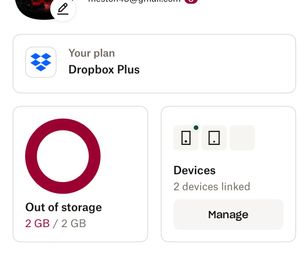
Dropbox Plan (Plus) Payment Method iDeal How did you upgrade? Trough website without my dad's consent Question or Issue They refuse a refund while this account is free only use my daughter of 12 is a minor and used my payment method to buy and upgrade her account. I will go to the police station and make a report that they took payment from a minor and pursue legal action. I called Dropbox immediately after my daughter told me she did pay to upgrade her account and I was billed € 119,88 this was done without consent. This was the second response Karma Beck, Dec 12, 2025, 8:45 AM PST: Chat Transcript: [2025-12-12 16:00:09]bot:Hello, Karma Beck [2025-12-12 16:00:09]bot:Welcome to Dropbox support. How can we help you? Learn about how we use and protect your data in our Privacy Policy . [2025-12-12 16:01:28]Karma Beck:According to regulations, the webshop is always responsible for the correct processing of iDEAL transactions. This means that if there is an issue with a payment (or its processing), the webshop is the first point of contact for the consumer and must provide support.In such cases, the webshop should contact its payment service provider, the company with which it has a contract, to check the status of the payment. This allows them to complete the order or facilitate a refund.A webshop should never refer the consumer to their bank or to us.If you have not yet contacted the webshop, you may use the text below to remind them of their responsibility.Have you already contacted the webshop but been unable to resolve the issue, or have you been incorrectly referred elsewhere? If so, please complete the form via the link below to notify us of the situation, allowing us to assess the matter and, if possible, assist in mediation. [2025-12-12 16:01:28]bot:Please wait while we connect you with a chat agent. [2025-12-12 16:01:41]System Message:Brian joined [2025-12-12 16:02:05]Brian:Hello Karma, thank you for contacting Dropbox Support. My name is Brian and I will be more than happy to assist you with your issue right away. [2025-12-12 16:02:14]Karma Beck:So what you are saying each time isn't true you have to pay the refund of € 119,88 [2025-12-12 16:02:39]Karma Beck:Not contact my bank which I did twice [2025-12-12 16:03:43]Karma Beck:So I expect my refund within 7 working days [2025-12-12 16:03:52]Brian:From what I understand you want to be refunded for your recent Dropbox transaction, correct? [2025-12-12 16:04:49]Karma Beck:Yes and the mail which states that the refund would be made [2025-12-12 16:05:44]Brian:As I can see on your account it is an iDeal payment. [2025-12-12 16:05:55]Karma Beck:This account is a free account and after refund it would be put back to free [2025-12-12 16:05:58]Brian:For iDeal Direct Debit payments, we recommend that you contact your bank and request that they reverse the charge in question. Once the reversal is processed, you should see the refund on your account. [2025-12-12 16:06:11]Karma Beck:Do not start again [2025-12-12 16:06:36]Karma Beck:Read what I send you this comes straight from the ideal website [2025-12-12 16:07:38]Brian:Please allow me a few minutes. [2025-12-12 16:08:18]Karma Beck:This is copied from the ideal website [2025-12-12 16:08:20]Karma Beck:According to regulations, the webshop is always responsible for the correct processing of iDEAL transactions. This means that if there is an issue with a payment (or its processing), the webshop is the first point of contact for the consumer and must provide support.In such cases, the webshop should contact its payment service provider, the company with which it has a contract, to check the status of the payment. This allows them to complete the order or facilitate a refund.A webshop should never refer the consumer to their bank or to us.If you have not yet contacted the webshop, you may use the text below to remind them of their responsibility.Have you already contacted the webshop but been unable to resolve the issue, or have you been incorrectly referred elsewhere? If so, please complete the form via the link below to notify us of the situation, allowing us to assess the matter and, if possible, assist in mediation. [2025-12-12 16:09:01]Karma Beck:So no more excuses this explains how Dropbox needs to refund me [2025-12-12 16:09:54]Karma Beck:Especially this part [2025-12-12 16:09:57]Karma Beck:In such cases, the webshop should contact its payment service provider, the company with which it has a contract, to check the status of the payment. This allows them to complete the order or facilitate a refund. [2025-12-12 16:11:52]Brian:I have read the text you have provided me [2025-12-12 16:12:33]Brian:But since the transaction was made using the iDeal payment I cannot process a refund. [2025-12-12 16:12:57]Brian:In order to have that resolved we recommend that you contact your bank and request that they reverse the charge in question. Once the reversal is processed, you should see the refund on your account. [2025-12-12 16:12:57]Karma Beck:In such cases, the webshop should contact its payment service provider, the company with which it has a contract, to check the status of the payment. This allows them to complete the order or facilitate a refund. [2025-12-12 16:13:16]Karma Beck:It say's clearly what Dropbox has to do [2025-12-12 16:13:49]Karma Beck:Do not start again that I have to contact my bank you are responsible [2025-12-12 16:15:15]Karma Beck:The payment was made without my consent by my 12 year old daughter [2025-12-12 16:15:40]Brian:I wish I could do more for you but you need to contact your bank for this issue. [2025-12-12 16:15:49]Karma Beck:So I also can pursue this legally that you accepted a payment of a minor [2025-12-12 16:16:22]Karma Beck:Clearly you can't read what the text from the ideal website says [2025-12-12 16:16:33]Karma Beck:So once more [2025-12-12 16:16:53]Brian:Can you provide me a screenshot of the message from the website? [2025-12-12 16:18:10]Karma Beck:Screenshot_2025-12-12-17-17-31-76_40deb401b9ffe8e1df2f1cc5ba480b12.jpg [2025-12-12 16:18:18]Karma Beck:Screenshot_2025-12-12-17-17-37-57_40deb401b9ffe8e1df2f1cc5ba480b12.jpg [2025-12-12 16:18:24]Karma Beck:Screenshot_2025-12-12-17-17-50-37_40deb401b9ffe8e1df2f1cc5ba480b12.jpg [2025-12-12 16:19:20]Karma Beck:So I don't need to call my bank Dropbox needs to contact their account team and refund the payment [2025-12-12 16:19:49]Karma Beck:www . ideal . nl/ contact [2025-12-12 16:21:01]Brian:I’ve reviewed our refund policies, and unfortunately they don’t allow me to provide you a refund, as requested. As mentioned your bank or online payment vendor may be able to help. [2025-12-12 16:23:29]Karma Beck:No I will go to the police station and make a statement that you took payment of a minor and call my lawyer which you will have to pay since I am in the right and you don't want or do understand what Ideal clearly stated on their website. Dropbox is responsible for the refund [2025-12-12 16:23:57]Karma Beck:Take that to your supervisor [2025-12-12 16:24:56]Karma Beck:You clearly are AI or bot a human could read and understand the text provided by Ideal [2025-12-12 16:25:15]Karma Beck:Dropbox is responsible for the refund [2025-12-12 16:25:21]Brian:I am human and I can read the texts you have provided me. [2025-12-12 16:26:15]Karma Beck:Then you can read that Dropbox need to contact their payment service [2025-12-12 16:27:04]Karma Beck:It states on their website you are responsible for the refund and how to refund [2025-12-12 16:28:04]Brian:The bank will resolve your issue, I cannot issue a refund. [2025-12-12 16:28:49]Karma Beck:If you say this again you clearly don't understand the text written by iDeal [2025-12-12 16:29:24]Karma Beck:According to regulations, the webshop is always responsible for the correct processing of iDEAL transactions. This means that if there is an issue with a payment (or its processing), the webshop is the first point of contact for the consumer and must provide support. [2025-12-12 16:29:40]Brian:I completely understand the text from iDeal, however we have our policies that we follow. [2025-12-12 16:31:19]Karma Beck:I would contact your supervisor and your payment service because the rules apply also to you and internationally [2025-12-12 16:32:01]Karma Beck:Has nothing to do with your policies Dropbox is responsible for the refund [2025-12-12 16:34:09]Brian:I wish I could have this resolved [2025-12-12 16:34:29]Brian:But as I mentioned above there is nothing I can do on my end. [2025-12-12 16:34:53]Brian:You have to contact your bank for the refund request. [2025-12-12 16:35:48]Brian:Is there anything else I can help you with today? [2025-12-12 16:38:37]Karma Beck:Contact you're payment provider [2025-12-12 16:39:42]Brian:iDeal payments are a form of direct debit payment. [2025-12-12 16:40:14]Brian:For direct debit you should contact your bank [2025-12-12 16:40:25]Brian:For more information visi t this link help dropbox . com / contact / refund [2025-12-12 16:40:40]Karma Beck:It clearly states that it's not my job [2025-12-12 16:41:16]Karma Beck:The same is stated on the website of Ideal [2025-12-12 16:42:03]Brian:I already provided you with the steps on how to claim your refund. [2025-12-12 16:42:08]Brian:Is there anything else I can help you with today? [2025-12-12 16:44:19]Karma Beck:And I provided you with the steps Dropbox needs to make by statement from iDeal [2025-12-12 16:44:54]Brian:This conversation is now unproductive. [2025-12-12 16:45:21]Brian:I will send you a follow up email to provide you all the necessary steps you need to take in order to take your money back. [2025-12-12 16:45:27]Brian:I will send you an email, with the ticket number of our communication, which you can respond to and get in touch with me directly, should you need further assistance. [2025-12-12 16:45:30]Brian:Thanks for chatting with us today. We would love to hear how satisfied you are with the assistance received today via the following one-click rating, after I close the chat. Have a lovely day! [2025-12-12 16:45:32]System Message:This engagement has been ended by Brian Calling the bank like they state is absurd they have to make the refund directly from their account. My account will be renewed yearly automatically in January I asked them instead of refunding me directly to use the payment for my account and cancel and make my daughter's account a free account again. You would think problem solved43Views0likes3Comments
Clarifications regarding personal use plans vs business use plans
Hi, I am trying to figure out a general outline of all the plans, and here are my finds. Personal Use plans : (payed as an individual) 1. Basic 2 Gb 1 user free 2. Plus 2 TB 1 user 3. Family 2 TB 6 users 4. Professional 3 TB 1 user 5. Essentials 3 TB 1 user Commercial Use plans: (payed as a company) 1. Essentials 3 TB 1 user 2. Business 9 TB 3 users+ 3. Business Plus 15 TB 3 users+ 4. Enterprise Custom Custom But I also found another group of Business plans: 1. Professional 3 TB 1 user 2. Standard 5 TB 3 users+ 3. Advanced 15 TB 3 users+ Questions: 1. I see Essentials as being both in the list of personal plans as well as in the group of company payed plans. Is it correct? 2. Is Professional plan a company payed plan or a personal payed plan? 3. Standard is the same thing as Business ? Advanced is the same as Business Plus? Or are they different? 4. The 3rd group of plans (Professional, Standard, Advanced) are all company payed plans? 5. Are there plans that can be both personal payed as well as company payed plans? 6. I also want to know if all business plans are company payed plans or there are exceptions (personal plans that can be company payed for, or business plans that can be personally payed for). 7. Do Work account mean is a business account? (see question 6 for exceptions) Thank You, Dan4KViews0likes6Comments
Some available offline files won't preview after changed from online-only on Windows.
I’m afraid we’re are migrating away from Dropbox, however whilst doing so we have noticed the following issue…. (Windows 11 – Latest Dropbox Version). Hence we though this may be useful. Most of our 2TB files are stored as “Online” only using Selective Sync. We then change the file status to “Available offline” so Dropbox copies(sync’s) the files back to the local disk from Dropbox.com. After some time (several hours) the Dropbox app confirms that all files are sync’d and the Dropbox task bar icon also indicates a complete/no activity status. The PC is rebooted and Dropbox is then uninstalled When trying to view via the PC the now sync’d Zip, Jpeg, Docx some of the files are corrupted/won’t open. As a test using Dropbox.com we manually download a problem file using MS Edge and the files will open correctly. It would seem that the Windows Dropbox client indicates it has finished its jobs even through it hasn’t fully completed syncing … We've also noticed that the corrupted file vs good file byte size are the same. We could duplicate this fault. Any thoughts ?7.7KViews0likes18CommentsCan I edit a text (*.txt) file in Chrome browser?
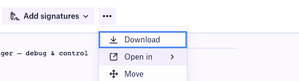
Hi there, I'm struggling to edit a TXT file in Chrome browser on Dropbox. I'm sure I've done it with a .docx file before. When I search for this feature, Google returns results asking for it back to 2012, but there's nothing recently, the feature requests such as this one have been closed, so I'm assuming I'm having an issue with my account. Especially since Dropbox is pushing Family plans, signature, and other feature way more complex and less universal as a simple TXT editor. I've been using link removed it has looked the same for years and works fine, but I find it extra weird that a giant company like Dropbox doesn't have a similar feature. How do you usually edit a TXT file in the browser? I only have a few lines to add/remove, when I'm on a machine without the Dropbox app/daemon installed, and don't want to leave any file traces on that machine. See my environment in Chrome on a Macbook air, as a Dropbox Plus paying client. On TXT files, I have an "Open in" Menu, but the arrow only opens a 2px high line. This is definitely not expected behavior, as if the submenu was empty, it should not appear with an arrow in the first place. What could I be I missing here?Solved12KViews1like22Comments
How can I redeem a 50% off offer I got on the Dropbox Plus plan?
Hi there, I was going to upgrade to the Dropbox Plus plan on my mobile app and was given an option for 50% off on opting for the annual plan. However I went on my desktop to opt into this as I needed to download a few pictures/videos but now it's not offering the 50% if I pay for it annually. Is there a discount code I can utilize?Solved15KViews0likes3Comments
Is there a way to change the default PDF viewer in the Dropbox App for the iPad?
Is there a way to change the default PDF viewer in the Dropbox App for the iPad? When I click on "Open in" in a PDF, it only shows the option of Adobe, but I use PDF Expert. (In contrast, on my Mac, when I double click on a PDF in my Dropbox folder, it automatically opens in PDF Expert). If I can't change the default PDF viewer to PDF Expert on the iPad, what is the easiest way to open a PDF from Dropbox in PDF Expert? (Of course I already know that I can start IN PDF Expert and open Dropbox files there from Dropbox, which I have linked to it; but this is for when I happen to have begun from the Dropbox iPad app instead.)Solved1.8KViews2likes5Comments
Latest email from Dropbox contains x-webdoc links that don't work
Got an email this morning from Dropbox - subject: "Introducing: Our newest set of tools to simply your life". The email contains links to various new features ... that are going to simply our lives apparently. e.g. x-webdoc://C33115A8-807A-463D-B0AA-ECE1119E84A1/experience.dropbox.com/resources/information-architecture-for-distributed-work?_tk=email&_camp=3216404&_ad=8566dbc5b57a4d3c95d278d1337f7282&utm_source=iter&utm_medium=email&utm_term=us-en&utm_campaign=p1_bb_co_all_pcn_b202111&utm_content=m2_c email link However, I can't find a browser that will open the x-webdoc: protocol. Anyone else able to do get this to work? I tried Mac/Safari, Mac/Chrome, Windows/Chrome - all without success. Whatever happened to just straightforward URL links to a specific page? BTW this is NOT making my life more simply, its complicating it by having to write this forum entry. Plus ... if you go to your Dropbox account, you CAN add tags to folders and files and search for them. This is good for any new folders/files uploaded. However, it doesn't help with 1,000s of existing folders/files. AND - for me, I'd have been MUCH happier have a search feature that I could restrict to just folder names or just file names, not 100s of files that CONTAIN part of whatever it is I'm searching for. So for me, at least, these new features (despite not being able to easily find out about them because of the x-webdoc based link) STILL does not provide a simple search feature for folders and/or files. Another reason I won't be renewing my subscription next September, unless things improve.Solved11KViews0likes3CommentsI need to permanently delete my files, but I get message "x items couldn’t be permanently deleted".
When I wanted to permanently delete a file or folder (which I may have shared with others or not). I used to be able to delete it in Finder and then would get asked by Dropbox: Delete "untitled folder" from everyone's account and all devices? I then confirm with "Delete for everyone" and proceed to empty the trash on my Mac. Now I log on to my Dropbox account, go to "Deleted files" and select the ones I want to permanently delete. Then confirm this and they were gone, space would be freed up. Well, gone are those glory days of simplicity, because: NOW I get told by Dropbox: "File XYZ will be gone forever for everyone, including for anyone still using the folder. Permanently deleting this folder won’t free up space." I confirm by selecting "Permanently delete" NOW I get the message: "x items couldn’t be permanently deleted" Dropbox tells me – uselessly: "What you can do": "Ask the owner to help permanently delete this" I AM the #!*¥ owner, aren't I? Plus, didn't clicking "Delete for everyone" on the desktop version make it clear that ALL those files have to go? Shurely this is a recent bug. It wasn't such a hassle before to get rid of old files. Or am I missing something? GrrrrrSolved18KViews3likes10CommentsNeed all my files accessible locally. On my machine there's no option to "Make Available Offline."
Honestly, this seemingly late "bringing to the forefront" (I guess you'd call it) of the whole "Online Only" vs. "Make Available Offline" thing has been more of a headache than a help, if I may offer my opinion. I purchased a new ultra-portable Windows computer which has a 256GB SSD on board, but I plan on using my Dropbox files with it, and I have well over 256GB worth of stuff in my Dropbox. The thing is that I'm often in situations in which I need offline access to my files. So I purchased a 1 TB microSD card, which will never leave its slot in this machine. Heck, I can't even retrieve it, it seems. I mounted it so that it isn't considered "Removable Media" by the computer, and then I proceeded to install Dropbox on the computer, with the intent of using the 1 TB card exclusively for Dropbox content...offline. I left my machine to sync overnight, and what do you know? Everything has a stupid cloud next to it. I have no option to "Make Available Offline," either in the file/folder context menu or in the Dropbox application > Preferences > Sync menu. If this is by design, it's a pitifully stupid design. I'm going to whatever lengths I can to make this work the way I envision, but I'm going to be awfully disappointed if Dropbox doesn't respect use cases that might not necessarily conform to a narrow definition. If it's an issue with a recent update to the application, then please bug the developers posthaste.Solved25KViews1like125Comments