We’re Still Here to Help (Even Over the Holidays!) - find out more here.
dropbox plus
549 Topics
I need to permanently delete my files, but I get message "x items couldn’t be permanently deleted".
When I wanted to permanently delete a file or folder (which I may have shared with others or not). I used to be able to delete it in Finder and then would get asked by Dropbox: Delete "untitled folder" from everyone's account and all devices? I then confirm with "Delete for everyone" and proceed to empty the trash on my Mac. Now I log on to my Dropbox account, go to "Deleted files" and select the ones I want to permanently delete. Then confirm this and they were gone, space would be freed up. Well, gone are those glory days of simplicity, because: NOW I get told by Dropbox: "File XYZ will be gone forever for everyone, including for anyone still using the folder. Permanently deleting this folder won’t free up space." I confirm by selecting "Permanently delete" NOW I get the message: "x items couldn’t be permanently deleted" Dropbox tells me – uselessly: "What you can do": "Ask the owner to help permanently delete this" I AM the #!*¥ owner, aren't I? Plus, didn't clicking "Delete for everyone" on the desktop version make it clear that ALL those files have to go? Shurely this is a recent bug. It wasn't such a hassle before to get rid of old files. Or am I missing something? GrrrrrSolved18KViews3likes10CommentsNeed all my files accessible locally. On my machine there's no option to "Make Available Offline."
Honestly, this seemingly late "bringing to the forefront" (I guess you'd call it) of the whole "Online Only" vs. "Make Available Offline" thing has been more of a headache than a help, if I may offer my opinion. I purchased a new ultra-portable Windows computer which has a 256GB SSD on board, but I plan on using my Dropbox files with it, and I have well over 256GB worth of stuff in my Dropbox. The thing is that I'm often in situations in which I need offline access to my files. So I purchased a 1 TB microSD card, which will never leave its slot in this machine. Heck, I can't even retrieve it, it seems. I mounted it so that it isn't considered "Removable Media" by the computer, and then I proceeded to install Dropbox on the computer, with the intent of using the 1 TB card exclusively for Dropbox content...offline. I left my machine to sync overnight, and what do you know? Everything has a stupid cloud next to it. I have no option to "Make Available Offline," either in the file/folder context menu or in the Dropbox application > Preferences > Sync menu. If this is by design, it's a pitifully stupid design. I'm going to whatever lengths I can to make this work the way I envision, but I'm going to be awfully disappointed if Dropbox doesn't respect use cases that might not necessarily conform to a narrow definition. If it's an issue with a recent update to the application, then please bug the developers posthaste.Solved25KViews1like125Comments
I have an unauthorized charge on my credit card. How can I reach Support?
Hi Dropbox Community, I recently noticed an unauthorized charge on my credit card and I’m seeking advice on how to handle this situation. On 03/07/24, I was charged ₪18.57 by Dropbox. However, I do not have a subscription with Dropbox and did not authorize this charge. Here are the details of the charge: • Amount: ₪18.57 • Date: 03/07/24 • Payment method: ****6031 I am concerned about how my credit card information was obtained and used for this transaction. I would like to understand how this happened and what steps I need to take to resolve this issue. Has anyone else experienced a similar problem? I have already tried to contact Dropbox support but have not been able to reach them directly. Therefore, I am turning to the community for help and advice. Any shared experiences or guidance would be greatly appreciated. Thank you for your help! Maor7.5KViews0likes3Comments
I cannot access email support with my paid Plus account
Dropbox Plan Plus Payment Method Card How did you upgrade? Sorry, don't remember Question or Issue Hi! I want to email a question to support. When I go to http://www.dropbox.com/get_help, it says my support options include email, but I only have access to the chatbot. The chatbot is unable to answer my question. How do I email a human? Thanks!107Views0likes9CommentsManaging your Dropbox subscription
The time may come when you want to change your Dropbox subscription and whether you need more or less from Dropbox, we want to make sure that you have all the information you need to do just that. Need more space? Why not move to a plan with more storage? If you’re changing plans because you need more space, you can check out the plan types here, but to give you a quick summary of space: Basic plan: 2 GB of space Plus plan: 2 TB of space Family plan: Shared 2 TB of space (up to 6 users) Professional plan: 3 TB of space If you’re maxing out the space in your account, you could try some space saving tips here, or it could be time to upgrade your dropbox account. Learn more about the plan that suits you best and make your choice. What happens when I cancel my Dropbox subscription or trial? So, you’ve decided to leave… we’ll try not to take it personally 😢 All joking aside, here are some of know when you decide to cancel your Dropbox subscription. Well, the first thing is that this doesn’t actually have to be goodbye, your account will downgrade to a Dropbox Basic account at the end of your billing cycle or trial. So that means; You’ll still have access to all of your files and folders Dropbox keeps deleted versions of your files for 30 days, in case you change your mind If you’re over your downgraded storage quota, Dropbox will stop syncing your files Changing your Dropbox plan to Basic is not the same as deleting your Dropbox account. Canceling or downgrading a Dropbox subscription Depending on how you subscribed to Dropbox, there are different ways to change or cancel your subscription. If you subscribed on mobile - you will need to unsubscribe on mobile too, through iTunes or Google Play, depending on your device type. Learn how to cancel a Dropbox subscription purchased on your computer. How to cancel a Dropbox subscription or trial on an iPhone or iPad On your iPhone or iPad, tap Settings and then your name. Tap Subscriptions (about midway through the screen) and find Dropbox in the list. Tap Cancel Subscription or Cancel Trial and confirm. Your account will downgrade to Dropbox Basic (free) at the end of your billing cycle. How to cancel a Dropbox subscription or trial on Android If you purchased Dropbox from an Android device, you can cancel a Dropbox subscription or free trial by following these steps: Open the Dropbox mobile app and head to the Account tab in the bottom right corner. Tap Manage your subscription and then How to cancel. Tap Cancel plan at the bottom of the screen. This will take you to your subscription in Google Play. Tap Cancel subscription. You’ll receive an email to your Google account to confirm your cancellation, and your account will downgrade to Dropbox Basic (free) at the end of your billing cycle. Cancel an individual Dropbox plan on desktop If you manage your Dropbox plan on desktop then here are some easy steps to follow to cancel your subscription on desktop. Follow the steps below, and you can update your plan to match your needs. Sign in to dropbox.com. Click your avatar (profile picture or initials) in the top-right corner. Click Settings. Click Plan. Click Cancel plan at the bottom of the page. Note: If you don’t see Cancel plan, you may have purchased Dropbox on your mobile device. If so, you’ll need to cancel your plan from the app store on your device. Select a reason for canceling. Click Continue canceling. You’ll receive an email confirmation that your subscription has been canceled. So, there you have it. Whether you want to change the features you have access to, or the amount of space you need, you can manage your Dropbox account to fit your needs. If you have any questions about managing your plan, drop them in the comments below and we can get you answers!12KViews1like2Comments
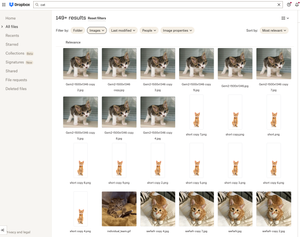
Did you know... you can search for images using just text?
Hello Dropbox Community! My name is Lainie and I'm a Product Manager at Dropbox. Every now and again, I am going to post a "Did you know..." to 1) keep you informed of all of the cool technology that exists at Dropbox and 2) gather your feedback on how the features are performing. In today's, "Did you know..." I'll be talking about Image Search! Image search is allows you to use the Search Bar to search for the contents of the image using words to describe the image. For example, if you search for "cat" your search results will show files that 1) contain the word "cat" in the file name or body, AND 2) files that contain images of cat. No mention of the word "cat" is necessary! Pretty cool! If you haven't yet, I recommend that you check it out. Please respond to this thread and let me know... A) Did you know this feature existed? Do you use it? B) How can we make this even more useful for you? Have a great day! Lainie For more information, check out our Help Center Article on Image Search!9.4KViews9likes3CommentsI upgraded from a trial to Plus via the site, but I'm getting a payment error
Dropbox Plan Plus Payment Method iDeal How did you upgrade? Directly through the Dropbox website Question or Issue I upgraded from Free Trial to the Plus plan, via the webbrowser (firefox) on Macbook, and everything went fine until after payment via iDeal, returning to the Dropbox site it showed an error simply stating "Something went wrong". And now I'm still in the free trial plan within Dropbox with a 2 GB limit, no upgrade to 2TB whatsoever. That's an expensive error.81Views0likes6CommentsI'm trying to upgrade but it says my account is already using the Plus plan.
I've been using the dropbox basic plan for years, but decided to upgrade to the Plus plan. I got an error when trying to upgrade, but it shows my account plan as Plus. It's saying that I'm out of storage at 12 GB. I can't go in and reupgrade right now, as it shows my plan already at Plus. Help!56Views0likes5Comments