We’re Still Here to Help (Even Over the Holidays!) - find out more here.
notifications
31 Topics
I keep seeing an unwanted desktop app notification about being over-quota. How can I make it stop?
Application Affected Dropbox for Windows Device Desktop Operating System/Browser (if using the web) Win11 Dropbox App Version (if using the app)Latest Question or Issue Every single day, the Dropbox app has started popping up a notification that my Dropbox is full and wants me to upgrade. I am well aware that my Dropbox is full, and I have no intention of ever upgrading. Please make this popup stop.103Views0likes6Comments
I'm being asked to update my desktop app to the latest version, but the update fails.
Application Affected (Dropbox Desktop for Windows) Device (ASUS core i9 13900K with 32GB RAM) Operating System/Browser (if using the web) (Windows 11 24H2 build 26100.6584) Dropbox App Version (if using the app) (Uninstalled and trying to install latest app) Question or Issue I had been getting an update to latest version prompt. When I click on install, it downloads DropboxInstaller.exe. I double click to install and it gets to a screen that shows "On your marks..." It then hangs at that point and does nothing. I waited a couple of hours and then restarted the computer. Ran the app again and still nothing. I uninstalled the desktop app, restarted the computer and tried running the installer again. No luck. I rebooted, went back to download the software and ran it again. Stil nothing.181Views0likes10Comments
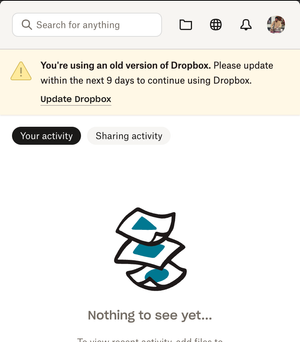
The desktop app keeps telling me I'm running an old version. Do I need to upgrade to File Provider?
Application Affected Dropbox Desktop Device M1 Macbook Pro Operating System/Browser (if using the web) Mac Os X 12.7.6 Dropbox App Version (if using the app) 222.4.5042 Question or Issue I have my Dropbox folder on an external drive, so since the File Provider update came out, it's told me that I'm not eligible for an update and my Dropbox has continued working without issues. Now the app is saying I have to update within the next 9 days. Before I update, I just want to confirm that this isn't the File Provider version, and I won't causes issues with my Dropbox location. Please can you confirm? Thanks113Views0likes2Comments
Single or double tick in notification section of the Android mobile app.
DROPBOX APP I messed up with some notifications after a long time I had not open drop box app. At the top RHS corner of the notification tab I have either 1 tick or 2 ticks at times, what are their meaning respectively? Thanks all, just making sure I have not missed any notificationsSolved185Views0likes5Comments
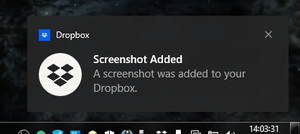
Add an option to choose between the removed "Screenshot Added" notification or the quick actions.
I've gotten really used to seeing this notification every time I took a screenshot and it'd help me know if I saved a screenshot or not and i'm noticing it's gone and there's a new feature that I assume replaced this which is to show quick actions after screenshot, but I like the Screenshot Added notification more because it's just a notification, while the quick actions are a seperate window, and I don't want to switch windows back every time I take a screenshot, so I feel like if there was a way to choose in the Screenshots menu whether if you want there to be a notification informing you after saving a screenshot or if you want the quick actions. I would love for there to be an option to choose between those two.96Views1like2Comments
Isn't Dropbox Violating the CAN-SPAM Act with This Email?
This is a spam tactic trying to sell me storage. The CAN-SPAM Act prohibits deceptive email practices, including misleading subject lines. If "RE:" falsely implies a prior conversation, it could be considered a violation.146Views0likes7Comments
Dropbox folder bounces in the dock on Mac when syncing.
NOTE: a thread already exists for this issue but was closed without a solution. I'm writing this here to reopen it. The Dropbox folder in my dock (Mac OS Sequoia) bounces every time a file is updated by dropbox Sync. When syncing hundreds of files, it will bounce constantly. When opening a cloud document (online-only document that is opened via the desktop file explorer and temporarily loaded onto the computer), it also bounces. This means that if I even use quick-look to preview a batch of images, my dropbox folder icon will bounce incessantly as it loads higher-resolution preview thumbnails. People have tried disabling this in terminal and it hasn't worked. I haven't personally tried the terminal method due to these reports, but I would prefer to manage this in the notifications preferences of Dropbox instead. Even with everything turned off on my notification preferences, it still bounces.Solved2.3KViews0likes13Comments
I keep being asked for my Mac password every time I rename/move files on Dropbox
I know there has been a couple of other incidents like this. But I dont want to reinstall Dropbox to be honest. So just like the subject say: Mac Finder asks for password each time I rename a file or move in Dropbox. And now comes the weird thing. This all is hapening on my iMac Pro (Sonoma v14.5). While when on my Macbook Pro (Sonoma v14.5) it just works fine. So its really only happening on the iMac. Got the same other programs installed on both machines. Yes, also Onedrive. But I closed it to test if that is the problem, but it isnt. Checked online if I can edit the file name there; and yes, I can. Installed in the right way and it always worked. It just stopped working like a week ago. I also checked the sharing & permissions, gave everyone read & write and also applied to enclosed items. Really lost atm.Solved6.2KViews0likes11Comments