We’re Still Here to Help (Even Over the Holidays!) - find out more here.
share
10 Topics
iOS Files app - can’t download shared files from Dropbox
Hi I'm using the iOS Files app to access Dropbox files, because I have >10 GBs of other files in iCloud, Box and elsewhere (working with different organisations), so just using the Dropbox app is not a solution for my filing needs. I have a Dropbox Pro subscription. When I use the Dropbox iPad app, I can easily and quickly download all files in my personal Dropbox folders. But when I try to access files in my corporate shared folders, I just get the "Waiting to download" message and the whirring download ring, but they never download. I need to wait for over 2 minutes, without change, until an error message comes up saying "couldn't communicate with a helper application". It also tells me to try again, and if that doesn't work, to quit the application and try again. I have done all that. I have also deleted the Dropbox iOS app, and re-installed it. That hasn't solved the problem either. Since I can download files from my standard Dropbox folders, could this be an issue with settings/restrictions on the folders in the shared corporate Dropbox folders? This doesn't seem likely because surely, if this was just the result of a setting in the corporate Dropbox, then surely Dropbox would have created an error message that told me that. (Such as "your System Administrator has restricted you from downloading.") The fact that the problem is with a "helper application" sounds most like a software incompatibility issues between Dropbox and iOS. Can anyone help please and advise on how to fix this problem?Solved18KViews1like7Comments
Can't share Google-Docs-files with "edit permission" to external people
So I started a company and bought Professioal Dropbox and G-Suite, to be able to have Google-Docs in my Dropbox, since we work from here with all our files. If I now create a "Google-Document" in Dropbox for a brainstorming session with a client, I CAN'T GET THIS FILE SHARED, so that the client can write with me in my doc. Is this supposed to be like this? I pay 2 Services and loose features, that the free ones easily provide? I suppose I just forgot a little box to be clicked or so. So please help me with this issue, if anyone knows the answer! THANK YOU!Solved13KViews1like17Comments
2 people editing a Word document at the same time in Dropbox
I work with one other person. We were both working on our laptops on the same file in our shared Dropbox folder. (I was adding to a working list and she was editing above.) But I kept getting an odd request for permission and the file name changed to a long sequence of numbers and letters and was saved in another folder called "old files." So the attempt to work on the same file at the same time failed. How can we make this work?Solved13KViews0likes7Comments
Embeddable videos without the ability to download
Hi All, I am working with a Business account of dropbox with the ability to switch off downloads. We are an event company and so we integrate embeddable links into the back end of our event platform to play video content navigable through the event agenda. We are able to get the embeddable links by altering the '?dl=0' to '?raw=1' at the end of each video link but when we disable the downloads this breaks the link. The content we embed is accessible for a limited period of time on our event platforms and is only for paying attendees, additionally, there are strict controls on our use of this media from the industry professionals who have given it to us. This means that having it downloadable and shareable is a nightmare scenario and could get us into very hot water indeed. I have convinced the company to continue using dropbox for its long term storage capabilities but this factor alone is being viewed very much as a dealbreaker. I am desperate to find a workaround for this issue or we will need to return to Vimeo for play-back, in which case there isn't much point in archiving the videos in dropbox. I vastly prefer handling files in dropbox so if there is someway to deal with this issue please do let me know!Solved7KViews1like4Comments
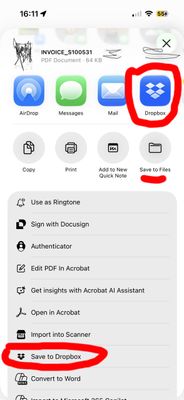
Unable to save PDFs from iOS 26.0.1 to Dropbox (via buttons in Mail or other PDF viewers)
Integration Affected iOS 26.0.1 Mail and other PDF viewers to Dropbox Device iPhone 15 Pro Operating System/Browser (if using the web) iOS 26.0.1 Mail Dropbox App Version (if using the app) 444.2.2 Question or Issue I've recently upgraded to the iOS 26.0.1 version on my Apple phone and I have lost the functionality of the Dropbox PDF sharing. This happens when I have opened a PDF on my phone and try to share to Dropbox (either via a "Save to Dropbox" button or a "Dropbox" logo button). (Screenshot attached). The buttons are visible, yet don't work as they did prior to the update. My workflows now don't work as they used to for 'on the fly' PDF management.300Views0likes6Comments