Your workflow is unique 👨💻 - tell us how you use Dropbox here.
shared links
5 Topics
Live stream link capability and copyright payment to holder
Not sure how this all works but what, since no one discussed it, it is now dead? How are people supposed to know about it? You are missing a good opportunity to retire rich here!! Doesn't anyone understand the implications of a successful plan to do what my idea described. A Live Stream Link onto drop box that viewers could watch a live production. AND, have a payment plan that we could sell the stream to viewers. DropBox through a payment plan could also then pay the copyright fees to the music license holder so we no longer get flags and muted for having live music on our production!99Views0likes2CommentsOrganize and share Christmas photos with Dropbox
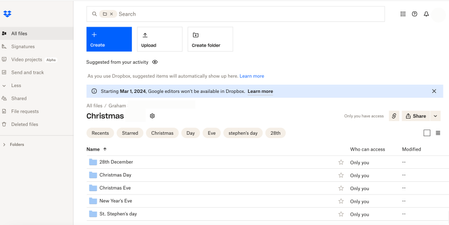
Christmas is definitely a time of year that I find myself taking more pictures than normal. Meeting up with family and friends and wanting to capture special moments means that I have my camera on more than I don’t. If you’re anything like me, you’ll want to be able to share all of these photos with those closest to you. Social media can be a good way to share photos, but there are definitely times when we might want to keep these photos within a private group of people, especially when family are involved, Dropbox makes it easy to share with exactly who you want. To start with, I’ll always make sure that my camera uploads are turned on. You’ve probably heard me talking about this a few times before, but I’ll stand by my words again because I love this feature, it saves me time, space on my phone and makes sure I never lose any photos, so it’s a no brainer for me. If you don’t know how to turn on Camera uploads you can find all the information you need right here. Now that all my photos will be automatically added to my Dropbox account, I’ll figure out a way to organize all of the photos I take at Christmas into folders. Generally speaking, I’ll be meeting up with a lot of different groups of people on different days, so I’ll only want to share photos with the people that are in them, so I’ll start by making a Christmas folder, then inside that I’ll make folders for Christas Eve, Christmas Day, Stephen’s Day, New Years Eve and any other days I might be out and about. Then, dependent on what I’m doing, I might make different folders within these daily folders, for example I might do Christmas morning swim and Christmas Dinner, or Stephen’s Day lunch and Stephen’s Day drinks. Once I’ve got my folders created and all my photos put in the right place, it makes it really easy to share with all of the other people who I was with. To do this, all I need to do is create a view-only shared link to the folder I want to share, and share it with everyone who I was with when I took those photos, or anyone else I want to see them. This link will allow anyone with access to it to view and download the photos inside that folder. If you’re not sure how to create shared links, you can find out everything you need to know here. Now, if your friends and family are anything like mine, you’ll know there are 2 types of people, those who take photos and those don’t. When I want to add photos that friends or family took to my collection, I use file request. This allows them to simply add their photos, which then go directly to my Dropbox account, allowing me to easily add them to the folder they belong in. You can find out more about using file request here. When it comes to using Dropbox for organizing photographs, there are literally hundreds of things you can do, and everyone uses it a little different to everyone else. Check out how our very own Sheena used Dropbox to help create a Christmas Family Calendar for another awesome example. We’d really love to hear how you plan on using Dropbox to organize your photos this Christmas, let us know in a comment below.3.7KViews1like0Comments
Updates Coming to the Folder Link Sharing Experience
Dropbox is moving to an updated shared link architecture where links are based on the content being shared rather than on the user doing the sharing. This new content-based link architecture is already in place for edit access links to folders and newly created links to files, and can be identified by the presence of an ‘rlkey’ parameter in the URL. Over the next few months, we’ll round out the shared link portfolio by bringing this new architecture to newly created view-only access folder links, or view folder links for short. With this transition we’re maintaining all the core functionality our users love about sharing with links, while making it even easier for content owners, collaborators, and team admins to manage their shared content easily and with confidence. Updates to Link Sharing Only Two Centralized Links per Item Securing your content and managing your shared links is now easier and simpler than ever. Basing links on the content being shared means there will never be more than one single edit and one single view link for each file or folder. Changing the settings on these links will universally apply to everyone with link access to that content. Because all collaborators on a piece of content share the same link, a change is that only content members with edit access are able to modify shared link settings or delete a shared link. URL Format Change Part of the new link architecture is the addition of an rlkey parameter. Query parameters are anything following “?” in a URL. It is this rlkey parameter which grants access to the content, and removing it will require visitors to sign in and request access. Visit this forum to read more about the new format, or this Help Center Article for details on forced downloads. Third Party Application Dependencies Due to the change in URL format you may notice some third party applications, websites, and custom programs that rely on pasting in a Dropbox link no longer function as expected. We have limited insight or influence on these third party use cases, but if you do experience issues, please contact Dropbox support or visit this community forum thread on this subject. Enhancing the Link Sharing Experience Quick, simple, stress-free file sharing is core to the Dropbox experience. Content-based links makes it even easier to share files securely and effortlessly in real-time, and we are excited to bring these benefits to all users across our full portfolio of shared links. If you have more questions, or find yourself needing support during this transition, please visit our Community Forums, reference our Help Center, or contact Dropbox Support.8.5KViews7likes8Comments