Our Community is in read-only mode until April 8th, learn more here. You can still search existing threads or get help via Dropbox Support, the Dropbox Help Center, or Learn.
sync
3273 Topics
Add .dropboxignore directory to exclude folders without using selective sync
Please please please can you add a feature that allows folders to be excluded from the Dropbox account (on windows and mac). For sure I'm not the first person to request this, but I'm yet to find a good explanation of why it's not there. A quick google search reveals loads of people also looking for the same feature. I really like the workflow I have with dropbox, but it's getting to the point where I might switch providers in order to allow better selective sync. I've seen hackish solutions using selective sync, but it would be great if this could be done in one of the following ways: - global pattern matching eg "node_modules" - a marker file in the directory like .dropboxignore - a simple right click context menu "Ignore this folder" Other than that, keep up the good work. Cheers. Tom Idea Status Update Ignore Files is available to all individual plan customers Learn more 👉 Cut the Clutter: Ignore Files Feature is now live | The Dropbox Community634KViews1422likes1036Comments
Apple Silicon (M1) Desktop Sync Compatibility
Please can you upgrade the Dropbox app so that it works natively on Apple Silicon Macs (M1) without Rosetta. Rosetta is not an option as it annihilates the battery. This may be a duplicate of the below idea however that started for ARM processors in general and you haven't looked at it in 6 years so starting an Apple specific idea in the hope you see it. https://www.dropboxforum.com/t5/Dropbox-ideas/Desktop-app-with-syncing-for-devices-with-ARM-processors/idi-p/57554/page/18 There are also lots of comments on this thread to help support the case for demand: https://www.dropboxforum.com/t5/Dropbox-installs-integrations/Dropbox-Apple-Silicon-M1-install/td-p/500325Solved236KViews2016likes496Comments
Why is my Dropbox upload speed so slow?
Hello guys, does anyone facing problem with slow uploading to Dropbox? I'm using 1Gbps connection uploading speed max around 3Mb/s, compared with Google Drive with my connection up to 80Mb/s. Already tried upload via Dropbox web, Dropbox Apps, Cyberduck, Zoom Uploader and all speed still same. Transferring 16TB data from Google Drive using Multcloud also average speed around 3Mb/s. Dropbox really capped limit or what? Seriously in 2018 with that speed?Solved170KViews3likes8Comments
Why have new Camera Upload files changed to the format "Photo abc"?
At some point over the last few months, Dropbox randomly stopped uploading my photos from my iPhone 13 (iOS17 and now 18). After lots of poor app behaviour, I eventually managed to re-enable it, having manually been uploading files for quite some time. As soon as I pointed it back at the right folder, it started uploading... but with the word "Photo" in front of the filename!! So thanks to this stupidity, I now have hundreds of duplicate photos, called things like "2024-09-18 19.38.54.jpg" and "Photo 18-09-24, 19 38 54.jpg". So not only has it completely renamed it, it's ruined all possibilities to sort by title. As a final slap in the face, it's processed the images to half their size and reduced the quality! So, Dropbox... how do I disable this ridiculous "feature" that some imbecile decided would be good to suddenly implement?Solved162KViews0likes13Comments
Bring back the green 'synced' checkmark in the system tray.
In my Windows system tray (next to the clock), Dropbox used to show that it was fully synced by showing a green check-mark over the Dropbox icon. This was really helpfull. If Dropbox was offline, it would show no overlay icon. Recently (and according to Dropbox itsself) this has changed, the Dropbox icon now shows no overlay if it is fully synced, but to me, i constantly think my Dropbox is offline, instead of 'fully synced'. So the idea is: please bring back the green 'fully synced' checkmark. Or -at least- make it an option to show it. Please upvote this idea if you agree142KViews502likes336CommentsWhy can't I upload files to my Dropbox account? I get an error that I lost connection.
I have used dropbox for years, I believe a new version was just installed and now I can't upload files. A simple video clip 848MB. It comes up Error and lost connection. I have internet connection so it is not that. I restarted computer but still does not work. I deleted old dropbox files, and still no go. If I use the basic installer it says it is too large, Can someone help.?Solved132KViews1like35Comments
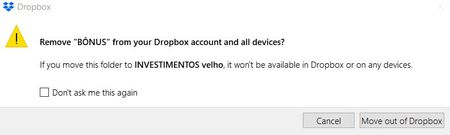
Remove X from your Dropbox account?
Hello, recently I have been receiving warnings that say "Remove X from your Dropbox account and all devices? If you move this folder to X it won’t be available in Dropbox or on any devices." X are names of folder I’m simply moving in my computer, but not deleting in anyway, nor from Dropbox nor from my computer. At the bottom of the message, it says "cancel" or "move out of dropbox". What is all that and why it started appearing to me? BEST116KViews2likes13Comments
How do I upload a file to someone else's Dropbox account?
I need to upload a file to the Dropbox of another user. I did not have an account, but in the process of trying to do this, I opened one. The other user sent me a link to his Dropbox, but I don't think it was an actual "request" for files-- it says I have the right to edit his folder. I have tried to upload my file from a flash drive to his folder about 15 times. Each time, the screen says the file is "uploading" and there is a bar showing the progress--but then the entire thing disappears and the folder is still empty. Questions: (1) is this because he did not send me a file request, but just a link that gives me access to edit files in his Dropbox? (2) is this because my own account does not have enough space for the large file? (3) something else? This is very frustrating and I am about to give up and just make a copy of the file onto another flash drive and put it in the mail.Solved116KViews2likes6Comments