Your workflow is unique 👨💻 - tell us how you use Dropbox here.
Forum Discussion

vivek-qualys-ssc
4 years agoExplorer | Level 4
Not able to list all connected apps
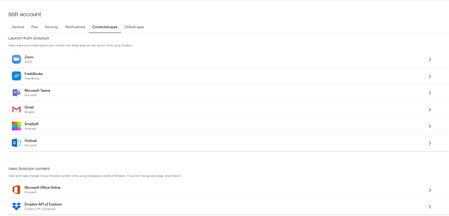
I am using dropbox business API to list down all connected apps linked to the team members accounts using below API. But not able to list them all, It returns only few apps . https://www.dropbox...

Greg-DB Dropbox Community Moderator
4 years agoDropbox Community ModeratorIt looks like you're referring to some of the integrations listed at the top of the page in that screenshot, like Zoom. Some of those are special partner integrations on Dropbox, not built like third party apps linked using the Dropbox API, and so will not show up in linked app list returned by the API.
 vivek-qualys-ssc4 years agoExplorer | Level 4
Thanks a lot for replying, So you mean Zoom, Slack, Gmail, Outlook, Microsoft Teams all these are special partner Integrations apps? but they get listed on UI dropbox console under connected apps and like Zoom is having write permission to the dropbox account to upload zoom meeting files so we want information about those kind of apps as well. Is there any way we can list those special partner integration apps?
- Greg-DB4 years ago
The Dropbox API doesn't offer a way to list this kind of integration, but I'll pass this along as a feature request. I can't promise if or when that might be implemented though.
- vivek-qualys-ssc4 years agoExplorer | Level 4
Thank you for the consideration of our use case.
About Dropbox API Support and Feedback

Get help with the Dropbox API from fellow developers and experts.
The Dropbox Community team is active from Monday to Friday. We try to respond to you as soon as we can, usually within 2 hours.
If you need more help you can view your support options (expected response time for an email or ticket is 24 hours), or contact us on X, Facebook or Instagram.
For more info on available support options for your Dropbox plan, see this article.
If you found the answer to your question in this Community thread, please 'like' the post to say thanks and to let us know it was useful!


