We’re Still Here to Help (Even Over the Holidays!) - find out more here.
Forum Discussion

alarson
8 years agoNew member | Level 2
Chrome reporting dropbox as an incompatible application
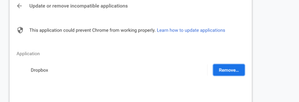
Receiving this error from chrome whenever i open chrome:
- 8 years ago
Hey folks ( office11 & chriscsullivan)!
Thanks for reporting this problem here. Without you, other customers could've experienced the same issue.
I have already relayed all the details of your problem to our engineering team. From this point onwards, they’ll evaluate the problem and work toward a solution.
I can’t say exactly how long this will take, however, I’ll keep a close watch on the team’s progress and I will let you know more info as soon as I have an update.
Thanks for your diligence and patience in regards to this matter and enjoy the rest of your day!


deafbowtie
8 years agoExplorer | Level 4
Dropbox was updated on August 28, 2018 to this version: 56.4.94 and it keeps crashing Chrome from time to time. Chrome Error Message for crash says Dropbox is causing and the app must be uninstalled. So I did. Now I no longer have the same problem. That is why I am writing this conversation. Any solution?
- Lusil8 years ago
Dropbox Staff
Hi deafbowtie!Do you experience this issue with any other browser, when using incognito/private browsing, and when you’re not running any browser extensions?A screenshot of any error message or the behavior you’re experiencing (omitting any personal info) would also help in understanding your concern better.Thanks in advance! :upside_down:- deafbowtie8 years agoExplorer | Level 4
Nothing happened with Window Edge and Firefox Mozilla. Once I uninstalled the Dropbox app, no longer I had any crash with Chrome. Want me to reinstall the Dropbox app and see what happens?
- Lusil8 years agoThanks for the swift reply, deafbowtie. Let’s see if we can work around this in a different way.Furthermore, could you navigate to your browser's settings and check that you have an updated version of your Chrome browser? You can do this by following the steps below:1. Go to Chrome's settings (ellipsis on the top right corner of your screen)2. Click Help3. Click About ChromeLet me know of any updates! :nerd:

About View, download, and export

Need support with viewing, downloading, and exporting files and folders from your Dropbox account? Find help from the Dropbox Community.
The Dropbox Community team is active from Monday to Friday. We try to respond to you as soon as we can, usually within 2 hours.
If you need more help you can view your support options (expected response time for an email or ticket is 24 hours), or contact us on X, Facebook or Instagram.
For more info on available support options for your Dropbox plan, see this article.
If you found the answer to your question in this Community thread, please 'like' the post to say thanks and to let us know it was useful!


