Your workflow is unique 👨💻 - tell us how you use Dropbox here.
Forum Discussion

pfahrun
5 months agoHelpful | Level 5
Dropbox Paper images aren't loaded on the web
Device Thinkpad X1 Carbon 2016 Operating System/Browser (if using the web)
Windows 10 Dropbox App Version/Browser Version
Chrome: Version 140.0.7339.185 (Offizieller Build) (64-Bit)
Edg...
- 5 months ago
Hey everyone, this issue appears to be resolved!
Let us know if you're still having problems.


Jay Dropbox Community Moderator
5 months agoDropbox Community ModeratorHi pfahrun, thanks for bringing this to our attention.
How many Paper documents on your account are experiencing this behavior?
How did you add the images to those Paper documents?
This will help me to assist further!
 antozanini5 months agoNew member | Level 2
This is the same error as reported here:
https://www.dropboxforum.com/discussions/101001012/all-markdown-exports-of-paper-docs-no-longer-show-images/848241/replies/848276The problem is that the DNS A records for the attachments.dropboxusercontent.com domain (the domain the images link to) no longer exist. That causes issues with the image upload feature, too.
Following for a solution, as this is a bug all Dropbox Paper users have...
- Jay5 months ago
Thanks for the info, it might be worth looking at that thread to see if there's any update on this matter.
- antozanini5 months agoNew member | Level 2
No updates, unfortunately...
The issue is still there and affecting all Dropbox Paper users. Basically, we can no longer export images from Dropbox Paper documents (old and new ones) and the image upload feature is very buggy, too.
Even if the DNS A record for the attachments.dropboxusercontent.com domain is restored, it will take a couple of days for propagation. Hope this is fixed soon by the team!
 pfahrun5 months agoHelpful | Level 5
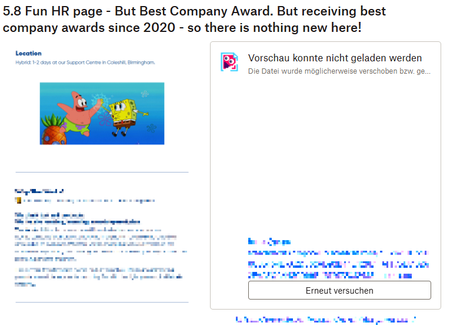
I can't tell you - I have hundreds of dropbox paper documents. I would say 80 to 90% of the documents I am opening are experiencing this problem. If this problem persists you deleted tons of my own intellectual property!
Sorry to say this but it is pretty much like hundreds of your word files stored on you system and composed over years are suddenly unusable because all tables, graphics etc are deleted. Fixing this should be a an ultra high priority ticket!!!
That is how files look now!
About View, Download, and Export

Get support with viewing, downloading, and exporting files and folders from your Dropbox account.
The Dropbox Community team is active from Monday to Friday. We try to respond to you as soon as we can, usually within 2 hours.
If you need more help you can view your support options (expected response time for an email or ticket is 24 hours), or contact us on X, Facebook or Instagram.
For more info on available support options for your Dropbox plan, see this article.
If you found the answer to your question in this Community thread, please 'like' the post to say thanks and to let us know it was useful!


