We’re Still Here to Help (Even Over the Holidays!) - find out more here.
Forum Discussion

Kirky29
6 years agoNew member | Level 2
The Requested Operation Couldn’t Be Completed - Dragging & Dropping iPad Files
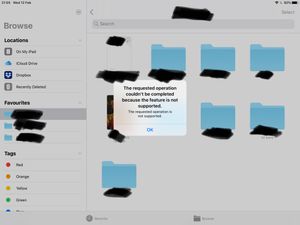
Dragging and dropping error using the stock files app on iPad OS (13 latest) with the latest version of Dropbox installed.
Each time I try to drag and drop a file using the files app I'm greeted w...

Kay V.
6 years agoExplorer | Level 4
Hi,
when trying to move files within the Dropbox using the iOS file manager (iOS 13.5), I get the following message:
"The requested operation couldn't be completed because the feature is not supported"
This makes the iOS file manager pretty useless for me, do you have any suggestions how to solve the issue?
Thanks in advance
Kay
- Daphne6 years ago
Dropbox Community Moderator
Hi Kay V., thanks for reaching out to us here!
Perhaps instead I can suggest taking this action through the Dropbox app instead. To move a file within the app, you can tap the "..." button next to the desired file and choose "Move" from the available options.
Also, if you need to quickly open a file in Dropbox that you have open via the Files app, you can press and hold the file to open the menu and choose "Open in Dropbox" so that you can take the relevant actions from there.
Let me know if this helps!
- Kay V.6 years agoExplorer | Level 4
Hi Daphne,
thanks for your reply. I was aware that you can move files using the Dropbox app. The question remains, why it doesn't work using the iOS files app, contradicting the manual of your website?
https://help.dropbox.com/en-en/installs-integrations/mobile/ios-files-app
I mean this is a really basic function so it shouldn't be that much of a problem. I like the iOS file app better because the layout is much clearer and I I can use different cloud solutions.
It does work with Onedrive though, so Apple I assume Apple isn't the culprit?Will the issue be solved in the near future?
Thanks a lot
Kay
- Daphne6 years ago
Thanks for getting back to me here Kay V..
I'm looking into this on my side, so please bear with me while I do some digging.
In the meantime, can you just confirm for me which version of the mobile app you have installed? You can check this by opening the Dropbox app, tapping the "Account" tab, tapping the gear icon and then checking under "App version".
Keep me posted!
 Willeverywhere6 years agoExplorer | Level 4Hi Jay,
I prefer to use the Files app because I can open multiple windows, I can do a right click, it is good integrated with iOS. I need two windows because I want to see my documents when I rename them, also I need two windows because I can drag-n-drop and move my files with no efforts between two folders, the move option is not really a good solution for me.
I found an alternative solution, I’m using the PDFExpert app that integrates really well with Dropbox, it not the purpose of this app but I’m using it as a file manager and it is working good for my need, they allow me to use multiple windows and drag and drop, etc.
I would definitely prefer to use your app or the Files app instead of a third party app.
Thank you for your answers

About View, download, and export

Need support with viewing, downloading, and exporting files and folders from your Dropbox account? Find help from the Dropbox Community.
The Dropbox Community team is active from Monday to Friday. We try to respond to you as soon as we can, usually within 2 hours.
If you need more help you can view your support options (expected response time for an email or ticket is 24 hours), or contact us on X, Facebook or Instagram.
For more info on available support options for your Dropbox plan, see this article.
If you found the answer to your question in this Community thread, please 'like' the post to say thanks and to let us know it was useful!


