We’re Still Here to Help (Even Over the Holidays!) - find out more here.
Forum Discussion

Kirky29
6 years agoNew member | Level 2
The Requested Operation Couldn’t Be Completed - Dragging & Dropping iPad Files
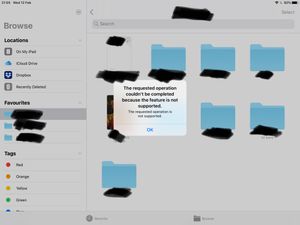
Dragging and dropping error using the stock files app on iPad OS (13 latest) with the latest version of Dropbox installed.
Each time I try to drag and drop a file using the files app I'm greeted w...

Daphne Dropbox Community Moderator
6 years agoDropbox Community ModeratorThanks for that Kay V..
Could you just try disabling and then enabling Dropbox as a location within the Files app?
To do this, open up the Files app and tap the "..." option in the top right and choose "Edit". From here, try toggling off and on the Dropbox option.

Willeverywhere
6 years agoExplorer | Level 4
Hi Daphne,
I just followed your instructions of disabling/re-enabling Dropbox on the Files app, and I’m still getting this error.
About View, download, and export

Need support with viewing, downloading, and exporting files and folders from your Dropbox account? Find help from the Dropbox Community.
The Dropbox Community team is active from Monday to Friday. We try to respond to you as soon as we can, usually within 2 hours.
If you need more help you can view your support options (expected response time for an email or ticket is 24 hours), or contact us on X, Facebook or Instagram.
For more info on available support options for your Dropbox plan, see this article.
If you found the answer to your question in this Community thread, please 'like' the post to say thanks and to let us know it was useful!


