We’re Still Here to Help (Even Over the Holidays!) - find out more here.
Forum Discussion

cle38393092
3 years agoNew member | Level 2
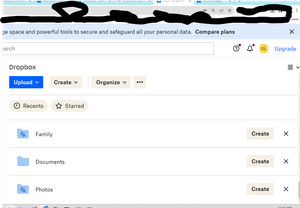
Why is my browser zoomed in?
As others have also had an issue with, everything in my chrome dropbox broswer window is zoomed in to about 500%. I've cleared the cache, logged out and back in, etc. This has been happening for ...

cle38393092
3 years agoNew member | Level 2
I tried that first thing of course. There are multiple other instances of people having this issue in the forum but I have not found a solution.

Jay Dropbox Community Moderator
3 years agoDropbox Community ModeratorAs the Dropbox site doesn't change your zoom preferences, there isn't much I can suggest on this end.
Does the site appear normal in another browser? Have you completely reset the Chrome browser?
About View, download, and export

Need support with viewing, downloading, and exporting files and folders from your Dropbox account? Find help from the Dropbox Community.
The Dropbox Community team is active from Monday to Friday. We try to respond to you as soon as we can, usually within 2 hours.
If you need more help you can view your support options (expected response time for an email or ticket is 24 hours), or contact us on X, Facebook or Instagram.
For more info on available support options for your Dropbox plan, see this article.
If you found the answer to your question in this Community thread, please 'like' the post to say thanks and to let us know it was useful!


