Our Community is in read-only mode until April 8th, learn more here. You can still search existing threads or get help via Dropbox Support, the Dropbox Help Center, or Learn.
Forum Discussion

dworsky
5 years agoExplorer | Level 3
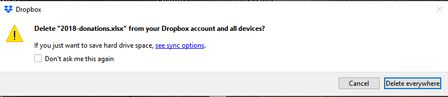
Annoying popup: "Delete -filename- from your Dropbox account and all devices?"
Two or three times a week at precisely 7am, I get a popup from Dropbox asking if I want to delete a particular file from Dropbox and everywhere else. There are two or three different filenames that r...
- 5 years ago
That does indeed sounds like the culprit then dworsky.
In order to avoid the pop up message that you receive, there's a few suggestions that I could give here.
The first would be to pause syncing of the desktop app around 7am when the back up will be copied over to the Dropbox folder. Once the back up has been done, you can then resume syncing and this will avoid the pop up and simply sync the changes.
Another option could be to disable the desktop app from starting on system start up, and launch the app manually after the back up has been copied over.
The final option would be to have your back up work the other way around, which would be to have the files you're working on and editing within Dropbox and back up to your external drive instead.
I understand that these might not be ideal, but with the current set up that you have with the program automatically backing up your files, these would be the best options I could suggest.
Let me know if you have any questions!

Daphne Dropbox Community Moderator
5 years agoDropbox Community ModeratorThat does indeed sounds like the culprit then dworsky.
In order to avoid the pop up message that you receive, there's a few suggestions that I could give here.
The first would be to pause syncing of the desktop app around 7am when the back up will be copied over to the Dropbox folder. Once the back up has been done, you can then resume syncing and this will avoid the pop up and simply sync the changes.
Another option could be to disable the desktop app from starting on system start up, and launch the app manually after the back up has been copied over.
The final option would be to have your back up work the other way around, which would be to have the files you're working on and editing within Dropbox and back up to your external drive instead.
I understand that these might not be ideal, but with the current set up that you have with the program automatically backing up your files, these would be the best options I could suggest.
Let me know if you have any questions!

dworsky
5 years agoExplorer | Level 3
Thanks for the suggestions, Daphne... and as you note, unfortunately none are really ideal.
What I decided to do was a variation on your first suggestion. I disabled the desktop dropbox app from starting when I turned on the computer. Instead, I scheduled a task to turn it on at 7:30 am daily.
Of course, if I reboot the computer during the day, dropbox will not be working in the background... but such is life.
Edgar
About Delete, Edit, and Organize
Solve issues with deleting, editing, and organizing files and folders in your Dropbox account.
The Dropbox Community team is active from Monday to Friday. We try to respond to you as soon as we can, usually within 2 hours.
If you need more help you can view your support options (expected response time for an email or ticket is 24 hours), or contact us on X, Facebook or Instagram.
For more info on available support options for your Dropbox plan, see this article.
If you found the answer to your question in this Community thread, please 'like' the post to say thanks and to let us know it was useful!


