Our Community is in read-only mode until April 8th, learn more here. You can still search existing threads or get help via Dropbox Support, the Dropbox Help Center, or Learn.
Forum Discussion

AshRaj
4 years agoNew member | Level 2
Can't find the DELETE option under the '...' menu in Images
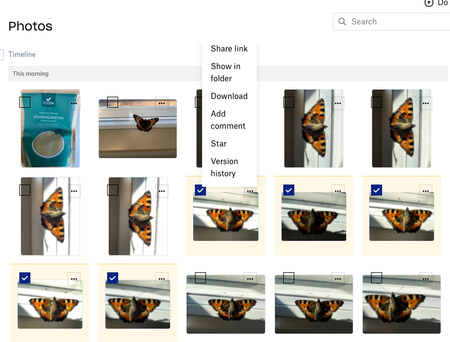
Hi The DELETE option is not available in the '...' menu in my Photos folder on Dropbox web (using a Mac). It is also not available in the menu that appears on the right of the screen when the an...
- 4 years ago
You cannot delete from the 'Photos' menu I'm afraid - that is simply a section of the site which shows all images on your account. You need to go to the actual folder they are in and delete from there - then the options you are reading about in the help article will appear.

Mark Super User II
4 years agoSuper User IIYou cannot delete from the 'Photos' menu I'm afraid - that is simply a section of the site which shows all images on your account. You need to go to the actual folder they are in and delete from there - then the options you are reading about in the help article will appear.

ButtonsK
4 years agoNew member | Level 2
I'm having the same problem, I'm on a mac too if that makes a difference. I am in a folder- camera uploads. I have THOUSANDS of photos I am trying to clean up. It takes forever to even locate the ones I want to delete. The first time I tried it, there were options to delete, but now it's gone. I don't understand why such an incredibly basic feature isn't obvious, let alone requiring me to ask on a help board. It's even more frustrating because I was able to delete some, and then as I scrolled through, selecting more, the option is gone again. I can delete them individually but that's a huge waste of time when I have thousands to delete.
Dropbox's slowness makes this whole process even more frustrating.
I'm attaching a screenshot - if anyone can see the dots where I find the options, please point it out - because I am certainly not seeing them. I was trying to filter to 2020-10, but that wasn't possible so I had to pull all of 2020.
Thanks very much
.
- Hannah4 years ago
Dropbox Community Moderator
Hey ButtonsK, thanks for commenting on this thread!
After selecting the photos you want to delete, try scrolling all the way up and you'll see a few options like 'copy' and 'move'.
Next to those, there should be a '...' (ellipsis) button with a few more options, 'delete' being one of them.
If you don't see any of this, try again from a different browser or from an incognito/private browsing window.
Let me know how it goes.- ButtonsK4 years agoNew member | Level 2
Thanks Hannah - I need to scroll through hundreds of pictures, which alone is painfully slow on dropbox (I don't know why dropbox is so slow on my computer, it doesn't matter which folder I'm in either), so that's not practical & I'm not sure that it would make difference anyway.
I did figure this out on my own though and maybe this can help someone else with the same question:
After deleting several selected images for the first time in a session, I do see the ellipsis (without scrolling) and the option to delete, so I click on that. The deleting process is ridiculously slow, and by the time it was finished I immediately selected more (I don't want to select too many at once because accidentally clicking at a certain spot on the selection box causes everything to be deselected, I wasted a huge amount of time with this). What I missed though, was after the first batch deleted, I have to click on "do you want to permanently delete these?", and go through the long wait a second time. I think that second step may only happen when I'm filtering the photos and then deleting, which also may be why I haven't noticed this problem before.
- Hannah4 years agoThanks for the update on this and I hope you've had a great weekend!
I do understand what you mean and I will definitely pass your feedback along to our team.
However, I'm happy to see that you were able to figure this out and were able to delete your files.
If there's anything else you'd like to ask, make sure to let us know!

About Delete, Edit, and Organize
Solve issues with deleting, editing, and organizing files and folders in your Dropbox account.
The Dropbox Community team is active from Monday to Friday. We try to respond to you as soon as we can, usually within 2 hours.
If you need more help you can view your support options (expected response time for an email or ticket is 24 hours), or contact us on X, Facebook or Instagram.
For more info on available support options for your Dropbox plan, see this article.
If you found the answer to your question in this Community thread, please 'like' the post to say thanks and to let us know it was useful!


