Your workflow is unique 👨💻 - tell us how you use Dropbox here.
Forum Discussion

Hanton
4 years agoExplorer | Level 3
Delete empty folders
I have deleted all files in alle folders, because I wanted tot cleanup mybdropbox complete. I noe see only the folders, but no way to delete these folders, how van I get them out of my Dropbox ,?


ncarter
2 years agoNew member | Level 2
I did. I am the only owner of this folder and there is nothing under the 3 dots.

Здравко
2 years agoLegendary | Level 20
No 👆 You didn't!!! Again, navigate to the folder that contains your "StoryAlbum" folder, not inside the folder you want to delete! In such a way you won't be able delete it (as already discussed previously) - read more careful.
PS: In your case the containing folder is the Dropbox folder, so just select it (i.e. one level up) and remove from there your "StoryAlbum".
- ncarter2 years agoNew member | Level 2That's what I'm saying the folder above that is a completely separate album. One that I need. These are all individual folders under all files.
So what am I doing wrong? - Megan2 years ago
Dropbox Community Moderator
Hi ncarter, let's jump right into this!
Based on the screenshot you provided, it looks like there's your "base" which is the root of your account, and in that root, you then have some folders including the "Story Album" folder.
You need to access the root of your account, and delete the folder from there.
You can do this by visiting your home page, selecting the folder, and the delete option should be right there.
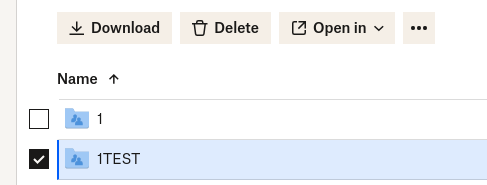
Let me know more!

About Delete, Edit, and Organize
Solve issues with deleting, editing, and organizing files and folders in your Dropbox account.
The Dropbox Community team is active from Monday to Friday. We try to respond to you as soon as we can, usually within 2 hours.
If you need more help you can view your support options (expected response time for an email or ticket is 24 hours), or contact us on X, Facebook or Instagram.
For more info on available support options for your Dropbox plan, see this article.
If you found the answer to your question in this Community thread, please 'like' the post to say thanks and to let us know it was useful!


