We’re Still Here to Help (Even Over the Holidays!) - find out more here.
Forum Discussion

alex b.35
9 years agoExplorer | Level 4
deleted folder re appeared after a couple of years
Something very weird just happened with my dropbox account. Out of nowhere, a folder which was deletec about 2 years ago re appeared on my dropbox. It has the files as they were, which makes me wonder why the hell dropbox is still keeping these files after a few years that they have been deleted?
First I thought it was a hack, but then I checked all my devices and what was accessing my account and indeed, everything was as it was before.
It makes me think this is a serious bug and on another note, why the hell is dropbox keeping data that was deleted 2 years ago?
I'll surprised, scared and angry at the same time. I'm not even sure where to begin! I'm now wondering about several of my clients that use dropbox in their business if the same happens.
Thanks everyone for your patience while we worked on a way to clean up the inadvertently restored files and folders. We've built a fix that will automatically return this content to the way it should be: deleted and out of your Dropbox. This will only impact the inadvertently restored files and folders, and only if you haven’t updated them. We’ll begin rolling out the fix to affected users’ accounts later today. We’re giving you a heads up here so you’re aware of why there may be changes to your Dropbox. Here’s a bit more information about the fix.
Will this affect my other files?
The fix will only impact the inadvertently restored files and folders. If you have edited the files or folders—by moving them or updating the content inside—they will stay in your Dropbox. You can still manually delete these files and folders if you don’t want them.What if I don’t want these files or folders removed?
While the fix will automatically take effect later today, you can contact our support team (dropbox.com/support) within 30 days and we’ll restore the files and folders for you. You won’t be able to restore on your own using the events page.Do I need to do anything?
We will automatically roll out the fix, you don’t need to do a thing. If you have questions or concerns, please write our support team at http://bit.ly/cm-support so that we can investigate your specific case. Your ticket will be prioritized by the team.Thanks again for your patience, and we’re sorry for any inconvenience and confusion we’ve caused.

116 Replies
Replies have been turned off for this discussion
 lem869 years agoNew member | Level 2
I am still seeing them - not sure how long the fix will take to be implemented?
 Michael G.239 years agoNew member | Level 2
Ross,
I have the same question asked by:
Level 2FridayRoss, thanks for this. One thing, its unclear how to identify all those files that have reappeared. There are obvious top level folders that have reappeared, but how do I find files that may have reappeared somewhere inside a valid top level folder (that is a folders that was correctly in my dropbox just before the bug) if I have 100Ks of valid files and folders in my dropbox?
Can you give some more guidance on how to identify them? Or does this bug only put these reappearing files and folders at the top level of my dropbox?
 jonny19 years agoNew member | Level 2
This happened to me too. All of a sudden a really old (at that time shared with another account) folder reappeared. From 2011 circa. Several gigabytes.
 Lily9 years agoNew member | Level 2
On Jan 17 some old files spontaneously appeared in my recents folder. These were audio files. We have shared access with my husband. None of us opened these files for the last two years. How is it possible? I have checked the security and events log. Looks like we were not hacked. Today another surprise. We found two videos recorded years ago in the recents folder again. None of us opened these files again. Does this have anything to do with this bug fix that restored deleted files?
 scrglblprvcy9 years agoNew member | Level 2
**bleep** .. You keep files for an extra 60 day after deletion!
Did the NSA ask you to do that?
 Markus K.69 years agoExplorer | Level 3
Same here. I am seeing some old folders and cannot delete them.
Moreover, if I use the API's list_folder endpoint with the include_deleted option I see a lot of files and folders that have been permanently delete years ago.
Why are they still there? I can't believe that so many files and folders have metadata inconsistencies.
- souravmishra9 years agoExplorer | Level 4
Thanks Ross,
We are glad Dropbox patched this problem. I have two short queries and hoping that you can reply.
I am sure some serious users may be having these questions on their minds too.
- For people having lots of folders, how to ensure that all the "un-dead" files & folders are purged. Right now the events section does not tell me any details if anything popped up.
- Has Dropbox ensured that previous versions of the file were not accidentally restored over legitimate files in their most recent versions.
The second question is more relevant since we have maybe worked on many files over the months & years and updated them with newer versions. Just because dropbox managed to revert all the zombie additions isnt enough. We have to be certain that the versions were right and/or they didn't delete legit file entirely from the folder index because it was affected i.e files missing because they were affected by the bug.
When we have several thousand files totalling to several GB's it is very hard to go and check them individually. We can't be even sure if the bug has been entirely quashed. Your response (even if bit technical) can help restore some faith in the bugfix.
- For people having lots of folders, how to ensure that all the "un-dead" files & folders are purged. Right now the events section does not tell me any details if anything popped up.
 floris9 years agoHelpful | Level 6If dropbox wanted to know if their pro users were in doubt about staying past the /public folder nonsense, this is a kick in the direction of the door and through it.
I guess the next 'news' they keep 'quiet' is that our data has already been leaked and not just our user/pass combo.- Deesazter9 years agoNew member | Level 2Hoi Floris,
Ik ben op zoek naar Nederlandse Dropbox-gebruikers die onverwachts verwijderde bestanden weer terughebben. Zou ik contact met je kunnen opnemen?
Met vriendelijke groet,
Danny
Redactie Kassa - feklee9 years agoHelpful | Level 6
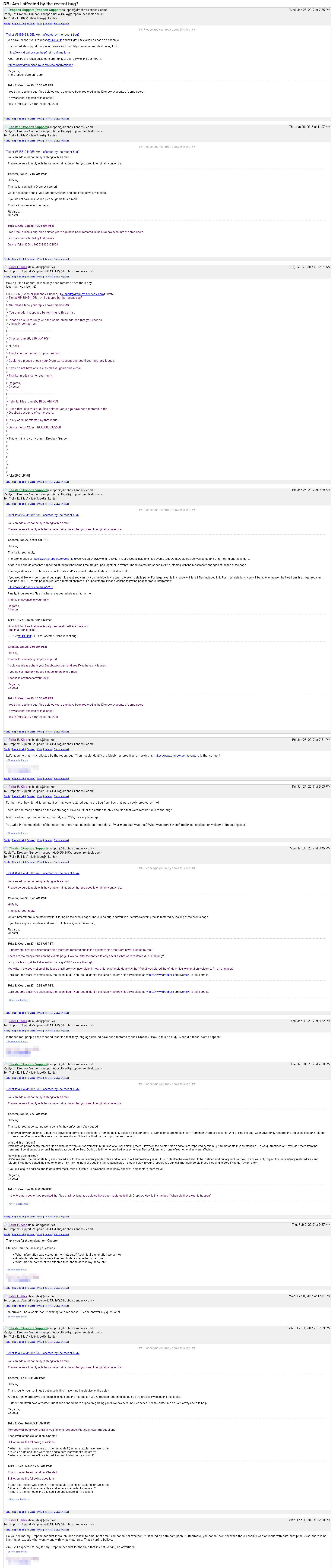
See screenshot below – I got in contact with support concerning the issue. Yesterday’s response, after waiting for about a week: “At the current moment we are not able to disclose the information you requested regarding the bug as we are still investigating this issue.”
Can anyone here tell me when files and folders have mysteriously reappeared?
I would like to compare old backups to see whether my account is affected.
About Delete, edit, and organize
Solve issues with deleting, editing, and organizing files and folders in your Dropbox account with support from the Dropbox Community.
The Dropbox Community team is active from Monday to Friday. We try to respond to you as soon as we can, usually within 2 hours.
If you need more help you can view your support options (expected response time for an email or ticket is 24 hours), or contact us on X, Facebook or Instagram.
For more info on available support options for your Dropbox plan, see this article.
If you found the answer to your question in this Community thread, please 'like' the post to say thanks and to let us know it was useful!

