We’re Still Here to Help (Even Over the Holidays!) - find out more here.
Forum Discussion

hrnadal
2 years agoNew member | Level 1
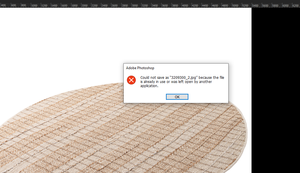
Error "Could not save because the file is already in use" when editing with Photoshop
Hi
The problem I mentioned below has been quite common since the last Dropbox update and continues to cause problems. This problem occurs in 4 out of every 10 photos saved from all 10 PCs I use. ...

hrnadal
2 years agoNew member | Level 1
Hey Hannah thank you
- There is no special situation, it is random. It does it even if it is a 20 MB file, it does it even if it is a 6 MB file.
- It can continue even if the PC is restarted and this problem can continue with other files.
- The file we are getting the error from is a file whose synchronization process has finished.
- version v213.4.4597
I only noticed it now because the information you responded to did not come as an email. Sorry.
- Nancy2 years ago
Dropbox Community Moderator
Hey hrnadal, hope it’s OK for me to jump in.
Just to make sure I got it right, there's no other third-party app, besides Photoshop, that could be accessing the same files at the same time, correct?
Same way, are the files being opened at the same time on a different device, where the Dropbox app is currently installed?
- hrnadal2 years agoNew member | Level 1
Hi Nancy no problem
No third-party app has access. There is no other device using the problematic file.- Walter2 years ago
Thanks for clarifying that for us hrnadal - much appreciated.
Have you tried pausing sync when you edit the file and resuming it after you're done with your edits?


About Delete, edit, and organize
Solve issues with deleting, editing, and organizing files and folders in your Dropbox account with support from the Dropbox Community.
The Dropbox Community team is active from Monday to Friday. We try to respond to you as soon as we can, usually within 2 hours.
If you need more help you can view your support options (expected response time for an email or ticket is 24 hours), or contact us on X, Facebook or Instagram.
For more info on available support options for your Dropbox plan, see this article.
If you found the answer to your question in this Community thread, please 'like' the post to say thanks and to let us know it was useful!


