We’re Still Here to Help (Even Over the Holidays!) - find out more here.
Forum Discussion

hrnadal
2 years agoNew member | Level 1
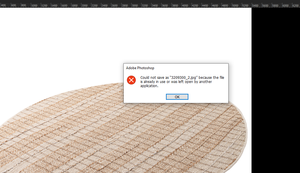
Error "Could not save because the file is already in use" when editing with Photoshop
Hi
The problem I mentioned below has been quite common since the last Dropbox update and continues to cause problems. This problem occurs in 4 out of every 10 photos saved from all 10 PCs I use. ...

Walter Dropbox Community Moderator
2 years agoDropbox Community ModeratorI see, thanks for the additional information there hrnadal
Can you please clarify the status of the files (by checking their syncing icons) and if you get the same results when using 'Save as' within the Dropbox folder?

hrnadal
2 years agoNew member | Level 1
Save as the file differently solves the problem.Our work is to overwrite the file. We have been using it this way for 10 years. This situation occurred after Dropbox's updates this year.
About Delete, edit, and organize
Solve issues with deleting, editing, and organizing files and folders in your Dropbox account with support from the Dropbox Community.
The Dropbox Community team is active from Monday to Friday. We try to respond to you as soon as we can, usually within 2 hours.
If you need more help you can view your support options (expected response time for an email or ticket is 24 hours), or contact us on X, Facebook or Instagram.
For more info on available support options for your Dropbox plan, see this article.
If you found the answer to your question in this Community thread, please 'like' the post to say thanks and to let us know it was useful!


