We're making some changes to the Dropbox Community 👩💻 - Find out more here.
Forum Discussion

Roo-On-Uke
1 year agoHelpful | Level 5
How can I turn off automations on a folder?
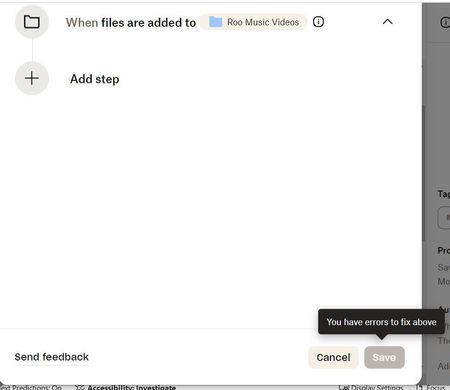
I set up my new Folder with automated conversion to MP4 because I thought I would need that format. However, I do not. I have been unable to figure out how to turn it off for that Folder. on my PC-...
 1 year ago
Never mind. I found it. I call that Trash, not bin.
Done.
Thanks.

Jay Dropbox Community Moderator
1 year agoDropbox Community ModeratorHi Roo-On-Uke, thanks for bringing this to our attention.
Are you able to follow these steps to delete the automation on that folder?
This will help me to assist further!
Roo-On-Uke
1 year agoHelpful | Level 5
Here is the step I am having trouble with.
Hover over the folder where you’d like to remove automation and click the “…” (ellipsis) to the right, or check the box next to the folder then click “…” above the file/folder list.
Hovering over the list on the left side of the screen does not result in the ellipses. I also cannot check it off. When I select the Folder and have it in the middle of the screen, hovering does not work either.
- Jay1 year ago
If you're in the parent folder above that automated folder, and then right click it, or hover over it and click the ellipsis, do you see the option there?
- Roo-On-Uke1 year agoHelpful | Level 5
Parent Folder? I don't see that. When I go to Folders on the Left side, it shows all of my Folders including this one. So, I don't know what the Parent Folder would be. On my computer listing, the Parent is simply Dropbox. Sorry, but I have never been facile in using this and am trying to learn.
- Jay1 year ago
Could you attach a screenshot showing the entire Dropbox window, showing where the folder is on the file structure on the site?
About Delete, Edit, and Organize
Solve issues with deleting, editing, and organizing files and folders in your Dropbox account.
The Dropbox Community team is active from Monday to Friday. We try to respond to you as soon as we can, usually within 2 hours.
If you need more help you can view your support options (expected response time for an email or ticket is 24 hours), or contact us on X, Facebook or Instagram.
For more info on available support options for your Dropbox plan, see this article.
If you found the answer to your question in this Community thread, please 'like' the post to say thanks and to let us know it was useful!


