Our Community is in read-only mode until April 8th, learn more here. You can still search existing threads or get help via Dropbox Support, the Dropbox Help Center, or Learn.
Forum Discussion

Roo-On-Uke
1 year agoHelpful | Level 5
How can I turn off automations on a folder?
I set up my new Folder with automated conversion to MP4 because I thought I would need that format. However, I do not. I have been unable to figure out how to turn it off for that Folder. on my PC-...
 1 year ago
Never mind. I found it. I call that Trash, not bin.
Done.
Thanks.
Roo-On-Uke
1 year agoHelpful | Level 5
Parent Folder? I don't see that. When I go to Folders on the Left side, it shows all of my Folders including this one. So, I don't know what the Parent Folder would be. On my computer listing, the Parent is simply Dropbox. Sorry, but I have never been facile in using this and am trying to learn.

Jay Dropbox Community Moderator
1 year agoDropbox Community ModeratorCould you attach a screenshot showing the entire Dropbox window, showing where the folder is on the file structure on the site?
- Roo-On-Uke1 year agoHelpful | Level 5
- Jay1 year ago
Okay, on the right hand side, not the left hand navigation window, could you scroll down past the MP3 files and locate the folder in question, and then click the ellipsis next to that folder when you hover over it, like in the below image?

- Roo-On-Uke1 year agoHelpful | Level 5
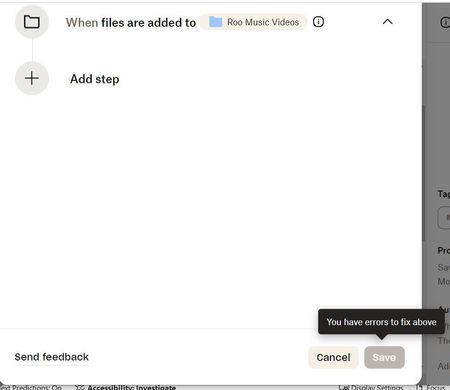
I did that, selected Edit Automation. When I tried to Delete the Automation mov to mp4 and went to Save, I got the same error message I had received previously. However, I also saw a blue button at the top. I put this in the off position, and it said Paused. Did that take care of it?
About Delete, Edit, and Organize
Solve issues with deleting, editing, and organizing files and folders in your Dropbox account.
The Dropbox Community team is active from Monday to Friday. We try to respond to you as soon as we can, usually within 2 hours.
If you need more help you can view your support options (expected response time for an email or ticket is 24 hours), or contact us on X, Facebook or Instagram.
For more info on available support options for your Dropbox plan, see this article.
If you found the answer to your question in this Community thread, please 'like' the post to say thanks and to let us know it was useful!


