Need to see if your shared folder is taking up space on your dropbox 👨💻? Find out how to check here.
Forum Discussion

mm-nyc
6 years agoHelpful | Level 5
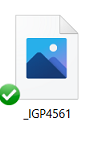
Image thumbnail not showing up, only generic icon when i goto 'camera uploads' to try to attach imag
hi, i just had to reinstall my pc, reinstall dropbox, etc.. all good.
but in outlook i goto attahc an image, i goto my 'dropbox\camera uploads\ folder, and all i see are generic blue icons , not...

Daphne Dropbox Community Moderator
5 years agoDropbox Community ModeratorThanks for your updates!
@Immortaleye, I've just sent you a brief message, so please check your inbox when you have the time.
I'm glad to hear that mm-nyc! If you have any other trouble with this, don't hesitate to give me a nudge here.
@Immortaleye, I've just sent you a brief message, so please check your inbox when you have the time.
I'm glad to hear that mm-nyc! If you have any other trouble with this, don't hesitate to give me a nudge here.

Rossella Brambilla
5 years agoNew member | Level 2
I also have this problem. I sell jewellery and need to see the thumbnails to select the right file. I have a Dropbox plus subscription but this makes it fairly useless.
- Daphne5 years agoThanks for joining us here Rossella Brambilla!
To have a better look into this with us, I've just sent you a brief email to the address linked with your profile here.
Please check your inbox when you have the chance, and get back to me there if you'd like to.
In the meantime, a workaround I can suggest is to make any local files that are missing the thumbnail to "online only", and then make then available locally through the right click menu instead of double clicking them. ambenisar5 years agoHelpful | Level 6
I'm also having this same issue.
Would it not be helpful to all DropBox users to simply post the solution here, instead of messaging individual users privately????
- Immortaleye5 years agoHelpful | Level 6
What would be helpful is for them to finally resolve it. This has been going on for a while now and I am not sure if I will hold off much longer before choosing an alternative.
Currently the only offering has been to suggest switching the folder from local to online then back again. Which in may case can mean doing this several times a week, and that is before I fire back up after lockdown and start shooting several times a day.
- patriotfence5 years agoExplorer | Level 4
I've had this same issue all week and tried every suggestion I could find. What worked for me was using the Disk Cleanup utility in Windows 10 (Right click on your hard drive and select Properties in the menu). I deleted the thumbnail cache, rebooted my pc and after Dropbox started again the thumbnails started re-appearing.
 gotogordon5 years agoNew member | Level 2
Same issue here on a clean install of Win 10. I did not have this issue before the clean install. I'm not using smart sync, all files are local. It only happens with folders within dropbox. If I move the folder to downloads or some other location outside of dropbox the thumbnails show.
I have deleted thumbs via disk cleanup and command prompt. I checked and unchecked the "show icon" button. Nothing worked.
On small folder switching to online then back works but I do not want to do that for my main pictures folder as it's 125+ gb. This is obviously a bug!
- ASiradakis5 years agoExplorer | Level 4
My thumbnail previews if they do show up disappear once selecting them and inserting them into a program or email. Then when going back to the folder all the thumbnail previews are gone! What is this!? Im paying for the service.
About Delete, edit, and organize
Solve issues with deleting, editing, and organizing files and folders in your Dropbox account with support from the Dropbox Community.
The Dropbox Community team is active from Monday to Friday. We try to respond to you as soon as we can, usually within 2 hours.
If you need more help you can view your support options (expected response time for an email or ticket is 24 hours), or contact us on X, Facebook or Instagram.
For more info on available support options for your Dropbox plan, see this article.
If you found the answer to your question in this Community thread, please 'like' the post to say thanks and to let us know it was useful!


