Need to see if your shared folder is taking up space on your dropbox 👨💻? Find out how to check here.
Forum Discussion

mm-nyc
6 years agoHelpful | Level 5
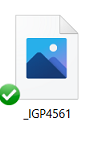
Image thumbnail not showing up, only generic icon when i goto 'camera uploads' to try to attach imag
hi, i just had to reinstall my pc, reinstall dropbox, etc.. all good.
but in outlook i goto attahc an image, i goto my 'dropbox\camera uploads\ folder, and all i see are generic blue icons , not...

Daphne Dropbox Community Moderator
5 years agoDropbox Community ModeratorThanks for your updates!
@Immortaleye, I've just sent you a brief message, so please check your inbox when you have the time.
I'm glad to hear that mm-nyc! If you have any other trouble with this, don't hesitate to give me a nudge here.
@Immortaleye, I've just sent you a brief message, so please check your inbox when you have the time.
I'm glad to hear that mm-nyc! If you have any other trouble with this, don't hesitate to give me a nudge here.

ramblingsu
5 years agoHelpful | Level 5
I'm having this same issue of thumbnails not showing up. I recently installed Dropbox on a new computer and am having this issue. Please message me directly if you can help as you did others, moderators!
- Daphne5 years agoHey ramblingsu!
Can you just confirm for me, does this only occur when you make a file available locally on your computer by double clicking the file to open it?
If you make one of these files online only through the right click menu, and afterwards make it local through the same right click menu, do you see the thumbnail appear then?- ramblingsu5 years agoHelpful | Level 5
It happens whether I change to to Local or Online Only.
- Daphne5 years agoI see, thanks for confirming ramblingsu.
Which version of the app do you have installed at the moment?
Also, what OS version is your device running?
About Delete, edit, and organize
Solve issues with deleting, editing, and organizing files and folders in your Dropbox account with support from the Dropbox Community.
The Dropbox Community team is active from Monday to Friday. We try to respond to you as soon as we can, usually within 2 hours.
If you need more help you can view your support options (expected response time for an email or ticket is 24 hours), or contact us on X, Facebook or Instagram.
For more info on available support options for your Dropbox plan, see this article.
If you found the answer to your question in this Community thread, please 'like' the post to say thanks and to let us know it was useful!


