Need to see if your shared folder is taking up space on your dropbox 👨💻? Find out how to check here.
Forum Discussion

mm-nyc
6 years agoHelpful | Level 5
Image thumbnail not showing up, only generic icon when i goto 'camera uploads' to try to attach imag
hi, i just had to reinstall my pc, reinstall dropbox, etc.. all good.
but in outlook i goto attahc an image, i goto my 'dropbox\camera uploads\ folder, and all i see are generic blue icons , not...
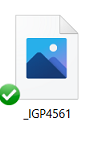

ramblingsu
5 years agoHelpful | Level 5
Not sure why Dropbox support didn't just post this publicly rather than only email me, but here's a solution they sent that worked for me:
Open File Explorer > View tab > Options > View tab > Uncheck Always show icons, never thumbnails (If this is already unchecked, check it and OK..Then go back again and uncheck it and OK

Immortaleye
5 years agoHelpful | Level 6
That will be because it has nothing to do with failing to check the right boxes. As you would have discovered if you read the thread first. This was a bug with Dropbox that has been accepted as such by them and hopefully now corrected. It has nothing to do with generic settings. It was the loss of thumbnails after dragging and dropping image files, in my case background textures, into the likes of Photoshop or making use of drag and drop uploaders
 madmick5 years agoExplorer | Level 4
Well, I have just finished getting rid of all the grey X's and generic labels from all my photos.
I first right clicked the main "camera images" folder which contains all my pics - literally thousands of 'em, and changed them all to "online only" which took quite a while but I finished up with everything online and a lot more space on my hard drive.
I then right clicked the main file again and changed it to "local". This took a lot longer, like several hours, but I ended up with a perfect set of photos complete with thumbnails now stored on my hard drive where they belong.
I have no idea exactly when this problem first arose but from the look of this and other threads it has been going on for a while. I just hope my photos will stay fixed and my future uploads will not suffer the same problem.
About Delete, edit, and organize
Solve issues with deleting, editing, and organizing files and folders in your Dropbox account with support from the Dropbox Community.
The Dropbox Community team is active from Monday to Friday. We try to respond to you as soon as we can, usually within 2 hours.
If you need more help you can view your support options (expected response time for an email or ticket is 24 hours), or contact us on X, Facebook or Instagram.
For more info on available support options for your Dropbox plan, see this article.
If you found the answer to your question in this Community thread, please 'like' the post to say thanks and to let us know it was useful!


