Need to see if your shared folder is taking up space on your dropbox 👨💻? Find out how to check here.
Forum Discussion

mm-nyc
6 years agoHelpful | Level 5
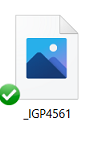
Image thumbnail not showing up, only generic icon when i goto 'camera uploads' to try to attach imag
hi, i just had to reinstall my pc, reinstall dropbox, etc.. all good.
but in outlook i goto attahc an image, i goto my 'dropbox\camera uploads\ folder, and all i see are generic blue icons , not...

Daphne Dropbox Community Moderator
5 years agoDropbox Community ModeratorThanks for joining us here Rossella Brambilla!
To have a better look into this with us, I've just sent you a brief email to the address linked with your profile here.
Please check your inbox when you have the chance, and get back to me there if you'd like to.
In the meantime, a workaround I can suggest is to make any local files that are missing the thumbnail to "online only", and then make then available locally through the right click menu instead of double clicking them.
To have a better look into this with us, I've just sent you a brief email to the address linked with your profile here.
Please check your inbox when you have the chance, and get back to me there if you'd like to.
In the meantime, a workaround I can suggest is to make any local files that are missing the thumbnail to "online only", and then make then available locally through the right click menu instead of double clicking them.

ddiwik
4 years agoNew member | Level 2
I am having the same issue with the thumbnail disappearing...
About Delete, edit, and organize
Solve issues with deleting, editing, and organizing files and folders in your Dropbox account with support from the Dropbox Community.
The Dropbox Community team is active from Monday to Friday. We try to respond to you as soon as we can, usually within 2 hours.
If you need more help you can view your support options (expected response time for an email or ticket is 24 hours), or contact us on X, Facebook or Instagram.
For more info on available support options for your Dropbox plan, see this article.
If you found the answer to your question in this Community thread, please 'like' the post to say thanks and to let us know it was useful!


