Our Community is in read-only mode until April 8th, learn more here. You can still search existing threads or get help via Dropbox Support, the Dropbox Help Center, or Learn.
Forum Discussion

enjayare
6 years agoExplorer | Level 3
Locked folder that can't be removed?
Hello Forum members, I have a folder that was sent to me by a client a couple of years ago that I can't remove from my Dropbox. The folder has a grey padlock on the bottom left corner and also an X ...
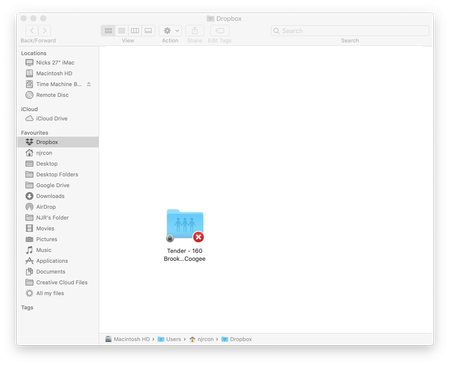
- 6 years ago
enjayare, may be something else have happened. Probably immutable flag have been set. If so, you can trow it out using: "sudo chflags nouchg /Users/njrcon/Dropbox/Tender\ -\ 160\ Brook\ St\,\ Coogee" and/or "sudo chflags noschg /Users/njrcon/Dropbox/Tender\ -\ 160\ Brook\ St\,\ Coogee". Try it, just to be sure.
Finally give the result from "ls -lO /Users/njrcon/Dropbox/Tender\ -\ 160\ Brook\ St\,\ Coogee" or just take a look on get info window to check is "Locked" is still checked.
enjayare
6 years agoExplorer | Level 3
Hello again 3Apabko,
This did not work because when I logged in under test the folder did not show up in my drop box. It only seems to show up in the finder window when when I open my dropbox files from the icon in the top menu bar??? Even when I open dropbox.com on the web the folder does not show up???

Здравко
6 years agoLegendary | Level 20
Hi enjayare,
The problem seems not just permissions, but owning. Your can read this for more information how to revert owning. It's normal when you switch to different user not to see directly Dropbox folder of the initial user. :wink: Every user have their own such folder. You have to be still able to navigate to appropriate Dropbox directory - just go to appropriate user directory first. Or may be the terminal solution would be better. The choice is yours. :wink:
Hope this gives additional direction.
- Lusil6 years ago
Dropbox Staff
Hi again enjayare,
Adding to what Здравко suggested, can you try and remove the folder by quitting the Dropbox desktop app and dragging it to another location or outside of your Dropbox folder?
Let me know if that helps!
- enjayare6 years agoExplorer | Level 3
Hello Lusil,
I'm not usre how to do this? how do I drag the folder out after I have closed the desktop application?
- Lusil6 years ago
You can quit the desktop app by:
- Clicking on the Dropbox icon that's next to your computer's clock.
- Selecting your profile picture or the initials that are on the top right corner of the pop up window.
- Click on Quit Dropbox.
From there, try to either drag the folder outside of the Dropbox folder to, for example, your desktop, or deleting it.
If this doesn't do the trick, please let me know or send me a screenshot (again, without any personal info) of the error message that you're presented with.
Thanks in advance!
- enjayare6 years agoExplorer | Level 3
Hello 3Apabko,
I tried to use the terminal but it kept saying illegal user name? Maybe I wasn't entering the info correctly? Also becasue the file was not mine in the first place does this mean that I can never remove it?
- Здравко6 years agoLegendary | Level 20
Hi enjayare,
Strange... :thinking: Did you try "ls /Users/"? What is the result? Also, what gives the command "whoami"?
- enjayare6 years agoExplorer | Level 3
Whoami = njrcon
The folder name is Tender - 160 Brook St, Coogee so I typed the following in terminal: -
sudo chown njrcon ~/Dropbox/Tender\ -\ 160\ Brook\ St\,\ Coogee
It told me
Operation not permitted
 rothm5 years agoNew member | Level 2
There is a locked folder in the dropbox files on my computer that I can not move to the trash (I'm on a Mac) and that will not sync with dropbox. The folder was originally shared with me on dropbox; however, the folder no longer shows up on when I go to dropbox using the web browser (even though the folder is on my machine).
I've tried rebooting, removing and reloading dropbox, and all the other suggestions I could find from the FAQs and other on-line help. I've also had a hour-long session with the IT folks where I work and they were unable to find a way to get rid of the folder. Advice or suggestions would be appreciated!
My computer is endlessly trying to sync the one folder (though I can pause it when the endless syncing becomes a problem)
MR
- Lusil5 years agoHi @rothm, thanks for reaching out to us.
I moved your post here, where other users have had a similar issue.
Could you have a look at the troubleshooting mentioned here, and let us know if it helps?

About Delete, Edit, and Organize
Solve issues with deleting, editing, and organizing files and folders in your Dropbox account.
The Dropbox Community team is active from Monday to Friday. We try to respond to you as soon as we can, usually within 2 hours.
If you need more help you can view your support options (expected response time for an email or ticket is 24 hours), or contact us on X, Facebook or Instagram.
For more info on available support options for your Dropbox plan, see this article.
If you found the answer to your question in this Community thread, please 'like' the post to say thanks and to let us know it was useful!


