Our Community is in read-only mode until April 8th, learn more here. You can still search existing threads or get help via Dropbox Support, the Dropbox Help Center, or Learn.
Forum Discussion

enjayare
6 years agoExplorer | Level 3
Locked folder that can't be removed?
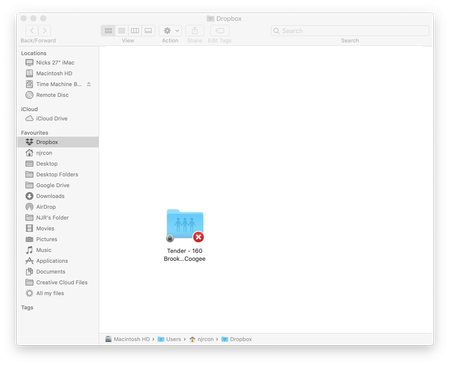
Hello Forum members, I have a folder that was sent to me by a client a couple of years ago that I can't remove from my Dropbox. The folder has a grey padlock on the bottom left corner and also an X ...
- 6 years ago
enjayare, may be something else have happened. Probably immutable flag have been set. If so, you can trow it out using: "sudo chflags nouchg /Users/njrcon/Dropbox/Tender\ -\ 160\ Brook\ St\,\ Coogee" and/or "sudo chflags noschg /Users/njrcon/Dropbox/Tender\ -\ 160\ Brook\ St\,\ Coogee". Try it, just to be sure.
Finally give the result from "ls -lO /Users/njrcon/Dropbox/Tender\ -\ 160\ Brook\ St\,\ Coogee" or just take a look on get info window to check is "Locked" is still checked.

enjayare
5 years agoExplorer | Level 3
I am not an expert with this sorry but I think you need to go to applications, then utilities, then terminal to enter the filename etc.

Willem Groenewald
5 years agoExplorer | Level 3
Hi, the following worked for me:
Typing " sudo rm -r " in the Terminal and thereafter dragging the folder from the Finder into the Terminal to get the path - worked to delete the locked files and folder.
Thank you!
- enjayare5 years agoExplorer | Level 3
That is great glad I could be of assistance for you.
About Delete, Edit, and Organize
Solve issues with deleting, editing, and organizing files and folders in your Dropbox account.
The Dropbox Community team is active from Monday to Friday. We try to respond to you as soon as we can, usually within 2 hours.
If you need more help you can view your support options (expected response time for an email or ticket is 24 hours), or contact us on X, Facebook or Instagram.
For more info on available support options for your Dropbox plan, see this article.
If you found the answer to your question in this Community thread, please 'like' the post to say thanks and to let us know it was useful!


