Our Community is in read-only mode until April 8th, learn more here. You can still search existing threads or get help via Dropbox Support, the Dropbox Help Center, or Learn.
Forum Discussion

mmday97
2 years agoExplorer | Level 3
Moving files from Dropbox back onto PC
Hi everyone. I wish there was a phone number to call for this but oh well. So my issue is, is that many files that were associated with my Student DropBox account became inaccessible on my PC. I down...

Jay Dropbox Community Moderator
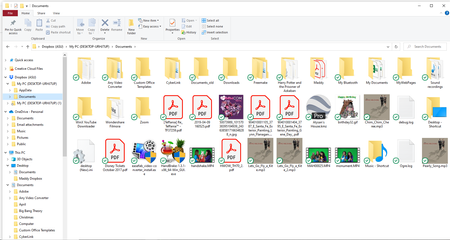
2 years agoDropbox Community ModeratorHi mmday97, if the files aren't showing the green icon with a white tick, as shown here, then it means the files are not on your computer fully.
You'll need to mark them as available offline first, allow them to sync so that they all show that icon. Afterwards, you can copy or move them out of the Dropbox folder to another location on your computer.
I'd also recommend disabling the computer backup feature to prevent any potential issues in the future.

mmday97
2 years agoExplorer | Level 3
I did that, and only some of the folders aren't showing up with the checkmark like you said.
The files that I moved from Dropbox into my Documents are available and they have no icon next to them at all. Are all these folders and files safe if I uninstall Dropbox?
- Jay2 years ago
Have you disabled the computer backup feature yet? This would ensure files would return to being local on your machine for any files in those system folders added to the backup.
- mmday972 years agoExplorer | Level 3
I thought I did, but I'm not sure if I did it correctly? Would you kindly take a screenshot of where I'm supposed to go in order to disable it, just so I know for sure?

About Delete, Edit, and Organize
Solve issues with deleting, editing, and organizing files and folders in your Dropbox account.
The Dropbox Community team is active from Monday to Friday. We try to respond to you as soon as we can, usually within 2 hours.
If you need more help you can view your support options (expected response time for an email or ticket is 24 hours), or contact us on X, Facebook or Instagram.
For more info on available support options for your Dropbox plan, see this article.
If you found the answer to your question in this Community thread, please 'like' the post to say thanks and to let us know it was useful!


