Our Community is in read-only mode until April 8th, learn more here. You can still search existing threads or get help via Dropbox Support, the Dropbox Help Center, or Learn.
Forum Discussion

segoi3d
4 years agoNew member | Level 2
Sharing one file with a person gives them access to all my files and folders?
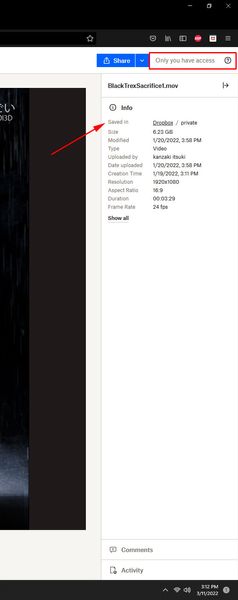
So I just now realized that sharing one file with a person gives them access to all my files and folders including deleted files?
I uploaded a file and set it's access to 'only me'. Lets say I ...
- 4 years ago
segoi3d wrote:
All they have to do is click the little 'info' (...) buttons next to the file and it shows the whole hierarchy of folders in my dropbox.
No, it doesn't. YOU see that when you're testing a link because you're signed in to Dropbox and Dropbox knows it's you, so you see your entire account. Anyone else accessing the link will see only the specific file or folder that it links to.
To test this yourself, make sure you're signed out of the Dropbox site when you open the link. Use an incognito or private browsing session to be sure.


Mark Super User II
4 years agoSuper User IIFourRivers even though you sent it to a different email address that is almost immaterial in regards to what Rich said above. If the person you sent it to opens the link on a device they, or you, are logged in on then you see it as though its your account. Dropbox knows and detects you are opening it on a device that you are a user of and as such shows you that.
To show that it only shows what is sent out copy and paste the link in to an incognito window without logging in.

FourRivers
4 years agoNew member | Level 2
Thank you, Mark. Can you tell me then, whether or not I, as a member in my team, can share a link to a folder with files the same as the Admin can? In my case, the Admin is on leave for a few weeks, so although I do have the login for Admin, I wouldn't make any changes to the account. I'm just not clear on what it means when only the "Admin" can share files in a folder? Thank you!
- Mark4 years ago
That very much depends upon what settings your admin has set I'm afraid FourRivers - some Teams are restricted from sharing and some are not
About Delete, Edit, and Organize
Solve issues with deleting, editing, and organizing files and folders in your Dropbox account.
The Dropbox Community team is active from Monday to Friday. We try to respond to you as soon as we can, usually within 2 hours.
If you need more help you can view your support options (expected response time for an email or ticket is 24 hours), or contact us on X, Facebook or Instagram.
For more info on available support options for your Dropbox plan, see this article.
If you found the answer to your question in this Community thread, please 'like' the post to say thanks and to let us know it was useful!


