Our Community is in read-only mode until April 8th, learn more here. You can still search existing threads or get help via Dropbox Support, the Dropbox Help Center, or Learn.
Forum Discussion

derrickyee Dropbox Product Manager
2 years agoDropbox Product ManagerStay organized and save time with new folder automation updates
Hey Dropbox Community!
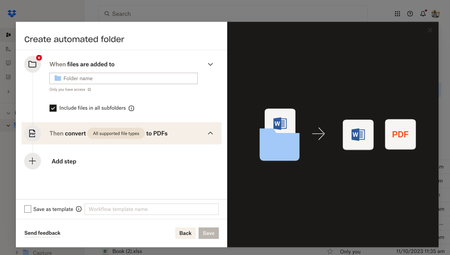
We are so excited to introduce new enhancements to the folder automation features to help you stay organized. We’re introducing multiple step automations (up to five), i...

margdoigh
1 year agoNew member | Level 2
Where can I find more information about automations? I need basic information such as;
- What is an autom- ation?
- Why did Dropbox create them?
- How do people use them?
- What is especially useful about them,?
- What are some precautions, if any, to take in using them?
- What can a person do to get the most out of using automations?
margdoigh
1 year agoNew member | Level 2
Can folder automations be used to automate the file naming process? For example, I would like to use file names that have a standard format, beginning with the date the file was created followed by a word or two referring to the content. Could that naming approach be automated? Could folder automations or another tool provide the names for me?
About Delete, Edit, and Organize
Solve issues with deleting, editing, and organizing files and folders in your Dropbox account.
The Dropbox Community team is active from Monday to Friday. We try to respond to you as soon as we can, usually within 2 hours.
If you need more help you can view your support options (expected response time for an email or ticket is 24 hours), or contact us on X, Facebook or Instagram.
For more info on available support options for your Dropbox plan, see this article.
If you found the answer to your question in this Community thread, please 'like' the post to say thanks and to let us know it was useful!


