Our Community is in read-only mode until April 8th, learn more here. You can still search existing threads or get help via Dropbox Support, the Dropbox Help Center, or Learn.
Forum Discussion

asakul
3 years agoHelpful | Level 6
Sync hung up 'waiting to sync' one file that i've already deleted from my disk
Hello
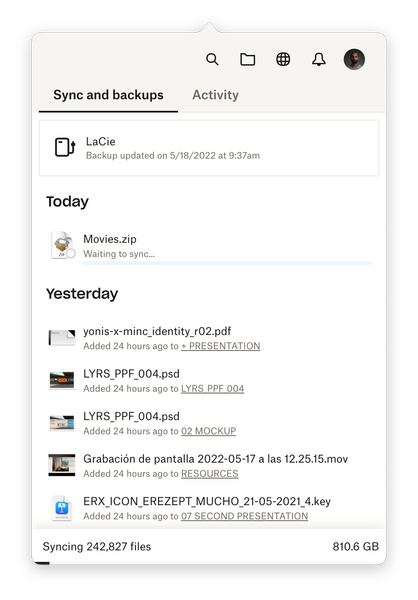
I'm having an issue where dropbox isn't syncing any of my files because it is waiting to sync one file in particular (see screenshot below).
Before being in this state, the file tri...
 3 years ago
Hi Megan
Just following up on this. It seems that logging out/in has worked in the end! Dropbox says it has synced everything now.
I suppose the main things now are:
- Reconnecting my desktop so that the things I put there are in Dropbox and not on my local desktop
- Fixing an issue where my Mac folder is hidden within my Dropbox folder. The only way to reach that top-level Mac folder is to navigate up the levels from a subfolder that I have saved on my sidebar. The hidden Mac folder isn't visible when I go directly to my Dropbox folder (comparison below).
Is it possible to address these issues here, or is it better to start another topic for each of them? I had talked with Walter about the second issue 6+ months ago, but we couldn't resolve it in the end.
Thanks a lot for your help!
asakul
3 years agoHelpful | Level 6
Hi Megan
Thanks for the info! I'll do the clean install asap.
Regarding the first part of your response, I'd like to clarify and make sure I'm not misunderstanding: I would like to have my most recent files syncing between my laptop and regular Dropbox storage so that I can share them/collaborate/etc. When I'm finished with a project I would move the files to an external drive, and that would back up to Dropbox Backup (taking into account that any share links will be disabled when the files are moved to the external drive).
Is this possible now? Basically having my laptop doing the everyday syncing/sharing/collaborating, and my external doing a cloud backup whenever something new is added to/deleted from it?
Thanks a lot

Megan Dropbox Community Moderator
3 years agoDropbox Community ModeratorHi asakul, happy Wednesday!
It's possible that this could work. In theory that would be feasible. Want to try and give this one a go, and let us know how it goes?
- asakul3 years agoHelpful | Level 6
Sure, I can look into it this weekend 👍
And with this option, the files that are on the regular Dropbox sync storage would have a "backup" of sorts as well, correct? Because you can rewind the folders by 180 days (on the professional plan at least). That way all files are safe in some way.
Will let you know how it goes 🤞
- asakul3 years agoHelpful | Level 6
Hi Megan
I was able to try this already. It looks like it's not possible, sadly.
Your Backup will work, but Dropbox won't continually sync the folders you don't have backed up unless they're inside the Dropbox folder. It's impossible to link/sync a folder (Desktop, for example) without backing it up or putting it inside the Dropbox folder. That might work for Documents, but Dropbox wouldn't connect to Desktop and Downloads, and files you download to those places would go to the local locations, not the Dropbox locations if that makes sense.
I went to the lengths to draw out a diagram to understand the interaction of Dropbox Backups and regular Dropbox 😅
It makes more sense to think of regular Dropbox as the shared folder or public partition of Dropbox versus where all of your files live. Backups is the secure partition, and Dropbox is the public partition. The marketing pages don't specify it that way, so I had trouble making sense of how they interact. Maybe it would help if they made some diagrams to explain the growing ecosystem. 😂
The only other thing is that I'm having a weird issue where the size of my Backups on Dropbox.com is different than the size in Finder, but I'll look for a similar topic or open a new one so this topic doesn't become more muddied than it is already.
Thanks for all your help!
- Megan3 years ago
Hi asakul, great troubleshooting, and detail on your end!
Thanks for keeping me up to date there!
Now, as for the folder sizes on the desktop app, vs on the web, that's an interesting one. Is the first screenshot that you attached (of the folders locally) from the Desktop, Downloads, Documents folders within the Dropbox folder?
- asakul3 years agoHelpful | Level 6
Hi Megan
Glad to help! I was determined to figure out how I could make this work since I like the product, and it offers some significant advantages for me over Google Drive...it just took me sketching the whole product workflow like a detective haha 😂
And yes, that's correct 👍🏽 It's the synced folders in Dropbox but from Finder instead of in-browser.
- Megan3 years ago
Hi asakul, happy Monday!
Can you also send me a screenshot of the desktop app's syncing status, showing the "up to date" status you mentioned?
About Delete, Edit, and Organize
Solve issues with deleting, editing, and organizing files and folders in your Dropbox account.
The Dropbox Community team is active from Monday to Friday. We try to respond to you as soon as we can, usually within 2 hours.
If you need more help you can view your support options (expected response time for an email or ticket is 24 hours), or contact us on X, Facebook or Instagram.
For more info on available support options for your Dropbox plan, see this article.
If you found the answer to your question in this Community thread, please 'like' the post to say thanks and to let us know it was useful!


