Your workflow is unique 👨💻 - tell us how you use Dropbox here.
Forum Discussion

lotusadmin
1 year agoExplorer | Level 3
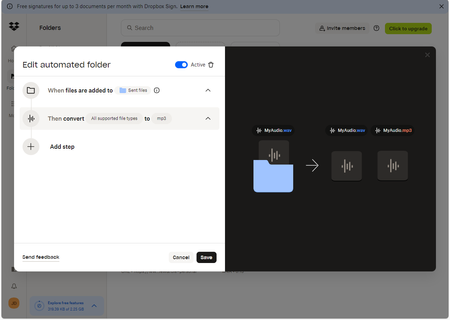
The Automation feature does not work for me - nothing happens when files are added to the folder
I'd first like to say in advance, thank you to anyone who posts here and is willing to lend a hand.
2nd I'd like to make it clear automation has never worked for me. All the other messages I've...

Hannah Dropbox Community Moderator
1 year agoDropbox Community ModeratorThanks for the additional info, lotusadmin.
One more question; are the files added to the automated folder less than 1 GB in size?

lotusadmin
1 year agoExplorer | Level 3
Yes, they are. In fact, all of them are typically less than 1 MB in size. They are all small 60 second voice audio recordings.
- Jay1 year ago
Hi lotusadmin, if none of the automations work on your account, then something else could be affecting this.
Are these in a shared folder or a private folder?
- lotusadmin1 year agoExplorer | Level 3
It is a shared folder.
- lotusadmin1 year agoExplorer | Level 3
Yes, they are a shared folder.

About Delete, Edit, and Organize
Solve issues with deleting, editing, and organizing files and folders in your Dropbox account.
The Dropbox Community team is active from Monday to Friday. We try to respond to you as soon as we can, usually within 2 hours.
If you need more help you can view your support options (expected response time for an email or ticket is 24 hours), or contact us on X, Facebook or Instagram.
For more info on available support options for your Dropbox plan, see this article.
If you found the answer to your question in this Community thread, please 'like' the post to say thanks and to let us know it was useful!


