Your workflow is unique 👨💻 - tell us how you use Dropbox here.
Forum Discussion

RebeccaIceQueen
4 months agoNew member | Level 2
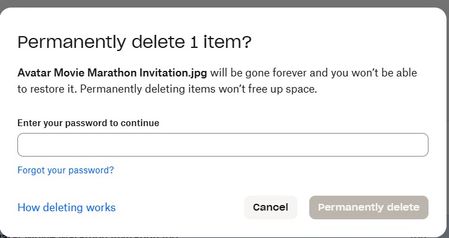
Trying to delete a file permanently but being asked for a password
Hello. I am trying to delete a file from my dropbox trash but it says I need a password to go and delete permanently even though I sign in with my google account which is suppose to bypass the passwo...
 4 months ago
at this point I found out how to add a password to the account so I can delete the file from trash and it worked after adding a password. but it would be nice if accounts that you sign in with google or apple actually honored the password bypass like it says its suppose to. cause I read somewhere that dropbox accounts with google or apple sign ins are suppose to bypass passwords for trash deletion. it clearly doesn't if it makes you have to add a password to the account.
RebeccaIceQueen
4 months agoNew member | Level 2
Thanks Walter for the response but I don't know how to clear my browsers cache on pc. If it in the browsing history, every time I do clear cache, it signs me out of my websites and I have to go log into everything again. But I can try the different browser idea. I have Google Chrome and Microsoft Edge I can try. Also how would I set up a password with Dropbox directly if I sign in with my Google account? Like you know how on the sign in page there is things like "sign in with google" or "sign in with Facebook" I choose to go with Google for the sign in.
- Jay4 months ago
Dropbox Community Moderator
Hi RebeccaIceQueen, could you try using an incognito browser without any extensions running, by following these steps?
- Open a private browsing/incognito window: Cached data and cookies can sometimes cause issues. Opening a private window should resolve problems in this case.
- Disable add-ons and extensions: Certain add-ons and extensions can interfere with expected browser behavior. Disable them and refresh the page.

About Delete, Edit, and Organize
Solve issues with deleting, editing, and organizing files and folders in your Dropbox account.
The Dropbox Community team is active from Monday to Friday. We try to respond to you as soon as we can, usually within 2 hours.
If you need more help you can view your support options (expected response time for an email or ticket is 24 hours), or contact us on X, Facebook or Instagram.
For more info on available support options for your Dropbox plan, see this article.
If you found the answer to your question in this Community thread, please 'like' the post to say thanks and to let us know it was useful!


