Our Community is in read-only mode until April 8th, learn more here. You can still search existing threads or get help via Dropbox Support, the Dropbox Help Center, or Learn.
Forum Discussion

fenulagg
3 years agoExplorer | Level 4
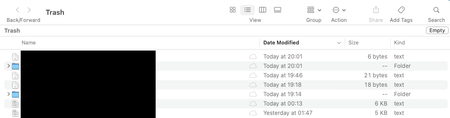
When I any file on my Mac it goes to ~/Library/CloudStorage/Dropbox/.Trash instead of ~/.Trash
While investigating some weird behavior on my Mac I figured out that files I deleted from the Finder (say with Cmd-Delete) were going not to ~/.Trash where they should but to ~/Library/CloudStorage/D...
 3 years ago
Hi Everybody,
It looks like this was an issue on Apple's side that was fixed with MacOS 13.1. If anyone is having this issue, please perform a system update, and it should be resolved. Feel free to let us know if that's not the case.
Regards,
Ben

Megan Dropbox Community Moderator
3 years agoDropbox Community ModeratorHi fenulagg, I hope you're doing well!
Interesting behavior. Could you clarify the version of the app that you're using on your end?
If I were you, I'd try to restart my device, then try again. Also, could you give me some example file paths of the content that you deleted when you noticed this behavior; just to clarify where they originally were?
Keep me posted, and we'll take it from there!


About Delete, Edit, and Organize
Solve issues with deleting, editing, and organizing files and folders in your Dropbox account.
The Dropbox Community team is active from Monday to Friday. We try to respond to you as soon as we can, usually within 2 hours.
If you need more help you can view your support options (expected response time for an email or ticket is 24 hours), or contact us on X, Facebook or Instagram.
For more info on available support options for your Dropbox plan, see this article.
If you found the answer to your question in this Community thread, please 'like' the post to say thanks and to let us know it was useful!


