Our Community is in read-only mode until April 8th, learn more here. You can still search existing threads or get help via Dropbox Support, the Dropbox Help Center, or Learn.
Forum Discussion

Garethahill
2 years agoExplorer | Level 4
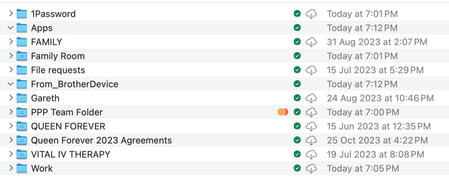
Both green check mark and cloud icon on folders which I marked "make available offline" on Mac OS
Apple M1 Pro
16GB RAM
macOS Sonoma 14.4
Dropbox v194.4.6267
For some time now I have been unable to set files or folders as "available offline" in actuality. The check mark next to...
- 2 years ago
When you uninstalled and reinstalled Dropbox, did you perform an advanced reinstallation?

Garethahill
2 years agoExplorer | Level 4
Thanks for the article. This doesn't explain it. I have tried marking the files and folders: "make available offline" and nothing changes. Keep in mind, it's not only folders that have both icons, it's both files and folders.
The only way to get rid of the cloud icon is to try to open a file. Then it downloads and becomes truly available offline.
I have tried selecting "make online-only" on the entire Dropbox folder, which works fine.
Then I attempt to mark all files and folders as "available offline" and the app indicates it's syncing around 500GB of data but it completes in around 60 seconds and I am back where I started with the same problem as per the image i posted in my first message.
I have had Dropbox for over 10 years and so am fairly experienced with it.
Short of trying to download every single file (one by one) in my Dropbox folder (there are 48,800 of them) I don't know what to do to fix this.
I have uninstalled & reinstalled Dropbox. I have uninstalled & reinstalled Google Drive (which to be honest I am considering moving to now) thinking there may be a conflict, but nothing works.
Surely I am not the only one with this issue.
Please advise of a method to reindex or reset settings to force Dropbox or my Mac to discard existing settings and start again.
Cheers

Jay Dropbox Community Moderator
2 years agoDropbox Community ModeratorWhen you uninstalled and reinstalled Dropbox, did you perform an advanced reinstallation?
- Garethahill2 years agoExplorer | Level 4Hi there, thanks for posting this article. This solved it, thank you!
 dropitlikeitshot11 year agoHelpful | Level 7
Garethahill Which article are you referring to that solved this issue?
About Create, Upload, and Share
Find help to solve issues with creating, uploading, and sharing files and folders with Dropbox.
The Dropbox Community team is active from Monday to Friday. We try to respond to you as soon as we can, usually within 2 hours.
If you need more help you can view your support options (expected response time for an email or ticket is 24 hours), or contact us on X, Facebook or Instagram.
For more info on available support options for your Dropbox plan, see this article.
If you found the answer to your question in this Community thread, please 'like' the post to say thanks and to let us know it was useful!


