Our Community is in read-only mode until April 8th, learn more here. You can still search existing threads or get help via Dropbox Support, the Dropbox Help Center, or Learn.
Forum Discussion

Garethahill
2 years agoExplorer | Level 4
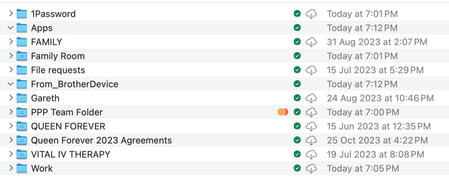
Both green check mark and cloud icon on folders which I marked "make available offline" on Mac OS
Apple M1 Pro
16GB RAM
macOS Sonoma 14.4
Dropbox v194.4.6267
For some time now I have been unable to set files or folders as "available offline" in actuality. The check mark next to...
- 2 years ago
When you uninstalled and reinstalled Dropbox, did you perform an advanced reinstallation?

Jay Dropbox Community Moderator
2 years agoDropbox Community ModeratorWhen you uninstalled and reinstalled Dropbox, did you perform an advanced reinstallation?

Garethahill
2 years agoExplorer | Level 4
Hi there, thanks for posting this article. This solved it, thank you!
 dropitlikeitshot11 year agoHelpful | Level 7
Garethahill Which article are you referring to that solved this issue?
About Create, Upload, and Share
Find help to solve issues with creating, uploading, and sharing files and folders with Dropbox.
The Dropbox Community team is active from Monday to Friday. We try to respond to you as soon as we can, usually within 2 hours.
If you need more help you can view your support options (expected response time for an email or ticket is 24 hours), or contact us on X, Facebook or Instagram.
For more info on available support options for your Dropbox plan, see this article.
If you found the answer to your question in this Community thread, please 'like' the post to say thanks and to let us know it was useful!


