Our Community is in read-only mode until April 8th, learn more here. You can still search existing threads or get help via Dropbox Support, the Dropbox Help Center, or Learn.
Forum Discussion

jpugarte1_
6 months agoExplorer | Level 3
Cannot see "Make available offline" option on Windows 11
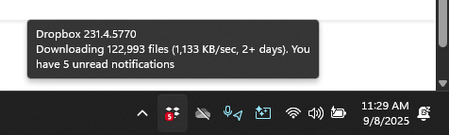
Device Lenovo Legion with Windows 11 Operating System/Browser (if using the web) N/A Dropbox App Version (if using the app) 231.4.5770 Syncing Status Downloading
Question or Issue When I ri...

Walter Dropbox Community Moderator
6 months agoDropbox Community ModeratorHi jpugarte1_ - sorry to hear you're having issues with this.
I'm not seeing any syncing icons in your screenshot - could you let me know their syncing status since I can't tell by your screenshot?
Since this is a fresh install you should have gotten the option to select the folders you'd like to be synced to your computer during the installation process and you can even adjust your sync settings through the desktop app's preferences as needed.
That said, note that it would be normal to not see the options to make available offline or online-only on files or folders that haven't fully synced yet.
In any case, please keep me posted on your progress.

jpugarte1_
6 months agoExplorer | Level 3
Here, the png and pdf file are synced, but there is no syncing icons. If I right click, these are my options:
About Create, Upload, and Share
Find help to solve issues with creating, uploading, and sharing files and folders with Dropbox.
The Dropbox Community team is active from Monday to Friday. We try to respond to you as soon as we can, usually within 2 hours.
If you need more help you can view your support options (expected response time for an email or ticket is 24 hours), or contact us on X, Facebook or Instagram.
For more info on available support options for your Dropbox plan, see this article.
If you found the answer to your question in this Community thread, please 'like' the post to say thanks and to let us know it was useful!


