Our Community is in read-only mode until April 8th, learn more here. You can still search existing threads or get help via Dropbox Support, the Dropbox Help Center, or Learn.
Forum Discussion

jpugarte1_
6 months agoExplorer | Level 3
Cannot see "Make available offline" option on Windows 11
Device Lenovo Legion with Windows 11 Operating System/Browser (if using the web) N/A Dropbox App Version (if using the app) 231.4.5770 Syncing Status Downloading
Question or Issue When I ri...

jpugarte1_
6 months agoExplorer | Level 3
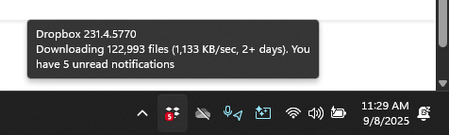
Hello Nancy thank you for your message. This is the current status:
As you can see, the internet connection is extremely slow where I currently am, which is one of the reasons why I need to have everything online-only. The folder structure is ready, but the folders have not been populated with files (whereas I would expect to see the files, even if they have not been downloaded yet).
Here are the properties of the Dropbox folder:
I am also trying to reinstall dropbox, but the installer downloads dropbox, and then restarts and says "downloading dropbox" again. Maybe my installation is corrupt. Should I try uninstalling and reinstalling?

Megan Dropbox Community Moderator
6 months agoDropbox Community ModeratorHey jpugarte1_!
Here are my suggestions:
-You should wait for the app to be fully synced, and up-to-date to check if the issue remains the same. I'm suggesting this, since the files' functionality might be affected when the app still syncs such a large amount of files.
While you're at it, feel free to close any third-party cloud apps (e.g., Google Drive, OneDrive), as they can sometimes interfere with Dropbox.
-You can always start fresh by signing out of the app on your device. Once you do that, please uninstall using these steps, and then delete your Dropbox folder. After that, you can reinstall the app and upon the initial set-up and specifically under your advanced settings you should see the option to make your files available offline.
About Create, Upload, and Share
Find help to solve issues with creating, uploading, and sharing files and folders with Dropbox.
The Dropbox Community team is active from Monday to Friday. We try to respond to you as soon as we can, usually within 2 hours.
If you need more help you can view your support options (expected response time for an email or ticket is 24 hours), or contact us on X, Facebook or Instagram.
For more info on available support options for your Dropbox plan, see this article.
If you found the answer to your question in this Community thread, please 'like' the post to say thanks and to let us know it was useful!


