Our Community is in read-only mode until April 8th, learn more here. You can still search existing threads or get help via Dropbox Support, the Dropbox Help Center, or Learn.
Forum Discussion

jpugarte1_
6 months agoExplorer | Level 3
Cannot see "Make available offline" option on Windows 11
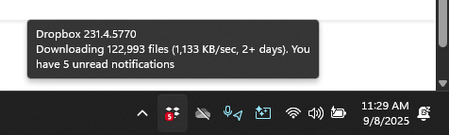
Device Lenovo Legion with Windows 11 Operating System/Browser (if using the web) N/A Dropbox App Version (if using the app) 231.4.5770 Syncing Status Downloading
Question or Issue When I ri...

jpugarte1_
6 months agoExplorer | Level 3
Hey Megan thank you for your reply. The problem is my library is almost 2TB and my hard drive doesn't have that much storage capacity. I don't want to do selective sync, because then only certain folders will show up on my computer. So what should I do then? I just want to know if the behavior I am seeing is EXPECTED by design... or if there is something wrong with my app.
As a side note, I think dropbox is very poorly thought when it comes to installing it either on drives that already have the files, or in new drives when the library size exceeds that of the local hard drive. It is a shame, because it is an excellent app and service otherwise imo.
- Megan6 months ago
Dropbox Community Moderator
Hey jpugarte1_!
What you mentioned isn't unexpected behavior, especially since the app is still syncing.
Based on all the info you've provided it sounds like this is a brand-new installation, which would justify it. When you're using an existing installation the app simply syncs and indexes new changes, whereas now it needs to download the content and placeholders first.
This is why I'm suggesting that you're a bit more patient and wait for the process to take place. In the meantime, you can always adjust the limit on the bandwidth in the Dropbox desktop application, and set it to off.
I'll be waiting for your updates!

About Create, Upload, and Share
Find help to solve issues with creating, uploading, and sharing files and folders with Dropbox.
The Dropbox Community team is active from Monday to Friday. We try to respond to you as soon as we can, usually within 2 hours.
If you need more help you can view your support options (expected response time for an email or ticket is 24 hours), or contact us on X, Facebook or Instagram.
For more info on available support options for your Dropbox plan, see this article.
If you found the answer to your question in this Community thread, please 'like' the post to say thanks and to let us know it was useful!


