Our Community is in read-only mode until April 8th, learn more here. You can still search existing threads or get help via Dropbox Support, the Dropbox Help Center, or Learn.
Forum Discussion

jpugarte1_
6 months agoExplorer | Level 3
Cannot see "Make available offline" option on Windows 11
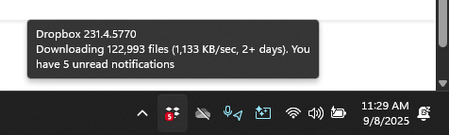
Device Lenovo Legion with Windows 11 Operating System/Browser (if using the web) N/A Dropbox App Version (if using the app) 231.4.5770 Syncing Status Downloading
Question or Issue When I ri...

jpugarte1_
5 months agoExplorer | Level 3
My computer ran out of hard drive space so I cannot think anything anymore. I have plenty of files that are fully synced, but none of them have a green check mark. I also still don't have the "only-only" option on them.
Lalia, I have two different computers, both with Windows 11 Pro. I have dropbox in both them. Here's a screenshot of the same file in both computers:
No "online-only" option here (dropbox version v233.4.4938).
The option does show here (dropbox version v233.4.4938 as well)
- Hannah5 months ago
Dropbox Community Moderator
Hi again, jpugarte1_, thanks for the screenshots and the update.
From what I could see from a previous screenshot of your Dropbox folder's properties, it seems like you have many files in your Dropbox folder.
The desktop app has a soft limit of 300k files, and if you're on that number (or close, or over that number), the app's performance might decline.
Have you tried using selective sync to remove some folders from the Dropbox folder completely, to see if that helps with the situation?

About Create, Upload, and Share
Find help to solve issues with creating, uploading, and sharing files and folders with Dropbox.
The Dropbox Community team is active from Monday to Friday. We try to respond to you as soon as we can, usually within 2 hours.
If you need more help you can view your support options (expected response time for an email or ticket is 24 hours), or contact us on X, Facebook or Instagram.
For more info on available support options for your Dropbox plan, see this article.
If you found the answer to your question in this Community thread, please 'like' the post to say thanks and to let us know it was useful!


