We're making some changes to the Dropbox Community 👩💻 - Find out more here.
Forum Discussion

wingrunner
2 years agoHelpful | Level 5
Can't create a paper file from dropbox.com
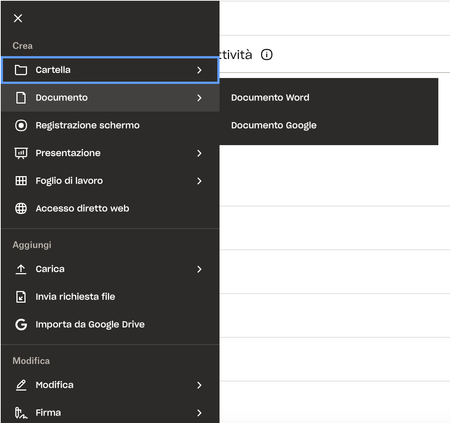
Hi all, I'm an happy user of dropbox paper but I still can't create paper files from within my dropbox.com web space. Do any of you have the same problem? As a workaround I currently create new p...
- 2 years ago
Hi again, wingrunner! I checked all the info you’ve sent us so far, and it looks like your Dropbox account hasn’t been upgraded so far to the latest release of Dropbox Paper (which explains why you’re only able to create new Paper docs via the Paper Home page, and not www.dropbox.com).
The new release of Dropbox Paper will gradually roll out to all Dropbox customers, until everyone is updated to the new version. You should get an email from Dropbox that lets you know when you’ll be getting the release.


Walter Dropbox Community Moderator
2 years agoDropbox Community ModeratorHi there wingrunner - sorry to hear you're having issues with this.
Could you please clear your browser's cache and/or try another browser, preferably with no extensions or plugins running, and let me know if the issue persists?
If it does, please send us a screenshot of the error or the last screen you can get too as well.
Thanks!
 wingrunner2 years agoHelpful | Level 5Ciao Walter, the cache clearing and a browser change did not solve the issue. The situation remain the same as the screenshot shown above.
- Jay2 years ago
Hi wingrunner, are you able to access the Dropbox Paper site from this page in order to create new docs?
- wingrunner2 years agoHelpful | Level 5
Yes I can, but unfortunately I can't see the paper docs created with that page in my dropbox web space.

About Create, Upload, and Share
Find help to solve issues with creating, uploading, and sharing files and folders with Dropbox.
The Dropbox Community team is active from Monday to Friday. We try to respond to you as soon as we can, usually within 2 hours.
If you need more help you can view your support options (expected response time for an email or ticket is 24 hours), or contact us on X, Facebook or Instagram.
For more info on available support options for your Dropbox plan, see this article.
If you found the answer to your question in this Community thread, please 'like' the post to say thanks and to let us know it was useful!


