Our Community is in read-only mode until April 8th, learn more here. You can still search existing threads or get help via Dropbox Support, the Dropbox Help Center, or Learn.
Forum Discussion

JK
8 months agoNew member | Level 2
"Do not sync" option on desktop not appearing? (Mac)
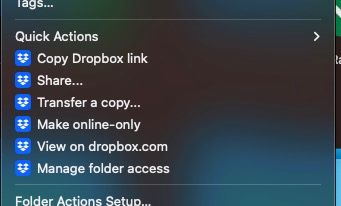
I have large folders I do not want to sync — from my computer to Dropbox — but when I right click, there is no option for "Do not sync". It appears sometimes when I re-install Dropbox or if I log out...

JK
8 months agoNew member | Level 2
Hi Hannah, worked on those steps but.... unfortunately still the same :(
Really puzzling... not sure what else I could do!? Really is very helpful to be able to not sync certain folders that are huge in size...
- Hannah8 months ago
Dropbox Community Moderator
I completely understand where you're coming from, JK, and we're going to get to the bottom of this one way or another.
Can you also try these steps and let me know what happens?
- Click System Settings > Privacy & Security
- Click Extensions.
- Click Finder extensions.
- Only check Dropbox finder integration.
- Close the window.
- Click the Apple logo.
- Click Force quit.
- Click Finder.
- Click Relaunch.
- JK8 months agoNew member | Level 2
Hi Hannah — thanks for these steps. I have just tried. The "Dropbox finder integration" was the only available selection in "Finder extensions". I unchecked, relaunched Finder, and then went to redo the steps to check it, and relaunched finder. Still the same. Then I tried to restart the computer. Still the same... :(
I will try to update my MacOS now (there's a Ventura update). Maybe I could try to update to Sequoia if it still doesn't work... but I think this issue was happening even before I upgraded to Ventura... very strange indeed...
Edit: I've tried updating Ventura, but still the same...

About Create, Upload, and Share
Find help to solve issues with creating, uploading, and sharing files and folders with Dropbox.
The Dropbox Community team is active from Monday to Friday. We try to respond to you as soon as we can, usually within 2 hours.
If you need more help you can view your support options (expected response time for an email or ticket is 24 hours), or contact us on X, Facebook or Instagram.
For more info on available support options for your Dropbox plan, see this article.
If you found the answer to your question in this Community thread, please 'like' the post to say thanks and to let us know it was useful!


