Our Community is in read-only mode until April 8th, learn more here. You can still search existing threads or get help via Dropbox Support, the Dropbox Help Center, or Learn.
Forum Discussion

JK
8 months agoNew member | Level 2
"Do not sync" option on desktop not appearing? (Mac)
I have large folders I do not want to sync — from my computer to Dropbox — but when I right click, there is no option for "Do not sync". It appears sometimes when I re-install Dropbox or if I log out...

Nancy Dropbox Community Moderator
8 months agoDropbox Community ModeratorHey JK! I’ve gone ahead and logged a new ticket for you.
Please reply back to me directly from your email address and we’ll look into this further.

JK
8 months agoNew member | Level 2
Hi Nancy , thanks. I tried to reply directly from my gmail, but I got an error message from Gmail about how they can't send the email to the Dropbox email address....
Just letting you know, in hopes you could still follow up with the missing "Do not sync" issue!
Grateful for your help.
- Megan8 months ago
Hey JK, happy Monday!
I was able to locate the ticket number my colleague opened for you.
It seems you've successfully replied back to Nancy. She'll start working on the case as soon as possible.
In the meantime, if you need something else, please let me know and I will be more than happy to help every step of the way.
- JK7 months agoNew member | Level 2
Hi there,
For a while the issue was solved as it seems like the "Do Not Sync" option moved up to above "Move to Bin".
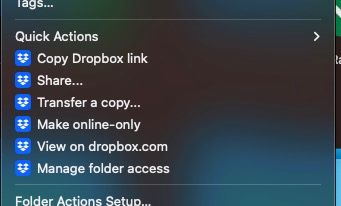
However I still sometimes don't see "Do Not Sync" at this menu area... as shown in the screenshots below (one with, and one without).
Wondering why this is... :/

About Create, Upload, and Share
Find help to solve issues with creating, uploading, and sharing files and folders with Dropbox.
The Dropbox Community team is active from Monday to Friday. We try to respond to you as soon as we can, usually within 2 hours.
If you need more help you can view your support options (expected response time for an email or ticket is 24 hours), or contact us on X, Facebook or Instagram.
For more info on available support options for your Dropbox plan, see this article.
If you found the answer to your question in this Community thread, please 'like' the post to say thanks and to let us know it was useful!


