Need to see if your shared folder is taking up space on your dropbox 👨💻? Find out how to check here.
Forum Discussion

kevanc
7 years agoNew member | Level 2
Don't see 'sync now' option to prioritise which files sync first
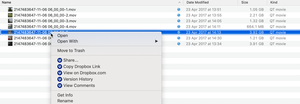
I have a personal dropxox account and am on Mac OS Mojave 10.14.4. I am syncing a large number of files and want to prioritise some larger files first. According to this article https://help.dropbox....
- 6 years ago
Hi -X-ARCH & UnkleRukus!
Sorry to not have provided this information before but if you have a Dropbox Plus, Professional, or Business account, you can prioritize a file to sync ahead of others syncing with the Dropbox app on your computer.
Note: You can’t prioritize folders or package files at this time.
In case you'd like to log a feature request for a similar functionality for folders, the 'Share an Idea' section of our Community is the right place. Here's a direct link:
https://www.dropboxforum.com/t5/Share-an-idea/ct-p/101002000
I hope this clears things up a tad and I'm always around if you have any more questions!

UnkleRukus
6 years agoNew member | Level 2
Hey Dropbox, Is this option only available for single files? I have something like 500,000 files to sync in hundreds of folders, I couldn't possibly select all the most important ones individually! It would be really nice if I could choose a whole folder for priority sync!
- Walter6 years ago
Dropbox Community Moderator
Hi -X-ARCH & UnkleRukus!
Sorry to not have provided this information before but if you have a Dropbox Plus, Professional, or Business account, you can prioritize a file to sync ahead of others syncing with the Dropbox app on your computer.
Note: You can’t prioritize folders or package files at this time.
In case you'd like to log a feature request for a similar functionality for folders, the 'Share an Idea' section of our Community is the right place. Here's a direct link:
https://www.dropboxforum.com/t5/Share-an-idea/ct-p/101002000
I hope this clears things up a tad and I'm always around if you have any more questions!
- wensleydale6 years agoHelpful | Level 6
So if I want to prioritize all 60 files in a folder, I have to do Sync Now for each of them individually rather than once for the folder? Good grief.
About Create, upload, and share
Find help to solve issues with creating, uploading, and sharing files and folders in Dropbox. Get support and advice from the Dropbox Community.
The Dropbox Community team is active from Monday to Friday. We try to respond to you as soon as we can, usually within 2 hours.
If you need more help you can view your support options (expected response time for an email or ticket is 24 hours), or contact us on X, Facebook or Instagram.
For more info on available support options for your Dropbox plan, see this article.
If you found the answer to your question in this Community thread, please 'like' the post to say thanks and to let us know it was useful!


